create user oem@localhost identified with mysql_native_password by '*********************';
 grant process, replication client on *.* to oem@localhost;
Also, this version of the plugin requires Perl 5.10+, which is the base version distributed with OEM 12cR3. Finally, due to the nature of the changes in the plugin required for it to be compatible with OEM 13c, if you have a previous version of the plugin deployed in your system it has to be removed, and with it all the MySQL monitored targets. This should not be the case unless you are upgrading to 13c which, most probably, will render the plugin unusable.
$ emcli login -username=sysman
 Enter password :

 Login successful

 $ emcli sync
 Synchronized successfully

 $ emcli import_update -file=/home/oracle/12.1.0.3.0_pythian.mysql_.prod_2000_0.opar -omslocal
 Processing update: Plug-in - MySQL plug-in by Alex Gorbachev, The Pythian Group
 Successfully uploaded the update to Enterprise Manager. Use the Self Update Console to manage this update.
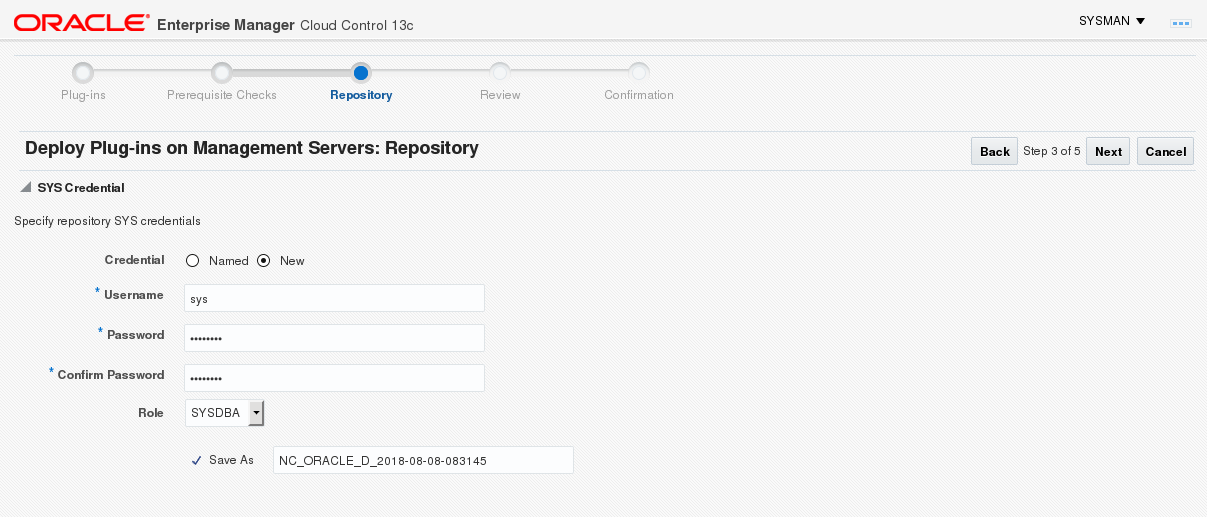
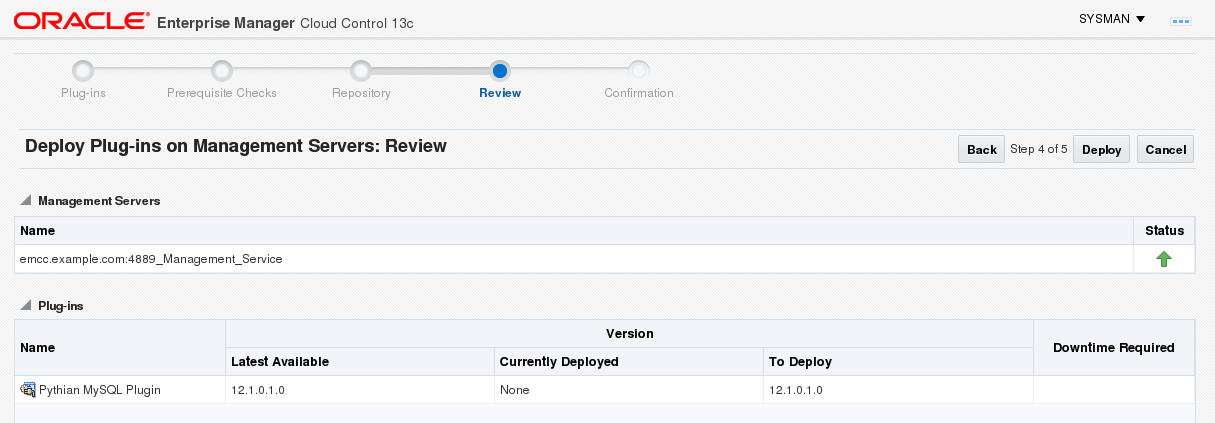
$ time emcli deploy_plugin_on_server -plugin=pythian.mysql.prod
 Enter repository DB sys password:

 Performing pre-requisites check... This will take a while.
 Prerequisites check succeeded
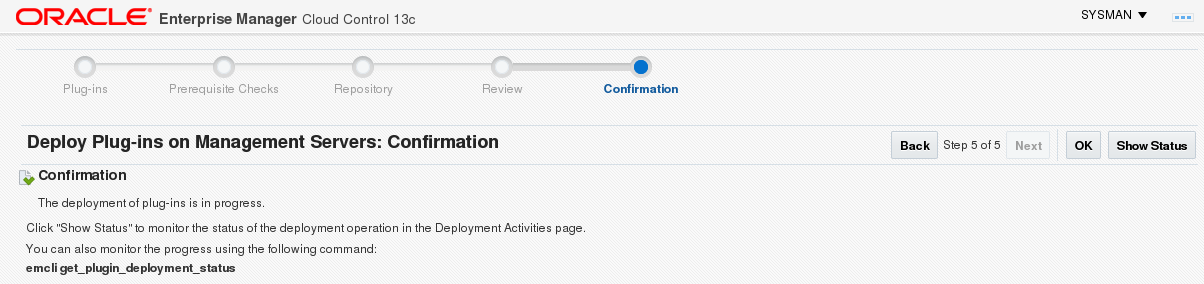
 Deployment of plug-in on the management servers is in progress
 Use "emcli get_plugin_deployment_status -plugin=pythian.mysql.prod" to track the plug-in deployment status.

 real 0m56.396s
 user 0m1.822s
 sys 0m0.212s
Monitor until completion:
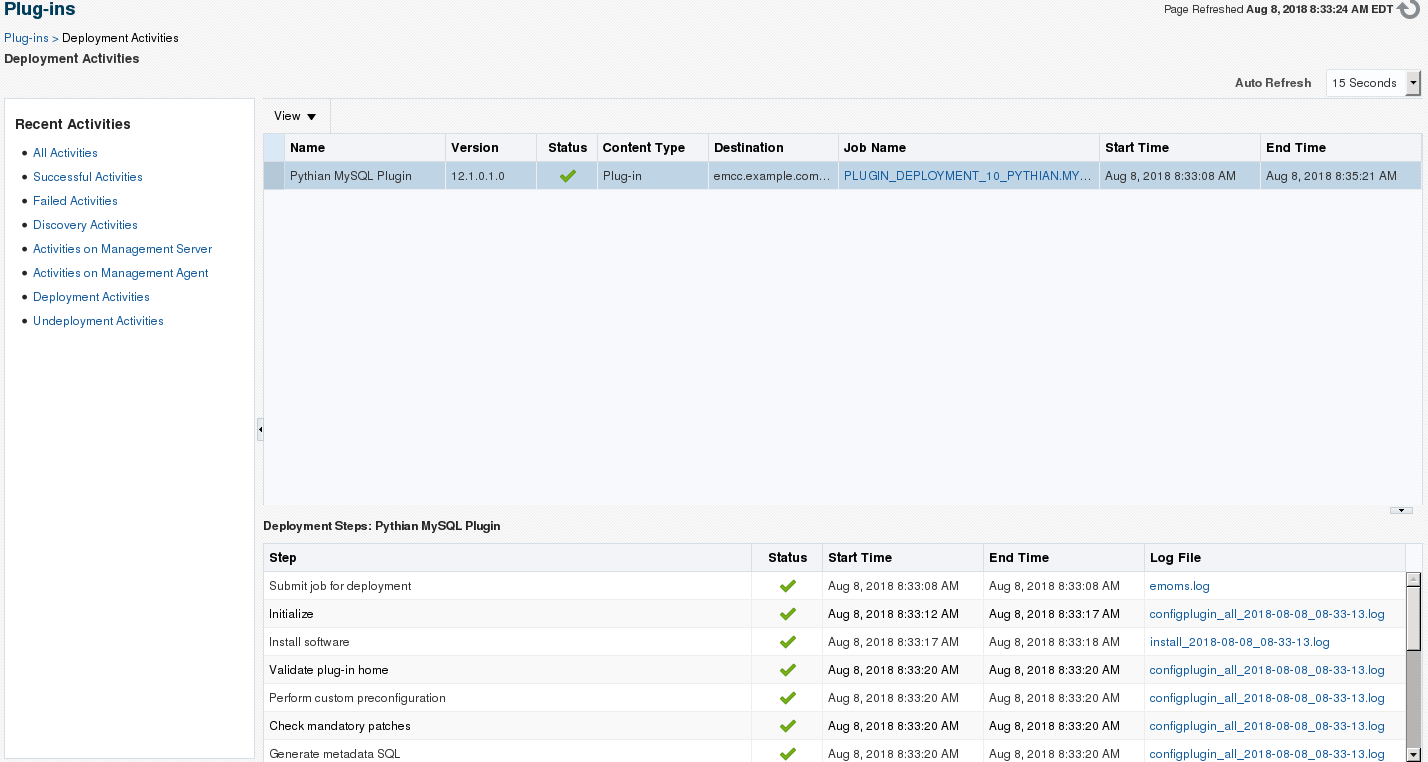
$ emcli get_plugin_deployment_status -plugin=pythian.mysql.prod
 Plug-in Deployment/Undeployment Status

 Destination : Management Server - emcc.example.com:4889_Management_Service
 Plug-in Name : Pythian MySQL Plugin
 Version : 12.1.0.3.0
 ID : pythian.mysql.prod
 Content : Plug-in
 Action : Deployment
 Status : Deploying
 Steps Info:
 ---------------------------------------- ------------------------- ------------------------- ----------
 Step Start Time End Time Status
 ---------------------------------------- ------------------------- ------------------------- ----------
 Submit job for deployment 8/6/18 7:02:41 AM EDT 8/6/18 7:02:41 AM EDT Success

 Initialize 8/6/18 7:02:44 AM EDT N/A Running

 ---------------------------------------- ------------------------- ------------------------- ----------

 $ emcli get_plugin_deployment_status -plugin=pythian.mysql.prod
 Plug-in Deployment/Undeployment Status

 Destination : Management Server - emcc.example.com:4889_Management_Service
 Plug-in Name : Pythian MySQL Plugin
 Version : 12.1.0.3.0
 ID : pythian.mysql.prod
 Content : Plug-in
 Action : Deployment
 Status : Deploying
 Steps Info:
 ---------------------------------------- ------------------------- ------------------------- ----------
 Step Start Time End Time Status
 ---------------------------------------- ------------------------- ------------------------- ----------
 Submit job for deployment 8/6/18 7:02:41 AM EDT 8/6/18 7:02:41 AM EDT Success

 Initialize 8/6/18 7:02:44 AM EDT 8/6/18 7:03:00 AM EDT Success

 Install software 8/6/18 7:03:00 AM EDT 8/6/18 7:03:02 AM EDT Success

 Validate plug-in home 8/6/18 7:03:04 AM EDT 8/6/18 7:03:04 AM EDT Success

 Perform custom preconfiguration 8/6/18 7:03:04 AM EDT 8/6/18 7:03:05 AM EDT Success

 Check mandatory patches 8/6/18 7:03:05 AM EDT 8/6/18 7:03:05 AM EDT Success

 Generate metadata SQL 8/6/18 7:03:05 AM EDT 8/6/18 7:03:05 AM EDT Success

 Preconfigure Management Repository 8/6/18 7:03:05 AM EDT 8/6/18 7:03:05 AM EDT Success

 Preregister DLF 8/6/18 7:03:05 AM EDT 8/6/18 7:03:05 AM EDT Success

 OPSS jazn policy migration 8/6/18 7:03:05 AM EDT 8/6/18 7:03:05 AM EDT Success

 Configure Management Repository 8/6/18 7:03:05 AM EDT N/A Running

 Register DLF 8/6/18 7:03:05 AM EDT N/A Running

 ---------------------------------------- ------------------------- ------------------------- ----------

 $ emcli get_plugin_deployment_status -plugin=pythian.mysql.prod
 Plug-in Deployment/Undeployment Status

 Destination : Management Server - emcc.example.com:4889_Management_Service
 Plug-in Name : Pythian MySQL Plugin
 Version : 12.1.0.3.0
 ID : pythian.mysql.prod
 Content : Plug-in
 Action : Deployment
 Status : Success
 Steps Info:
 ---------------------------------------- ------------------------- ------------------------- ----------
 Step Start Time End Time Status
 ---------------------------------------- ------------------------- ------------------------- ----------
 Submit job for deployment 8/6/18 7:02:41 AM EDT 8/6/18 7:02:41 AM EDT Success

 Initialize 8/6/18 7:02:44 AM EDT 8/6/18 7:03:00 AM EDT Success

 Install software 8/6/18 7:03:00 AM EDT 8/6/18 7:03:02 AM EDT Success

 Validate plug-in home 8/6/18 7:03:04 AM EDT 8/6/18 7:03:04 AM EDT Success

 Perform custom preconfiguration 8/6/18 7:03:04 AM EDT 8/6/18 7:03:05 AM EDT Success

 Check mandatory patches 8/6/18 7:03:05 AM EDT 8/6/18 7:03:05 AM EDT Success

 Generate metadata SQL 8/6/18 7:03:05 AM EDT 8/6/18 7:03:05 AM EDT Success

 Preconfigure Management Repository 8/6/18 7:03:05 AM EDT 8/6/18 7:03:05 AM EDT Success

 Preregister DLF 8/6/18 7:03:05 AM EDT 8/6/18 7:03:05 AM EDT Success

 OPSS jazn policy migration 8/6/18 7:03:05 AM EDT 8/6/18 7:03:05 AM EDT Success

 Configure Management Repository 8/6/18 7:03:05 AM EDT 8/6/18 7:04:58 AM EDT Success

 Register DLF 8/6/18 7:03:05 AM EDT 8/6/18 7:05:01 AM EDT Success

 Register metadata 8/6/18 7:05:01 AM EDT 8/6/18 7:05:09 AM EDT Success

 Perform custom postconfiguration 8/6/18 7:05:09 AM EDT 8/6/18 7:05:09 AM EDT Success

 Update inventory 8/6/18 7:05:09 AM EDT 8/6/18 7:05:11 AM EDT Success

 ---------------------------------------- ------------------------- ------------------------- ----------
Once the plugin has been deployed to the server, it is time to deploy it to the agents. We start by listing the existing management agents.
$ emcli get_targets -target="oracle_emd"
 Status Status Target Type Target Name
  ID
 1 Up oracle_emd emcc.example.com:3872
Then we deploy the plugin to the agents we want, only one in this case.
$ time emcli deploy_plugin_on_agent -agent_names=emcc.example.com:3872 -plugin=pythian.mysql.prod
 Agent side plug-in deployment is in progress
 Use "emcli get_plugin_deployment_status -plugin=pythian.mysql.prod" to track the plug-in deployment status.

 real 0m1.637s
 user 0m1.271s
 sys 0m0.089s
Now we monitor the deployment status until it completes. Note: I am using the watch command to automatically execute the query every 15 seconds but it may not be available in your OS distribution so simply execute the emcli command manually after a few minutes to review the status.
$ watch -n 15 emcli get_plugin_deployment_status -plugin=pythian.mysql.prod

 Plug-in Deployment/Undeployment Status

 Destination : Management Agent - emcc.example.com:3872
 Plug-in Name : Pythian MySQL Plugin
 Version : 12.1.0.3.0
 ID : pythian.mysql.prod
 Content : Plug-in
 Action : Deployment
 Status : Deploying
 Steps Info:
 ---------------------------------------- ------------------------- ------------------------- ----------
 Step Start Time End Time Status
 ---------------------------------------- ------------------------- ------------------------- ----------
 Submit job for deployment 8/8/18 10:09:34 AM EDT 8/8/18 10:09:34 AM EDT Success

 Initialize 8/8/18 10:09:38 AM EDT 8/8/18 10:09:46 AM EDT Success

 Validate Environment 8/8/18 10:09:47 AM EDT 8/8/18 10:09:47 AM EDT Success

 Install software 8/8/18 10:09:47 AM EDT 8/8/18 10:09:48 AM EDT Success

 Attach Oracle Home to Inventory 8/8/18 10:09:49 AM EDT 8/8/18 10:10:03 AM EDT Success

 Configure plug-in on Management Agent 8/8/18 10:10:03 AM EDT N/A Running

 Update inventory 8/8/18 10:10:23 AM EDT N/A Running

 ---------------------------------------- ------------------------- ------------------------- ----------


 Plug-in Deployment/Undeployment Status

 Destination : Management Agent - emcc.example.com:3872
 Plug-in Name : Pythian MySQL Plugin
 Version : 12.1.0.3.0
 ID : pythian.mysql.prod
 Content : Plug-in
 Action : Deployment
 Status : Success
 Steps Info:
 ---------------------------------------- ------------------------- ------------------------- ----------
 Step Start Time End Time Status
 ---------------------------------------- ------------------------- ------------------------- ----------
 Submit job for deployment 8/8/18 10:09:34 AM EDT 8/8/18 10:09:34 AM EDT Success

 Initialize 8/8/18 10:09:38 AM EDT 8/8/18 10:09:46 AM EDT Success

 Validate Environment 8/8/18 10:09:47 AM EDT 8/8/18 10:09:47 AM EDT Success

 Install software 8/8/18 10:09:47 AM EDT 8/8/18 10:09:48 AM EDT Success

 Attach Oracle Home to Inventory 8/8/18 10:09:49 AM EDT 8/8/18 10:10:03 AM EDT Success

 Configure plug-in on Management Agent 8/8/18 10:10:03 AM EDT 8/8/18 10:10:29 AM EDT Success

 Update inventory 8/8/18 10:10:23 AM EDT 8/8/18 10:10:29 AM EDT Success

 ---------------------------------------- ------------------------- ------------------------- ----------
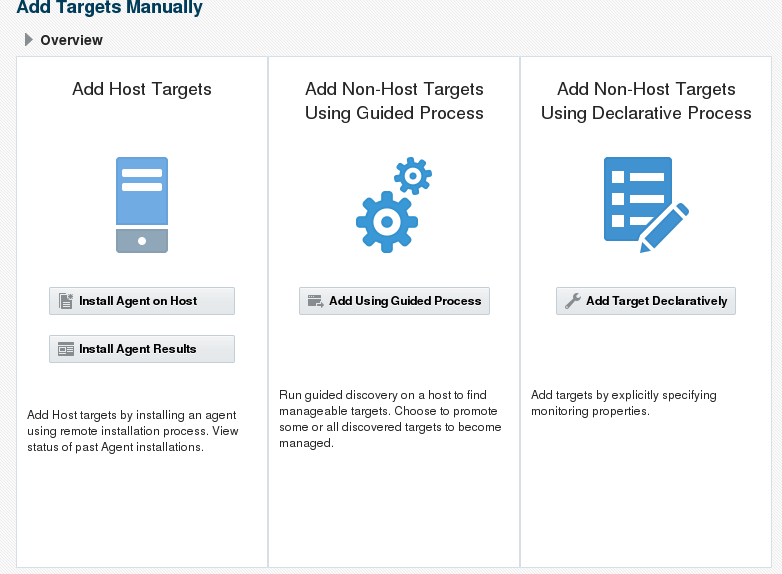
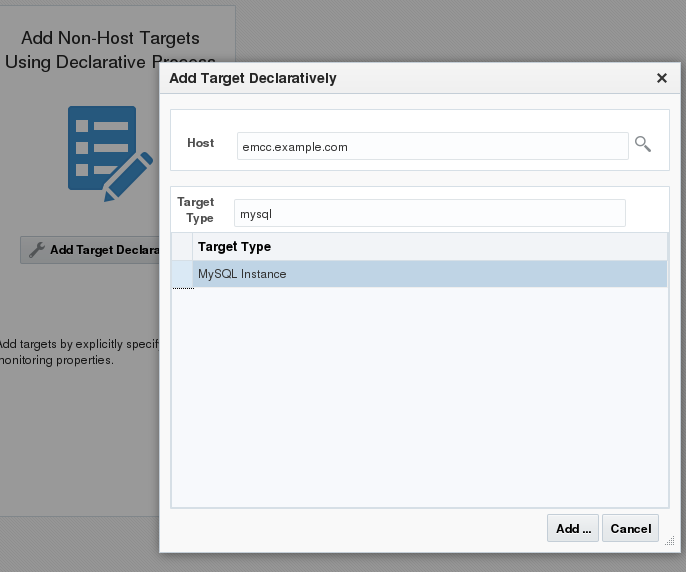
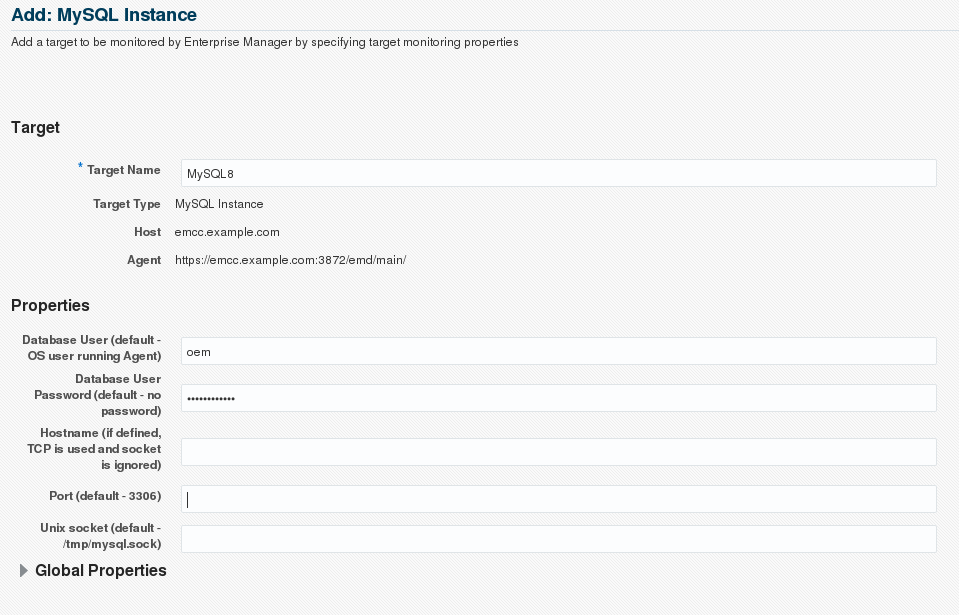
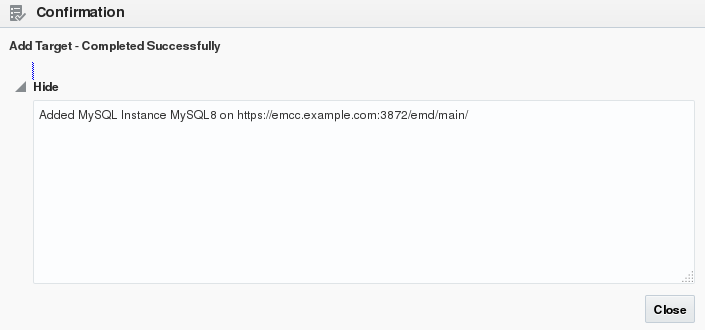
Once you are done with the deployment on both the management servers and the management agents you can add the MySQL targets. The current version of the plugin does not include the discovery scripts, so you have to add the targets manually using the OEM console. In the console, got to Setup -> Add Target -> Add targets manually. Click on Add target Declaratively and fill in the details. Pay special attention to the username, server, port and socket if these are not the default. See the screenshots below for a basic setup: [caption id="attachment_104957" align="aligncenter" width="782"]
Add Targets Manually page[/caption] [caption id="attachment_104956" align="aligncenter" width="686"]
Select host where the MySQL instance exists and the target type "MySQL Instance"[/caption] [caption id="attachment_104955" align="aligncenter" width="959"]
Enter the MySQL instance details.[/caption] [caption id="attachment_104954" align="aligncenter" width="705"]
Confirmation notice[/caption] Now you should be able to list the MySQL targets in the All Targets page. [caption id="attachment_104958" align="aligncenter" width="1444"]
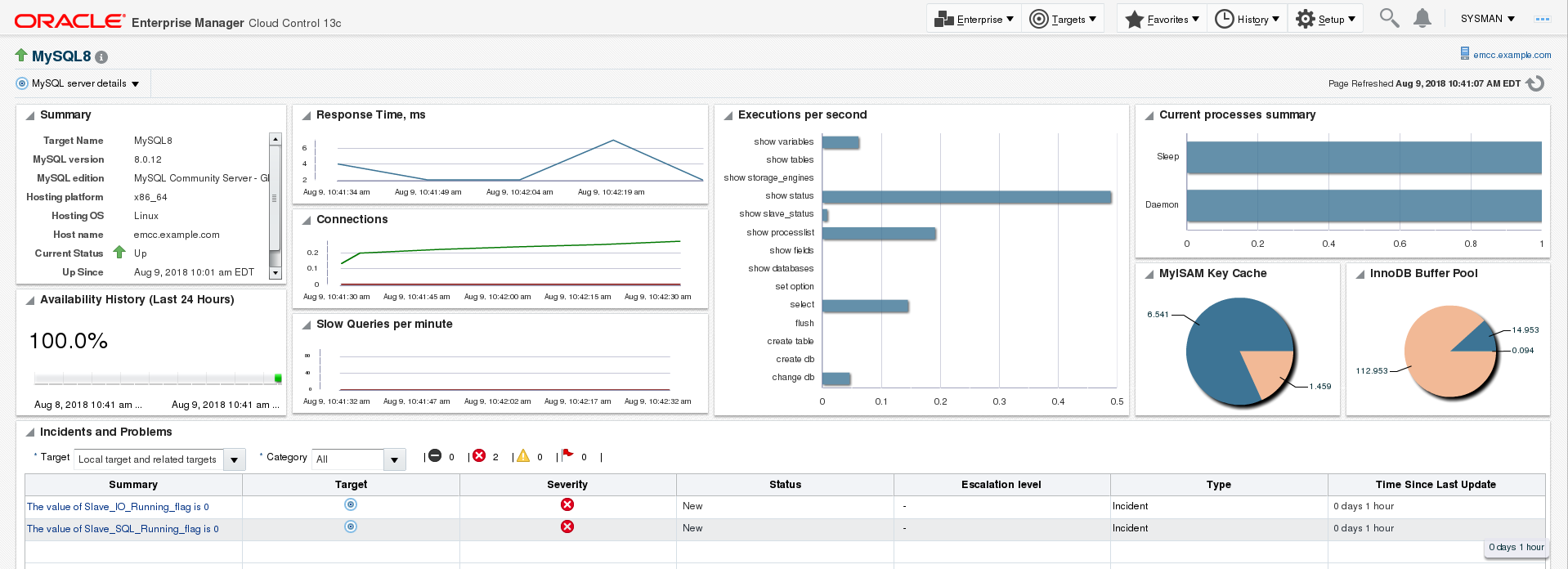
MySQL targets in the All Targets page[/caption] If the target appears down, and you know for sure that it is up, review the Monitoring Configuration of the target for correct user, host, password, socket, etc. After a few minutes, the agent has collected data and OEM will be able to populate the MySQL monitoring target charts as below: [caption id="attachment_104966" align="aligncenter" width="1918"]MySQL target charts[/caption]
Ready to future-proof your SQL Server investment?