To get started, navigate and choose the " Try It" button for the free 30-day trial, which provides 250GB of free storage during the trail period. Here you'll be promoted to choose which billing model you'll want to continue with after your free-trial expires:
From there you'll be prompted for information such as your name and address and of course your existing "Oracle Account". Note that it is mandatory to first have an " Oracle Account" that anyone can create. Interestingly Oracle also wants to verify your mobile phone number (so they can "verify your identity") as part of the sign-up process unlike most other cloud providers. Presumably, so a sales associate can eventually follow-up with you. The final step is to create a new "Cloud Account" and specify the name for the account. Not to be confused with your "Oracle.com Account" that is used on OTN and My Oracle Support - this one differs:
Here's the interesting part: even though the sign-up page mentions a free 30-day trial (see screen-shot earlier), when actually registering the time magically doubles to 60-days:
The online documentation also says 30-days yet the service Dashboard (or sometimes called "WebUI" by Oracle) clearly shows 60-days. It's also interesting to note that after signing up specifically for the Database Backup Service, the trial automatically also includes most of the other Oracle Public Cloud offerings including the "Oracle Storage Cloud Service", the "Oracle Compute Cloud Service", the "Oracle Database Cloud Service", the "Oracle Java Cloud Service", and some others. All with the same 60-day trial period. Though it's not obvious when signing up specifically for the "metered ODBS trial", this is sort of mentioned in the online documentation:
"There are no specific trials for Oracle Database Backup Service. When you request a trial of Oracle Database Backup Service, you actually get a trial of Oracle Storage Cloud Service. Oracle Database Backup Service uses Oracle Storage Cloud Service containers to store cloud backups."
Hence, if you're planning to try these different services using the free-trials serially, you're out of luck. You get the one 60-day window for all services running in parallel. But you can start a new trial under a separate & new identity domain. After submitting, the order should take less than an hour to complete after which you'll receive an email with further details. This is where it gets a little confusing. You now have an "Oracle.com Account" used for OTN, MOS, etc., which is based on your email address and has a password as well as an "Oracle Cloud Administrator Account". This is also based on that same email address but has a different password (temporary password is in the email). Log on to your Oracle Cloud account as logging in and navigating from cloud.oracle.com is confusing.Creating individual users or credentials to use with the RMAN backup through secured wallet files is not at all obvious at first (unlike the competitive offering from Amazon Web Services, which is discussed in the next article in this series). From the main dashboard at this point it's not simple to setup credentials to be used specifically and exclusively by the RMAN backup scripts. Instead by pressing the "Security" button in the top right you can add additional administrators to your Oracle Cloud account, but each is tied to an Oracle.com account. The trick is that you need to navigate into the dashboard specific for the identity domain! One way to do this is to find the Backup Service from the main dashboard, click on the menu option on the far right and choose "My Services":
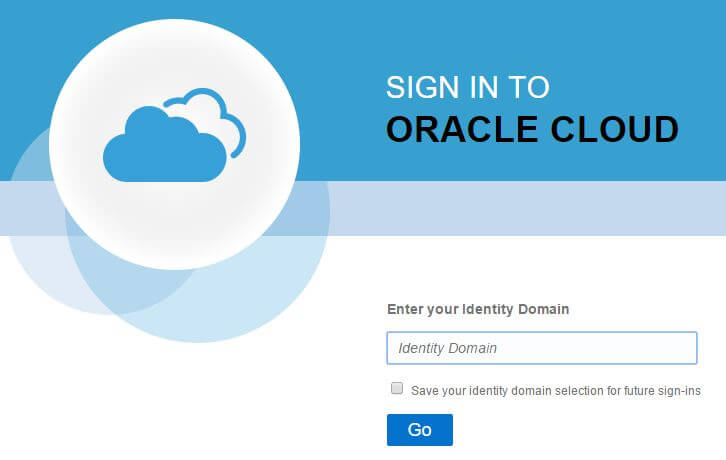
You'll then be prompted with a new login window specific to the Identity Domain:
Specify, the required Identity Domain or the one chosen (or default one used) when signing up - this is also in your welcome email that can be re-sent from the same menu. After specifying the Identity Domain, log in using your Oracle Cloud Account credentials, not your Oracle.com account credentials (even though the two emails are the same)! The Identity Domain dashboard looks almost identical to the main Oracle Cloud dashboard, though one noticeable exception is that there's now a "Users" button along the top:
From here we can add new users and assign them specific roles such as the ability to read, write, or administer database backups:
However the disadvantage here is that these are actual "users" and not just keys and secure credentials as Amazon Web Services Identity Access Module provides.
After running, the appropriate library file is downloaded, the configuration file created, and a secure wallet file (with the credentials) created:$ java -jar opc_install.jar \ > -serviceName Storage \ > -identityDomain ************ \ > -opcId 'pane@pythian.com' \ > -opcPass '*****' \ > -walletDir $ORACLE_HOME/dbs/opc_wallet \ > -libDir $ORACLE_HOME/lib Oracle Database Cloud Backup Module Install Tool, build 2015-05-12 Oracle Database Cloud Backup Module credentials are valid. Oracle Database Cloud Backup Module wallet created in directory /u01/app/oracle/product/12.1.0/dbhome_2/dbs/opc_wallet. Oracle Database Cloud Backup Module initialization file /u01/app/oracle/product/12.1.0/dbhome_2/dbs/opcCDB121.ora created. Downloading Oracle Database Cloud Backup Module Software Library from file opc_linux64.zip. Downloaded 23169388 bytes in 34 seconds. Transfer rate was 681452 bytes/second. Download complete.
There are other optional customizations that can be added to the configuration file (discussed later), but at this point the initial configuration is complete and RMAN backups to the ODBS can be made.$ ls -ltr $ORACLE_HOME/lib | tail -1 -rw-r--r--. 1 oracle oinstall 72062283 Sep 4 11:35 libopc.so $ ls -ltr $ORACLE_HOME/dbs | tail -1 -rw-r--r--. 1 oracle oinstall 183 Sep 4 11:35 opcCDB121.ora $ cat $ORACLE_HOME/dbs/opcCDB121.ora OPC_HOST=https://************.storage.oraclecloud.com/v1/Storage-************ OPC_WALLET='LOCATION=file:/u01/app/oracle/product/12.1.0/dbhome_2/dbs/opc_wallet CREDENTIAL_ALIAS=storage_opc' $ ls -l $ORACLE_HOME/dbs/opc_wallet -rw-r--r--. 1 oracle oinstall 10196 Sep 4 11:35 cwallet.sso
RMAN> run {
 2> allocate channel odbs type sbt
 3> PARMS='SBT_LIBRARY=libopc.so,SBT_PARMS=(OPC_PFILE=/u01/app/oracle/product/11.2.0/dbhome_1/dbs/opcORA11G.ora)';
 4> backup tablespace users;
 5> }

 allocated channel: odbs
 channel odbs: SID=21 device type=SBT_TAPE
 channel odbs: Oracle Database Backup Service Library VER=3.15.1.16

 Starting backup at 04-SEP-15
 channel odbs: starting full datafile backup set
 channel odbs: specifying datafile(s) in backup set
 input datafile file number=00006 name=/u01/app/oracle/oradata/CDB121/users01.dbf
 channel odbs: starting piece 1 at 04-SEP-15
 released channel: odbs
 RMAN-00571: ===========================================================
 RMAN-00569: =============== ERROR MESSAGE STACK FOLLOWS ===============
 RMAN-00571: ===========================================================
 RMAN-03009: failure of backup command on odbs channel at 09/04/2015 13:11:08
 ORA-27030: skgfwrt: sbtwrite2 returned error
 ORA-19511: non RMAN, but media manager or vendor specific failure, error text:
  KBHS-01602: backup piece 0kqgaeut_1_1 is not encrypted

 RMAN>
This error is not unexpected and brings us to a unique feature of the ODBS - backup encryption is mandatory. RMAN backups to disk require the Advanced Security Option in order to use encryption but RMAN backups using the "Oracle Secure Backup SBT interface" does not. Similarly, the "Oracle Database Cloud Backup Module" is effectively just a customized version of the Oracle Secure Backup SBT interface and also does not require the Advanced Security Option. The required encryption can be implemented one of these ways:
RMAN> SET ENCRYPTION ON IDENTIFIED BY passw0rd ONLY;

 executing command: SET encryption
 using target database control file instead of recovery catalog

 RMAN> run {
 2> allocate channel odbs type sbt
 3> PARMS='SBT_LIBRARY=libopc.so,SBT_PARMS=(OPC_PFILE=/u01/app/oracle/product/11.2.0/dbhome_1/dbs/opcORA11G.ora)';
 4> backup tablespace users;
 5> }

 allocated channel: odbs
 channel odbs: SID=272 device type=SBT_TAPE
 channel odbs: Oracle Database Backup Service Library VER=3.15.1.16

 Starting backup at 04-SEP-15
 channel odbs: starting full datafile backup set
 channel odbs: specifying datafile(s) in backup set
 input datafile file number=00006 name=/u01/app/oracle/oradata/CDB121/users01.dbf
 channel odbs: starting piece 1 at 04-SEP-15
 channel odbs: finished piece 1 at 04-SEP-15
 piece handle=0mqgahd0_1_1 tag=TAG20150904T135232 comment=API Version 2.0,MMS Version 3.15.1.16
 channel odbs: backup set complete, elapsed time: 00:00:15
 Finished backup at 04-SEP-15

 Starting Control File and SPFILE Autobackup at 04-SEP-15
 piece handle=c-3847224663-20150904-00 comment=API Version 2.0,MMS Version 3.15.1.16
 Finished Control File and SPFILE Autobackup at 04-SEP-15
 released channel: odbs

 RMAN> list backup of tablespace users;
 List of Backup Sets
 ===================

 BS Key Type LV Size Device Type Elapsed Time Completion Time
 ------- ---- -- ---------- ----------- ------------ ---------------
 18 Full 1.50M SBT_TAPE 00:00:06 04-SEP-15
  BP Key: 18 Status: AVAILABLE Compressed: NO Tag: TAG20150904T135232
  Handle: 0mqgahd0_1_1 Media: ************.storage.oraclecloud.com/v1/Storage-************/oracle-da
  List of Datafiles in backup set 18
  File LV Type Ckp SCN Ckp Time Name
  ---- -- ---- ---------- --------- ----
  6 Full 1394781 04-SEP-15 /u01/app/oracle/oradata/CDB121/users01.dbf

 RMAN>
Voila: Encrypted backups straight to the cloud via ODBS. Additional commands such as RESTORE, RECOVER, CROSSCHECK, DELETE BACKUP, etc. all work in exactly the same way - the ODBS simply appears to RMAN as a SBT_TAPE device. Now if we want all backups to use the ODBS without having to manually specify the SBT device parameters in a channel allocation each time we can simply persist the configuration using the CONFIGURE command:
RMAN provides various encryption algorithms (listed in the V$RMAN_ENCRYPTION_ALGORITHMS view) and all are applicable to the ODBS backups. Another marketed benefit of ODBS is compression. "Basic Compression" (CONFIGURE COMPRESSION ALGORITHM 'BASIC';) can be used for all RMAN backups without the requirement for additional licensing ( Source).The Oracle Advanced Compression Option allows for RMAN compression to include the additional compression levels "HIGH", "MEDIUM", and "LOW". High compresses the most and results in the minimal amount of data transferred through the network (likely ideal for backing up through the internet), but at the expense of higher local CPU resources. Therefore, a few additional permutations of the sample backup would be:RMAN> CONFIGURE CHANNEL DEVICE TYPE sbt 2> PARMS='SBT_LIBRARY=libopc.so,SBT_PARMS=(OPC_PFILE=/u01/app/oracle/product/11.2.0/dbhome_1/dbs/opcORA11G.ora)'; new RMAN configuration parameters: CONFIGURE CHANNEL DEVICE TYPE 'SBT_TAPE' PARMS 'SBT_LIBRARY=libopc.so,SBT_PARMS=(OPC_PFILE=/u01/app/oracle/product/11.2.0/dbhome_1/dbs/opcORA11G.ora)'; new RMAN configuration parameters are successfully stored RMAN> SET ENCRYPTION ON IDENTIFIED BY passw0rd ONLY; executing command: SET encryption RMAN> backup device type sbt tablespace users; Starting backup at 04-SEP-15 allocated channel: ORA_SBT_TAPE_1 channel ORA_SBT_TAPE_1: SID=255 device type=SBT_TAPE channel ORA_SBT_TAPE_1: Oracle Database Backup Service Library VER=3.15.1.16 channel ORA_SBT_TAPE_1: starting full datafile backup set channel ORA_SBT_TAPE_1: specifying datafile(s) in backup set input datafile file number=00006 name=/u01/app/oracle/oradata/CDB121/users01.dbf channel ORA_SBT_TAPE_1: starting piece 1 at 04-SEP-15 channel ORA_SBT_TAPE_1: finished piece 1 at 04-SEP-15 piece handle=0oqgaidh_1_1 tag=TAG20150904T140953 comment=API Version 2.0,MMS Version 3.15.1.16 channel ORA_SBT_TAPE_1: backup set complete, elapsed time: 00:00:15 Finished backup at 04-SEP-15 Starting Control File and SPFILE Autobackup at 04-SEP-15 piece handle=c-3847224663-20150904-01 comment=API Version 2.0,MMS Version 3.15.1.16 Finished Control File and SPFILE Autobackup at 04-SEP-15 RMAN>
Comparing the backup performance and compression of FULL database backups using:RMAN> backup as compressed backupset device type sbt tablespace users; Starting backup at 04-SEP-15 using channel ORA_SBT_TAPE_1 channel ORA_SBT_TAPE_1: starting compressed full datafile backup set channel ORA_SBT_TAPE_1: specifying datafile(s) in backup set input datafile file number=00006 name=/u01/app/oracle/oradata/CDB121/users01.dbf channel ORA_SBT_TAPE_1: starting piece 1 at 04-SEP-15 channel ORA_SBT_TAPE_1: finished piece 1 at 04-SEP-15 piece handle=0qqgajcv_1_1 tag=TAG20150904T142639 comment=API Version 2.0,MMS Version 3.15.1.16 channel ORA_SBT_TAPE_1: backup set complete, elapsed time: 00:00:15 Finished backup at 04-SEP-15 Starting Control File and SPFILE Autobackup at 04-SEP-15 piece handle=c-3847224663-20150904-02 comment=API Version 2.0,MMS Version 3.15.1.16 Finished Control File and SPFILE Autobackup at 04-SEP-15 RMAN> CONFIGURE COMPRESSION ALGORITHM 'HIGH'; new RMAN configuration parameters: CONFIGURE COMPRESSION ALGORITHM 'HIGH' AS OF RELEASE 'DEFAULT' OPTIMIZE FOR LOAD TRUE; new RMAN configuration parameters are successfully stored RMAN> backup as compressed backupset device type sbt tablespace users; Starting backup at 04-SEP-15 using channel ORA_SBT_TAPE_1 channel ORA_SBT_TAPE_1: starting compressed full datafile backup set channel ORA_SBT_TAPE_1: specifying datafile(s) in backup set input datafile file number=00006 name=/u01/app/oracle/oradata/CDB121/users01.dbf channel ORA_SBT_TAPE_1: starting piece 1 at 04-SEP-15 channel ORA_SBT_TAPE_1: finished piece 1 at 04-SEP-15 piece handle=0sqgajg1_1_1 tag=TAG20150904T142817 comment=API Version 2.0,MMS Version 3.15.1.16 channel ORA_SBT_TAPE_1: backup set complete, elapsed time: 00:00:15 Finished backup at 04-SEP-15 Starting Control File and SPFILE Autobackup at 04-SEP-15 piece handle=c-3847224663-20150904-03 comment=API Version 2.0,MMS Version 3.15.1.16 Finished Control File and SPFILE Autobackup at 04-SEP-15 RMAN>
Clearly the compression helps significantly in terms of output bytes and the elapsed backup time. And the ODBS unique advantage of being able to specify COMPRESSION=‘HIGH’ makes a noticeable difference on my system at the expense of CPU resources. But drilling into the details of this test any further is of little value as there are so many site and system specific variables in play. Specifically:SQL> COLUMN status FORMAT a10 SQL> COLUMN input_bytes_display HEADING INPUT_BYTES FORMAT a14 SQL> COLUMN output_bytes_display HEADING OUTPUT_BYTES FORMAT a14 SQL> COLUMN input_bytes_per_sec_display HEADING INPUT_BPS FORMAT a14 SQL> COLUMN output_bytes_per_sec_display HEADING OUTPUT_BPS FORMAT a14 SQL> COLUMN time_taken_display HEADING TIME_TAKEN FORMAT a10 SQL> SQL> SELECT status, input_type, 2 compression_ratio, 3 input_bytes_display, output_bytes_display, 4 input_bytes_per_sec_display, output_bytes_per_sec_display, 5 time_taken_display 6 FROM v$rman_backup_job_details; STATUS INPUT_TYPE COMPRESSION_RATIO INPUT_BYTES OUTPUT_BYTES INPUT_BPS OUTPUT_BPS TIME_TAKEN ---------- ----------- ----------------- -------------- -------------- -------------- -------------- ---------- COMPLETED DB FULL 1.2824343 4.53G 3.53G 22.08M 17.21M 00:03:30 COMPLETED DB FULL 1.28192371 4.53G 3.53G 400.65K 312.54K 03:17:34 COMPLETED DB FULL 5.39639373 4.46G 845.75M 1.22M 232.00K 01:02:13 COMPLETED DB FULL 6.44232804 4.46G 708.75M 1.88M 299.41K 00:40:24 10 rows selected. SQL>
Further, searching the OPC library module shows many additional hidden parameters (an examination of each is outside of the scope of this article):OPC_PFILE OPC_PROXY OPC_CONTAINER OPC_CHUNK_SIZE
$ strings $ORACLE_HOME/lib/libopc.so | grep ^_OPC_
 _OPC_ALLOCBUF_DISABLE
 _OPC_ACCESSLOG_RETENTION_TIME
 _OPC_SEND_BUF_SIZE
 _OPC_RECV_BUF_SIZE
 _OPC_SDU_SIZE
 _OPC_TDU_SIZE
 _OPC_REUSE_CONNECTION
 _OPC_SESSION_RETENTION_TIME
 _OPC_CHECKER_RETENTION_TIME
 _OPC_PURGE_LIMIT
 _OPC_CLEANER
 _OPC_CLEANER_RETENTION_TIME
 _OPC_RUN_CLEANER
 _OPC_ACCESSLOG_CLEANER
 _OPC_ACCESSLOG
 _OPC_CONNECT_TIMEOUT
 _OPC_RESPONSE_TIMEOUT
 _OPC_SEND_TIMEOUT
 _OPC_RETRY_WAIT_TIME
 _OPC_UPLOAD_DELAY
 _OPC_EVENT
 _OPC_TRACE_LEVEL
 _OPC_VALIDATE_CHUNK
 _OPC_100_CONTINUE
 _OPC_DEFERRED_DELETE
 _OPC_AUTH_SCHEME
 _OPC_LOG_BUCKET
 _OPC_REDIRECT
 _OPC_BUFFER_WRITE
 _OPC_BUFFER_READ
 _OPC_USE_IPV6
 _OPC_NO_SSL
 _OPC_VALIDATE_CERT
"Bug 18339044 - Support encryption on oracle public cloud sbt library in standard edition (Doc ID 18339044.8)"
A one-off patch for this bug is available for Oracle database 10.2.0.5 onward on all ODBS supported platforms. And fortunately the patch can be applied without outage. However depending on how up to date you are with PSU patching this may be a moot point as this bug fix is included with the following PSUs or server patch sets/bundles:12.1.0.2 (Server Patch Set) 11.2.0.4.5 (Jan 2015) Database Patch Set Update (DB PSU) 11.2.0.4 Bundle Patch 6 for Exadata Database 11.2.0.3 Bundle Patch 23 for Exadata Database 11.2.0.4 Patch 12 on Windows Platforms 11.2.0.3 Patch 33 on Windows Platforms
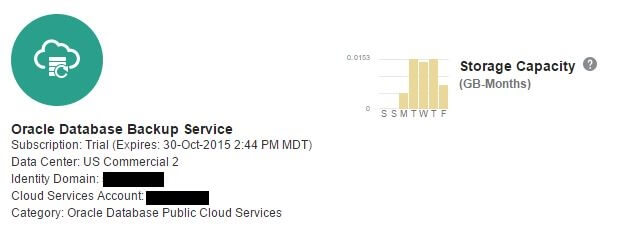
Viewing the amount of data used is quite simple from the Oracle Cloud Dashboard:
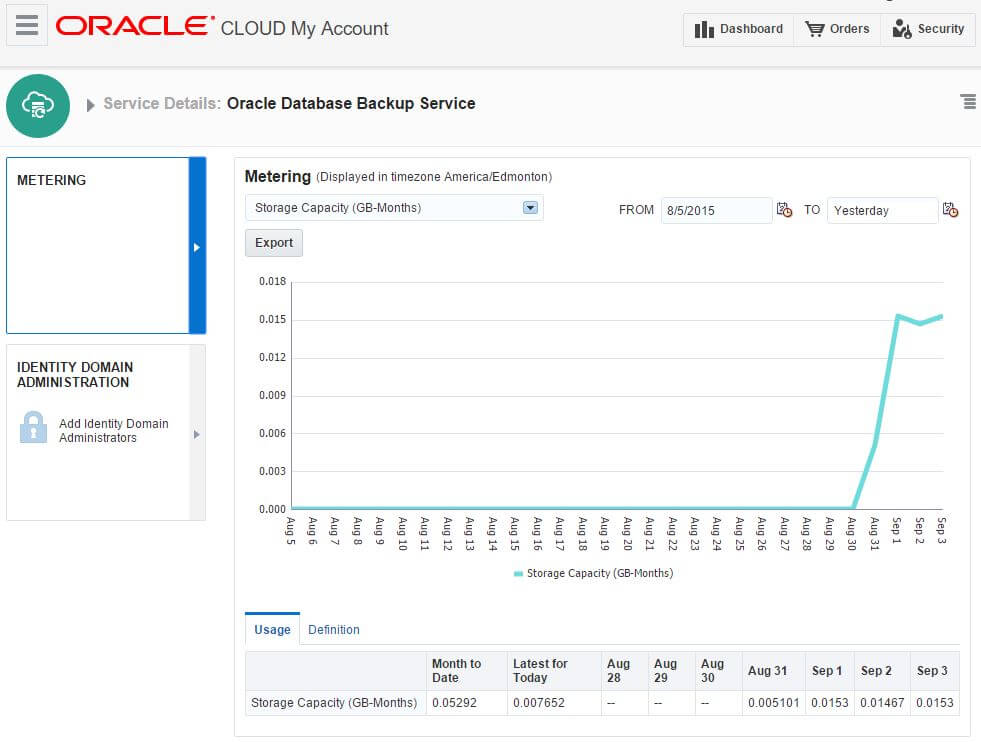
Note that this storage is not reflected as part of the "Oracle Storage Cloud Service" - they are treated as separate. Drilling down into the "Oracle Database Backup Service" details:
Some interesting observations from this:The Oracle Database Backup Service definitely is a simple, low-cost, and effective off-site backup solution. No upfront costs and extremely reasonable metered usage rates make it extremely competitive. And forcing backups to the service to be encrypted (and transferred via HTTPS), while the keeping the encryption key in a wallet maintained on your on-premise device makes the configuration secure. And protected as long as the wallet file is backed up and secured separately. Oracle's triple-mirroring of the data in their data centers is nice, however there's no option to choose which of the 19 Oracle data centers is used. The position of the "special-use licensing" for the encryption and compression backup options at no additional cost may not be as much of a unique advantage as initially thought. Backup encryption to competing cloud services through the Oracle Secure Backup SBT module is already permitted as is "BASIC" level backup compression for all RMAN backups, both without additional licenses (specifically the Advanced Security Option or the Advanced Compression Option). Whether the advanced compression options provided as part of the "special-use licensing", such as "HIGH" compression is of significant value will vary on a case-by-case or site-by-site basis. But the key difference on the licensing front is that there is no requirement for the Oracle Secure Backup module which is separately licensed per RMAN channel ( Source). This is likely the reason why the product name, modules, etc make no reference of "Oracle Secure Backup" or OSB. DYI solutions of backing up to disk, then encrypting and possibly compressing those RMAN backup pieces separatel
Ready to optimize your Oracle Database for the future?