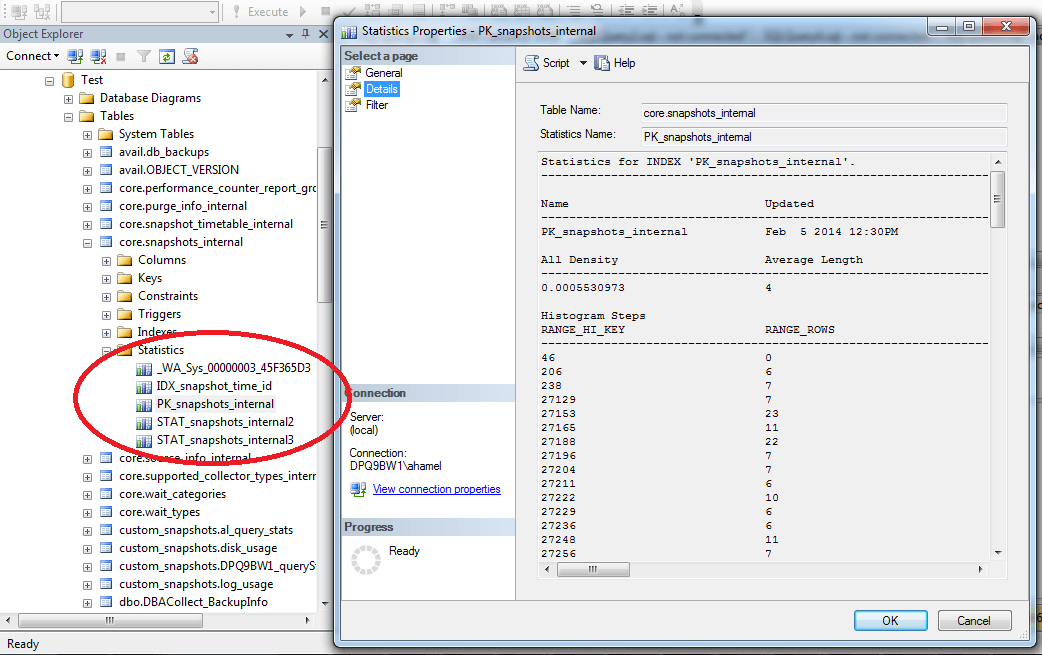
There are multiple paths a database can use to answer a query, some of them being faster and more efficient than others. It is the job of the query optimizer to evaluate and choose the best path, or execution plan, for a given query. Using the available indexes may not always be the most efficient plan. For example, if 95% of the values for a column are the same, an index scan will probably be more efficient than using the index on that column. Statistics are SQL Server objects which contain metrics on the data count and distribution within a column or columns used by the optimizer to help it make that choice. They are used to estimate the count of rows. Index statistics: Created automatically when an index (both clustered and non-clustered) is created. These will have the same name as the index and will exist as long as the index exists. Column statistics: Created manually by the DBA using the ‘CREATE STATISTICS’ command, or automatically if the “Auto Create Statistics” option is set to “True”. Column statistics can be created, modified and dropped at will. Statistics contain two different types of information about the data; density and distribution. Density is simply the inverse of the count of distinct values for the column or columns. The distribution is a representation of the data contained in the first column of the statistic. This information is stored in a histogram; the histogram contains up to 200 steps with a lower and upper limit and contains the count of values that fall between both limits. To view this histogram, go to the details tab of the statistic’s properties or use the command DBCC SHOW_STATISTICS. The screenshot below shows the histogram of an index statistic; the RANGE_HI_KEY is the upper limit of the step, the RANGE_HI_KEY of the previous step + 1 is the lower limit, and the RANGE_ROWS is the count of rows between the limits.
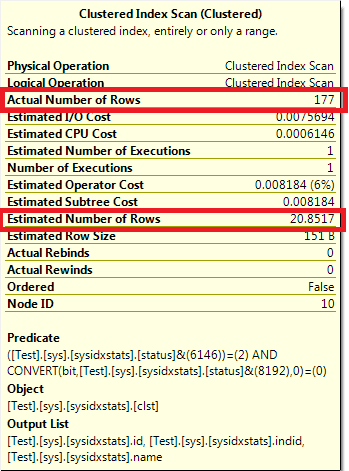
When the data in the database changes the statistics become stale and outdated. When examining a query execution plan, a large discrepancy between the Actual Number of Rows and the Estimated Number of Rows is an indication of outdated stats. Outdated statistics can lead the optimizer in choosing inefficient execution plan and can dramatically affect overall performance. Steps must therefore be taken in order to keep statistics up to date.
Keep Auto Create Statistics enabled: This database property allows SQL Server to automatically create stats for a single non-indexed column if they are missing when it is used in a where or join condition. This ensures the optimizer will have the necessary information to choose a plan. The statistics automatically created by SQL Server will start with _WA_ in their name. Keep Auto Update Statistics enabled: This database property allows SQL Server to automatically update the statistics when they are deemed outdated. The update occurs before executing a query if certain conditions are met, or after the query is executed if Auto Update Statistics Asynchronously is used instead. The three conditions that will trigger an update if one is met are: -Table had 0 rows and increases to one or more rows. -Table had less than 500 rows and there is an increase of 500 rows or more since the last update -Table has over 500 rows and there is an increase of 500 + 20% of the table size since the last update
Maintenance plan: You can also proactively update the statistics yourself using TSQL (sp_updatestats for all stats in a database or UPDATE STATISTICS for a single one) or a maintenance plan task. Scheduling the statistics maintenance during off hours will help reduce the need to update statistics during peak times. The need and frequency of this proactive maintenance will depend on your environment; frequent data changes causes the statistics to become outdated more quickly. You can also specify the sample size used to update the statistic; Ex: UPDATE STATISTICS TableName(StatsName) WITH FULLSCAN: Costs more time and resources but will ensure that statistics are accurate. UPDATE STATISTICS TableName(StatsName) WITH SAMPLE 50 PERCENT: Will only use half the rows and extrapolate the rest, meaning the updating will be faster, but the statistics may not be accurate. Rebuilding an index will also update index statistics with full scan (column stats will not be updated, and an index reorg will do the update). Note however that updating statistics forces queries to recompile; you must therefore decide when the cost of the overhead for the recompiles is worth having the latest statistics. Unused Statistics: Statistics comes with a cost, and just as with indexes, too many of them can lead to issues like increasing the cost of statistics maintenance, and can make the optimizer’s job more difficult. Updating statistics for a large database can easily take hours, even days, to complete. When Auto Create Statistics is enabled, stats can be created even for a one time query. A table could end up having a large number of statistics that serve no purpose. It is wise to review and clean up the statistics as part of general maintenance. Identifying unused statistics can be difficult since, unlike indexes, SQL Server does not record statistics usage. However you can identify the statistics that satisfy one of the thresholds for the automatic update above but still hasn't been updated; this is a good indication of unused statistics. In addition to unused stats, you may find overlapping stats which are covered by other statistics. The following script from Kendal Van Dyke will identify all single column statistics that are covered by an existing index statistic (share the same leading column) in a database and generates the TSQL commands to drop them. [code lang="sql"] WITH autostats ( object_id, stats_id, name, column_id ) AS ( SELECT sys.stats.object_id , sys.stats.stats_id , sys.stats.name , sys.stats_columns.column_id FROM sys.stats INNER JOIN sys.stats_columns ON sys.stats.object_id = sys.stats_columns.object_id AND sys.stats.stats_id = sys.stats_columns.stats_id WHERE sys.stats.auto_created = 1 AND sys.stats_columns.stats_column_id = 1 ) SELECT OBJECT_NAME(sys.stats.object_id) AS [Table] , sys.columns.name AS [Column] , sys.stats.name AS [Overlapped] , autostats.name AS [Overlapping] , 'DROP STATISTICS [' + OBJECT_SCHEMA_NAME(sys.stats.object_id) + '].[' + OBJECT_NAME(sys.stats.object_id) + '].[' + autostats.name + ']' FROM sys.stats INNER JOIN sys.stats_columns ON sys.stats.object_id = sys.stats_columns.object_id AND sys.stats.stats_id = sys.stats_columns.stats_id INNER JOIN autostats ON sys.stats_columns.object_id = autostats.object_id AND sys.stats_columns.column_id = autostats.column_id INNER JOIN sys.columns ON sys.stats.object_id = sys.columns.object_id AND sys.stats_columns.column_id = sys.columns.column_id WHERE sys.stats.auto_created = 0 AND sys.stats_columns.stats_column_id = 1 AND sys.stats_columns.stats_id != autostats.stats_id AND OBJECTPROPERTY(sys.stats.object_id, 'IsMsShipped') = 0 [/code] Source: https://www.kendalvandyke.com/2010/09/tuning-tip-identifying-overlapping.html
Statistics are a crucial element in the overall performance of a database and require proper maintenance and attention. In addition, each environment is unique and has different needs regarding statistics maintenance. For more information regarding statistics, see https://technet.microsoft.com/en-us/library/ms190397.aspx.
Ready to future-proof your SQL Server investment?