



Recently, checking Amazon Web Services, I stumbled upon a service I hadn't tested before. It was Data Migration Service (DMS). I read documentation and checked other resources. I found a good, fresh blog post
AWS Database Migration Service written by Jeff Barr. It was really interesting and I decided to give a try and test the service. I created an Oracle RDS on AWS as a target and an Oracle Linux box on Azure with Oracle 12c EE as a source database for migration. The source database sid was "test" and destination was "orcl". I created tablespaces and users on both sides with the name "testmig" and created a table on the source database. Initially I loaded 1000000 records to the table and created an index. The schema on destination database was empty. I also enabled archivelog mode on the source database. Creating user and table on the source: [code lang="sql"] test> create user testmig identified by welcome1 default tablespace testmig temporary tablespace temp; User created. test> grant connect,resource to testmig; Grant succeeded. test> conn test test> create table test_tab_1 (pk_id number, rnd_str_1 varchar2(15),use_date date,rnd_str_2 varchar2(15), acc_date date); Table created. test> [/code] Loading the data: [code lang="bash"] [oracle@oradb1 patchdepot]$ head test_tab_1.dat 340,MLBO07LV,10/30/13 15:58:04,NABCFVAQ,12/08/17 18:22:48 341,M48R4107,12/09/13 12:30:41,ACA79WO8,12/15/16 08:13:40 342,KARMF0ZQ,04/21/14 08:53:33,JE6SOE0K,06/18/17 07:12:29 343,8NTSYDIS,11/09/14 23:41:48,FBJXWQNX,08/28/15 20:47:39 344,0LVKBJ8T,09/28/12 06:52:05,VBX3FWQG,10/28/15 06:10:42 345,Z22W1QKW,06/06/13 11:14:32,26BCTA9L,08/21/17 08:35:15 346,CGGQO9AL,08/27/14 02:37:41,15SRXZSJ,11/09/17 19:58:58 347,WKHINIUK,07/02/13 14:31:53,65WSGVDG,08/02/15 10:45:50 348,HAO9X6IC,11/17/12 12:08:18,MUQ98ESS,12/03/15 20:37:20 349,D613XT63,01/24/15 16:49:11,3ELW98N2,07/03/16 11:03:40 [oracle@oradb1 patchdepot]$ export NLS_DATE_FORMAT="MM/DD/YY HH24:MI:SS" [oracle@oradb1 patchdepot]$ sqlldr userid=testmig table=test_tab_1 Password: SQL*Loader: Release 12.1.0.1.0 - Production on Wed Mar 16 13:07:50 2016 Copyright (c) 1982, 2013, Oracle and/or its affiliates. All rights reserved. Express Mode Load, Table: TEST_TAB_1 Path used: External Table, DEGREE_OF_PARALLELISM=AUTO Table TEST_TAB_1: 100000 Rows successfully loaded. Check the log files: test_tab_1.log test_tab_1_%p.log_xt for more information about the load. [oracle@oradb1 patchdepot]$ [/code] On the target system: [code lang="sql"] rdsorcl> create tablespace testmig; Tablespace TESTMIG created. rdsorcl> create user testmig identified by welcome1 default tablespace testmig; User TESTMIG created. rdsorcl> [/code] In the blog post mentioned, the migration was done without replication and I was curious to test it with some kind of ongoing DML activity on the source database. I setup a linux box with Jmeter and started my load with pace about 15 transactions per second. The transactions were inserts and updates on the created table. Everything was working fine so far and I switched to the Data Migration Service on AWS. The service has a pretty easy and clear workflow. You need just push the button "Create migration" and it will guide you through the process. In general, you need to create a replication instance, endpoints for source and target and task to start initial load and replication. I created a replication instances and while it was creating (it took some time) was asked to setup endpoints for source and target. The first issue I hit when I tried to use a DNS name for my Azure instance. The test connection was failing by timeout and it was not clear where the problem were. It could be either connection or DNS problem. The issue was solved by providing IP address instead of domain name for my Azure instance.
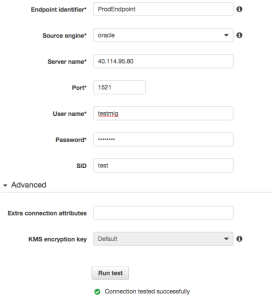 The test for target endpoint failed with the same timeout, but the reason was totally different. It was not DNS, but rather a connection issue. At first, I couldn't figure that out because I was able to connect to my RDS instance from my laptop using server name and port but test endpoint in DMS was not working. Eventually I figured out that the problem was in security groups for endpoint in RDS. By default the AWS RDS instance was created with security group allowing connections outside but somehow restricting connections from DMS. I changed the security group for AWS RDS to "default" and was able to successfully test the endpoint in DMS. The next step was to create a task. I created a task with initial load and ongoing replication for my testmig schema. The task was supposed to drop any tables on the target (you can choose truncate instead if you want) create objects, move data and keep replication until cutover day when you will be able to switch your applications to the new database. It will tell you that you need to setup supplemental logging for replication. Unfortunately it doesn't tell you what kind of supplemental logging you have to setup. So, I enabled minimal data supplemental logging on my Azure test instance. [code lang="sql"] test> alter database add supplemental log data; Database add SUPPLEMENTAL altered. test> exec dbms_capture_adm.prepare_table_instantiation('testmig.test_tab_1','keys') PL/SQL procedure successfully completed. test> [/code] It was not enough and I got the error. By default you are not getting logging for your task but only configuration and statistics about replicated and loaded objects. As a result if you get an error, it is not clear where to look. I enabled supplemental logging for primary key on my replicated table and recreated task checking and logging checkbox. I got error again but I had a log and was able to see what was causing the issue. [code lang="text"] 2016-03-16T19:41:11 [SOURCE_CAPTURE ]I: Oracle compatibility version is 12.1.0.0.0 (oracle_endpoint_conn.c:86) 2016-03-16T19:41:11 [SOURCE_CAPTURE ]I: Oracle capture start time: now (oracle_endpoint_capture.c:701) 2016-03-16T19:41:12 [SOURCE_CAPTURE ]I: New Log Miner boundaries in thread '1' : First REDO Sequence is '4', Last REDO Sequence is '4' (oracdc_reader.c:589) 2016-03-16T19:41:18 [SOURCE_UNLOAD ]W: Supplemental logging is not defined for table with no key 'TESTMIG.TEST_TAB_1' (oracle_endpoint_utils.c:831) 2016-03-16T19:41:18 [SOURCE_UNLOAD ]E: Supplemental logging for table 'TESTMIG.TEST_TAB_1' is not enabled properly [122310] Supplemental logging is not correct (oracle_endpoint_unload.c:245) 2016-03-16T19:41:18 [SOURCE_UNLOAD ]I: Unload finished for table 'TESTMIG'.'TEST_TAB_1' (Id = 1). 0 rows sent. (streamcomponent.c:2567) 2016-03-16T19:41:18 [SOURCE_UNLOAD ]E: Failed to init unloading table 'TESTMIG'.'TEST_TAB_1' [122310] Supplemental logging is not correct (oracle_endpoint_unload.c:441) [/code] It looked like my supplemental logging was not enough. So, I added supplemental logging for all columns and for entire schema testmig. I recreated task and started it again. [code lang="sql"] test> exec dbms_capture_adm.prepare_table_instantiation('testmig.test_tab_1','all'); PL/SQL procedure successfully completed. test> exec dbms_capture_adm.prepare_schema_instantiation('testmig'); PL/SQL procedure successfully completed. test> [/code] It was working fine and was able to perform initial load. [code lang="text"] 2016-03-16T19:49:19 [SOURCE_CAPTURE ]I: Oracle capture start time: now (oracle_endpoint_capture.c:701) 2016-03-16T19:49:20 [SOURCE_CAPTURE ]I: New Log Miner boundaries in thread '1' : First REDO Sequence is '4', Last REDO Sequence is '4' (oracdc_reader.c:589) 2016-03-16T19:49:31 [SOURCE_UNLOAD ]I: Unload finished for table 'TESTMIG'.'TEST_TAB_1' (Id = 1). 100723 rows sent. (streamcomponent.c:2567) 2016-03-16T19:49:31 [TARGET_LOAD ]I: Load finished for table 'TESTMIG'.'TEST_TAB_1' (Id = 1). 100723 rows received. 0 rows skipped. Volume transfered 45929688 (streamcomponent.c:2787) [/code] What about ongoing changes? Yes, it was keeping the replication on and the tables were in sync. Replication lag for my case was minimal but we need to note that it was just one table with a low transaction rate. By the end I switched my load to AWS RDS database, stopped and deleted the DMS task. Migration was completed. I compared data in tables running a couple of simple checks for count and rows and running also one table "minus" other. Everything was fine. [code lang="sql"] rdsorcl> select max(pk_id) from testmig.test_tab_1; MAX(PK_ID) ---------------- 1000843 rdsorcl> select * from testmig.test_tab_1 where pk_id=1000843; PK_ID RND_STR_1 USE_DATE RND_STR_2 ACC_DATE ---------------- --------------- --------------------------- --------------- --------------------------- 1000843 OUHRTHQ8 02/11/13 07:27:44 NFIAODAU 05/07/15 03:49:29 rdsorcl> ---------------- test> select max(pk_id) from testmig.test_tab_1; MAX(PK_ID) ---------------- 1000843 test> select * from testmig.test_tab_1 where pk_id=1000843; PK_ID RND_STR_1 USE_DATE RND_STR_2 ACC_DATE ---------------- --------------- --------------------------- --------------- --------------------------- 1000843 OUHRTHQ8 02/11/13 07:27:44 NFIAODAU 05/07/15 03:49:29 test> test> select count(*) from (select * from test_tab_1 minus select * from test_tab_1@rdsorcl); COUNT(*) ---------------- 0 test> [/code] A summary of DMS:
The test for target endpoint failed with the same timeout, but the reason was totally different. It was not DNS, but rather a connection issue. At first, I couldn't figure that out because I was able to connect to my RDS instance from my laptop using server name and port but test endpoint in DMS was not working. Eventually I figured out that the problem was in security groups for endpoint in RDS. By default the AWS RDS instance was created with security group allowing connections outside but somehow restricting connections from DMS. I changed the security group for AWS RDS to "default" and was able to successfully test the endpoint in DMS. The next step was to create a task. I created a task with initial load and ongoing replication for my testmig schema. The task was supposed to drop any tables on the target (you can choose truncate instead if you want) create objects, move data and keep replication until cutover day when you will be able to switch your applications to the new database. It will tell you that you need to setup supplemental logging for replication. Unfortunately it doesn't tell you what kind of supplemental logging you have to setup. So, I enabled minimal data supplemental logging on my Azure test instance. [code lang="sql"] test> alter database add supplemental log data; Database add SUPPLEMENTAL altered. test> exec dbms_capture_adm.prepare_table_instantiation('testmig.test_tab_1','keys') PL/SQL procedure successfully completed. test> [/code] It was not enough and I got the error. By default you are not getting logging for your task but only configuration and statistics about replicated and loaded objects. As a result if you get an error, it is not clear where to look. I enabled supplemental logging for primary key on my replicated table and recreated task checking and logging checkbox. I got error again but I had a log and was able to see what was causing the issue. [code lang="text"] 2016-03-16T19:41:11 [SOURCE_CAPTURE ]I: Oracle compatibility version is 12.1.0.0.0 (oracle_endpoint_conn.c:86) 2016-03-16T19:41:11 [SOURCE_CAPTURE ]I: Oracle capture start time: now (oracle_endpoint_capture.c:701) 2016-03-16T19:41:12 [SOURCE_CAPTURE ]I: New Log Miner boundaries in thread '1' : First REDO Sequence is '4', Last REDO Sequence is '4' (oracdc_reader.c:589) 2016-03-16T19:41:18 [SOURCE_UNLOAD ]W: Supplemental logging is not defined for table with no key 'TESTMIG.TEST_TAB_1' (oracle_endpoint_utils.c:831) 2016-03-16T19:41:18 [SOURCE_UNLOAD ]E: Supplemental logging for table 'TESTMIG.TEST_TAB_1' is not enabled properly [122310] Supplemental logging is not correct (oracle_endpoint_unload.c:245) 2016-03-16T19:41:18 [SOURCE_UNLOAD ]I: Unload finished for table 'TESTMIG'.'TEST_TAB_1' (Id = 1). 0 rows sent. (streamcomponent.c:2567) 2016-03-16T19:41:18 [SOURCE_UNLOAD ]E: Failed to init unloading table 'TESTMIG'.'TEST_TAB_1' [122310] Supplemental logging is not correct (oracle_endpoint_unload.c:441) [/code] It looked like my supplemental logging was not enough. So, I added supplemental logging for all columns and for entire schema testmig. I recreated task and started it again. [code lang="sql"] test> exec dbms_capture_adm.prepare_table_instantiation('testmig.test_tab_1','all'); PL/SQL procedure successfully completed. test> exec dbms_capture_adm.prepare_schema_instantiation('testmig'); PL/SQL procedure successfully completed. test> [/code] It was working fine and was able to perform initial load. [code lang="text"] 2016-03-16T19:49:19 [SOURCE_CAPTURE ]I: Oracle capture start time: now (oracle_endpoint_capture.c:701) 2016-03-16T19:49:20 [SOURCE_CAPTURE ]I: New Log Miner boundaries in thread '1' : First REDO Sequence is '4', Last REDO Sequence is '4' (oracdc_reader.c:589) 2016-03-16T19:49:31 [SOURCE_UNLOAD ]I: Unload finished for table 'TESTMIG'.'TEST_TAB_1' (Id = 1). 100723 rows sent. (streamcomponent.c:2567) 2016-03-16T19:49:31 [TARGET_LOAD ]I: Load finished for table 'TESTMIG'.'TEST_TAB_1' (Id = 1). 100723 rows received. 0 rows skipped. Volume transfered 45929688 (streamcomponent.c:2787) [/code] What about ongoing changes? Yes, it was keeping the replication on and the tables were in sync. Replication lag for my case was minimal but we need to note that it was just one table with a low transaction rate. By the end I switched my load to AWS RDS database, stopped and deleted the DMS task. Migration was completed. I compared data in tables running a couple of simple checks for count and rows and running also one table "minus" other. Everything was fine. [code lang="sql"] rdsorcl> select max(pk_id) from testmig.test_tab_1; MAX(PK_ID) ---------------- 1000843 rdsorcl> select * from testmig.test_tab_1 where pk_id=1000843; PK_ID RND_STR_1 USE_DATE RND_STR_2 ACC_DATE ---------------- --------------- --------------------------- --------------- --------------------------- 1000843 OUHRTHQ8 02/11/13 07:27:44 NFIAODAU 05/07/15 03:49:29 rdsorcl> ---------------- test> select max(pk_id) from testmig.test_tab_1; MAX(PK_ID) ---------------- 1000843 test> select * from testmig.test_tab_1 where pk_id=1000843; PK_ID RND_STR_1 USE_DATE RND_STR_2 ACC_DATE ---------------- --------------- --------------------------- --------------- --------------------------- 1000843 OUHRTHQ8 02/11/13 07:27:44 NFIAODAU 05/07/15 03:49:29 test> test> select count(*) from (select * from test_tab_1 minus select * from test_tab_1@rdsorcl); COUNT(*) ---------------- 0 test> [/code] A summary of DMS:
- We may need to adjust security groups for target RDS or EC2 systems. It may prevent connections.
- Better to use IP for source endpoints since DNS may be not reliable.
- Enable logging when you create task.
- If you enable replication from Oracle database you have to setup full supplemental logging for the replicated schemas on your source system.
- It requires basic knowledge about replication and how it works to understand and fix the error.
On this page
Share this
Share this
Fix: SSIS Catalog Creation Error – “SQL Server Denali is Required to Install Integration Services”
Fix: SSIS Catalog Creation Error – “SQL Server Denali is Required to Install Integration Services”
Mar 24, 2022 12:00:00 AM
1
min read
Fix: SSIS Installation Error – Rule “Existing clustered or clustered-prepared instance” Failed
Fix: SSIS Installation Error – Rule “Existing clustered or clustered-prepared instance” Failed
Mar 29, 2022 12:00:00 AM
1
min read
Fix: Invalid Object Name 'SSISDB.catalog.customized_logging_levels'
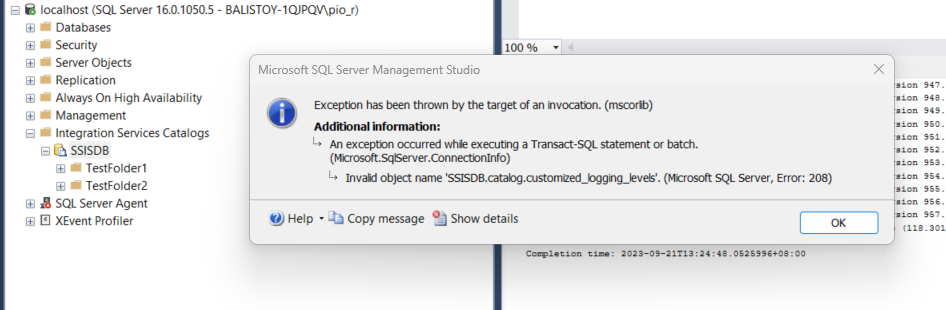
Fix: Invalid Object Name 'SSISDB.catalog.customized_logging_levels'
Oct 18, 2023 1:56:42 PM
3
min read

.svg)
.svg)