


A client recently asked us to migrate a Cassandra cluster running in Docker containers to Elassandra, with the data directory persisted via a bind mount. Elassandra is a fork of Cassandra integrated closely with Elasticsearch, to allow for a highly scalable search infrastructure. To prepare the maintenance plan, we tested some of the methods as shown below. The following are the commands used if you would like to test the process locally. Docker commands are used on one node at a time throughout the process to execute test statements. The Cassandra container is named my_cassandra_container, and the test Elassandra container is called my_elassandra_container. Replace the local directory /Users/youruser below as appropriate.
Start the Cassandra container
First, start a container with the latest Cassandra version (3.11.2), binding the data volume locally as datadir. In our use case, variables such as data center were pre-determined, but note that Cassandra and Elassandra have different default values in the container startup scripts for some of the variables. In the example below, data center, rack, snitch and token number will be sent explicitly via environment variables flags (-e), but you can alternatively adjust these in the configuration files before starting Elassandra. It will take about 15 seconds for this to start up before Cassandra is ready to accept the write statement following this. If you're following the logs, look for "Created default superuser role 'cassandra'" before proceeding.docker run --name my_cassandra_container -e CASSANDRA_DC=DC1 -e CASSANDRA_RACK=RAC1 -e CASSANDRA_ENDPOINT_SNITCH=SimpleSnitch -e CASSANDRA_NUM_TOKENS=8 -v /Users/youruser/mytest/datadir:/var/lib/cassandra -d cassandra:latest
Copy configuration files
Copy the Cassandra configuration files to a local location for ease of editing.docker cp my_cassandra_container:/etc/cassandra/ /Users/youruser/mytest/cassandra
Create and validate test data
Next, create some data in Cassandra using cassandra-stress as a data generator.docker exec -it my_cassandra_container cassandra-stress write n=20000 -pop seq=1..20000 -rate threads=4For comparison later, do a simple validation of the data by executing count and sample queries.
docker exec -it my_cassandra_container cqlsh -e "select count(*) from keyspace1.standard1"
 docker exec -it my_cassandra_container cqlsh -e "select * from keyspace1.standard1 limit 1"
Stop and remove the Cassandra container
To prepare for the migration, stop Cassandra and remove the container.docker exec -it my_cassandra_container nodetool flush docker stop my_cassandra_container docker rm my_cassandra_container
Install Elassandra container
On a new container, install the latest Elassandra version using the same local data and configuration file paths as above. Again, it will take 15 seconds or so before the next statement can be run. If you are following the logs, look for "Elassandra started."docker run --name my_elassandra_container -e CASSANDRA_DC=DC1 -e CASSANDRA_RACK=RAC1 -e CASSANDRA_ENDPOINT_SNITCH=SimpleSnitch -e CASSANDRA_NUM_TOKENS=8 -v /Users/youruser/mytest/datadir:/var/lib/cassandra -d strapdata/elassandra:latest
Validate data
Now that Elassandra is running, re-validate the data. Note that at this point, only the fork of Cassandra is running, not integrated yet with Elasticsearch.docker exec -it my_elassandra_container cqlsh -e "select count(*) from keyspace1.standard1" docker exec -it my_elassandra_container cqlsh -e "select * from keyspace1.standard1 limit 1"Repeat the above steps on remaining nodes.
Enable Elasticsearch
To enable the Elasticsearch part of Elassandra, stop Cassandra on all nodes. A rolling update does not work for this step. Enable Elasticsearch by updating the elasticsearch.yml configuration file as below. (Note that you have linked it to your local filesystem via the cp statement, so edit it directly on your local machine.)docker stop my_elassandra_container docker cp my_elassandra_container:/opt/elassandra-6.2.3.1/conf/elasticsearch.yml /Users/youruser/mytest/cassandra vi /Users/youruser/mytest/cassandra/elasticsearch.yml cluster.name: Test Cluster ## Name of cluster network.host: 172.17.0.2 ## Listen address http.port: 9200
Restart and validate Elassandra
Finally, restart and test the Elassandra container.docker start my_elassandra_container docker exec -it my_elassandra_container curl -X GET https://localhost:9200/
Sample output: [caption id="attachment_104664" align="alignnone" width="588"]
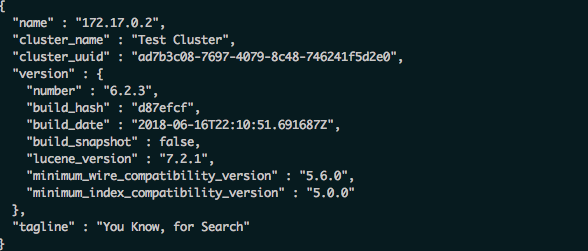
Elassandra GET Output[/caption] Thank you to Valerie Parham-Thompson for assistance in testing.
Cassandra Database Consulting Services
Ready to optimize your Cassandra Database for the future?
On this page
Share this
Share this
Cassandra backups using nodetool
Cassandra backups using nodetool
Jun 11, 2018 12:00:00 AM
4
min read
Cassandra CQL cheatsheet
![]()
Cassandra CQL cheatsheet
Jun 15, 2018 12:00:00 AM
1
min read
Cassandra information using nodetool
Cassandra information using nodetool
May 22, 2018 12:00:00 AM
10
min read

.svg)
.svg)