Share this
OEM 13c Monitoring Features - Part 4, Corrective Actions
by Fernando Salgado on Jan 21, 2020 12:00:00 AM
T his is the fourth in a series of blog posts covering the most important topics you should know to completely monitor your IT infrastructure with Oracle Enterprise Manager Cloud Control 13c. The previous posts covered how to set up basic monitoring, how to use extended metrics and how to create reports based on metric data. Oracle Enterprise Manager (OEM) Corrective Actions allow OEM to take immediate action as soon as an event is raised, such as a metric alert. In the 13c version, Oracle already includes a corrective action to automatically add space to a tablespace whenever it meets certain criteria, such as free space on the diskgroup / file system, and so on. With corrective actions, it is possible to significantly reduce the amount of work a human has to perform whenever alerts are raised. Besides the one mentioned above, PL/SQL packages and shell scripts are also accepted by corrective actions to perform a wide variety of automated actions. For example, an extended metric that uses a simple shell script to query a particular URL, and whenever the result of this script indicates an issue with the URL, OEM will raise an alert which will then trigger a corrective action to automatically restart the HTTP server. There is a wide range of possibilities for the combination of extended metrics and corrective actions. Using the extended metric example presented previously, I’ll create a corrective action that will automatically list all the pending calls and send it by e-mail whenever the threshold for the extended metric is reached. This is just an example to show how corrective actions and its notifications works, but as explained above, these powerful tools may be used to monitor virtually anything in the IT environment. Just be creative!
Go to “Enterprise -> Monitoring -> Corrective Actions”

Select what type of command should be used for the corrective action and click on the “Go” button:
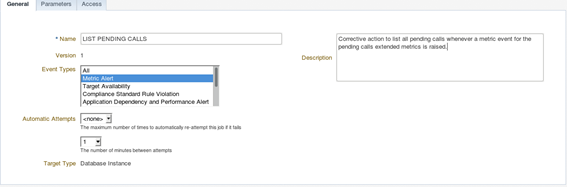
Define a name and which type of events may trigger this corrective action:
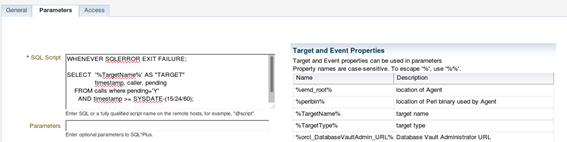
In the parameters tab, input the SQL or PL/SQL code for the corrective action. This is just a simple example, using a regular query:
On the table to the left named “Target and Event Properties”, OEM displays all the variables available for use. These variables are related to the targets / events that triggered the corrective action. The example above uses the %TargetName% variable in the “SELECT” statement. Another very useful variable is the “%key_value_name%”. This variable holds the name of the key record that triggered the alert. For example, when dealing with a “Tablespace Full (%)” metric, the “%key_value_name%” variable will hold the name of the actual tablespace that triggered the alert and “%key_value% will hold the actual utilization percentage for that tablespace.
In the parameters tab, input the SQL or PL/SQL code for the corrective action. This is just a simple example, using a regular query:
On the table to the left named “Target and Event Properties”, OEM displays all the variables available for use. These variables are related to the targets / events that triggered the corrective action. The example above uses the %TargetName% variable in the “SELECT” statement. Another very useful variable is the “%key_value_name%”. This variable holds the name of the key record that triggered the alert. For example, when dealing with a “Tablespace Full (%)” metric, the “%key_value_name%” variable will hold the name of the actual tablespace that triggered the alert and “%key_value% will hold the actual utilization percentage for that tablespace.More details on the environment variables can be found at Oracle® Enterprise Manager Cloud Control Administrator’s Guide.
As mentioned before, OEM 13c offers a default corrective action to automatically add new datafile(s) to a tablespace, but in previous versions, a personalized PL/SQL code was required to do that. One example of such code is displayed below:
SET SERVEROUTPUT ON;
WHENEVER SQLERROR EXIT SQL.SQLCODE;
DECLARE
v_dg VARCHAR2(100);
v_pctfree_dg NUMBER(20);
v_tablespace VARCHAR2(100);
v_stmt VARCHAR2(100);
BEGIN
v_tablespace := '%key_value_name%' ;
SELECT DISTINCT SUBSTR(file_name, 2,INSTR(file_name,'/',1,1)-2)
INTO v_dg
FROM dba_data_files;
SELECT ((free_mb / DECODE (type,'NORMAL',2,
'HIGH',3,
'EXTERN',1)) /
(total_mb / DECODE (type,'NORMAL',2,
'HIGH',3,
'EXTERN',1)))*100
INTO v_pctfree_dg
FROM v$asm_diskgroup
WHERE name = v_dg;
IF ( v_pctfree_dg > 5 ) THEN
v_stmt := 'ALTER TABLESPACE ' || v_tablespace || ' ADD DATAFILE SIZE 1g AUTOEXTEND ON NEXT 512m ';
EXECUTE IMMEDIATE v_stmt;
dbms_output.put_line('Successfully added datafile to: ' || v_tablespace );
ELSE
dbms_output.put_line('Not enough free space to add datafile to: ' || v_tablespace );
RAISE_APPLICATION_ERROR (-20200, 'Not enough free space on diskgroup ' || v_dg || ' (' || v_pctfree_dg || ' MB free),
to add datafile to: ' || v_tablespace );
END IF;
END;
/
Note: This code was created for an environment that used a single ASM diskgroup for datafiles but didn't have the “db_create_file_dest” parameter set, so we just query the name of the diskgroup directly from the “DBA_DATA_FILES” view.
When using a PL/SQL, it is important to include the “SET SERVEROUTPUT ON” at the first line of the “SQL Script” text box or Oracle won't display any output. Also, don’t forget to include the “/” at the end of it, otherwise the PL/SQL code will not be executed.
Next, on the “Access” tab, select whether to grant access to other administrators so they can change / use this corrective action. After setting all these parameters, click the “Save to Library” button.
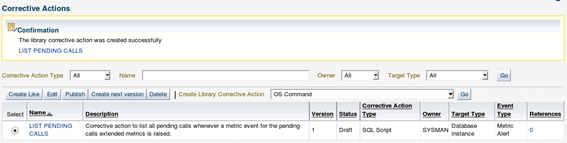
The newly created corrective action will be displayed on the main page:

In version 13c, corrective actions need to be published before being used, so select the action and click on the “Publish” button after creating it. It will ask for confirmation.
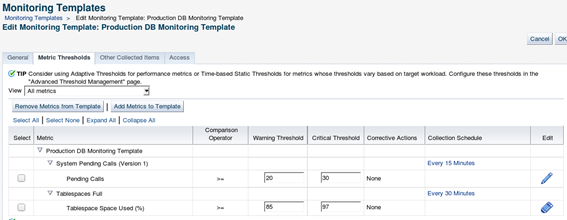
Although adding the corrective action to the library is not mandatory, in versions prior to 13c, it’s good practice to have all corrective actions stored in the library. Now that the corrective metric is in place, OEM needs to know when to execute it. To do so, go back to the target / monitoring template to which the corrective action will be added. To keep a healthy and easily maintainable OEM environment, is always better to use monitoring templates for the different target types and different environments setup. Here we’ll add the corrective action to the “Production DB Monitoring Template” and then apply this template to all the Production DBs. Go to the monitoring template page (Enterprise -> Monitoring -> Monitoring Templates), select the desired template and click on the “Edit” button:
Now go to the “Metric Thresholds” tab, locate the desired metric to add the corrective action - in this case “Pending Calls” - and edit it by clicking on the pencil button at the left.

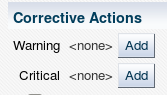
The next page displays an empty corrective action section. Initially, we’ll execute a corrective action only when the critical threshold is reached, so click on the “Add” button right in front of the “Critical”:

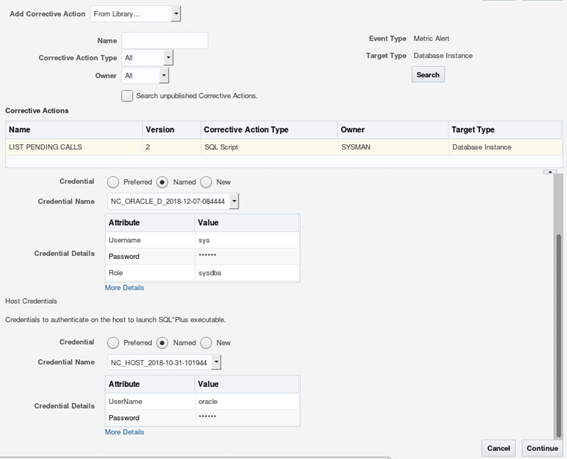
Oracle will display the corrective actions that match the “Event” and “Target” types:
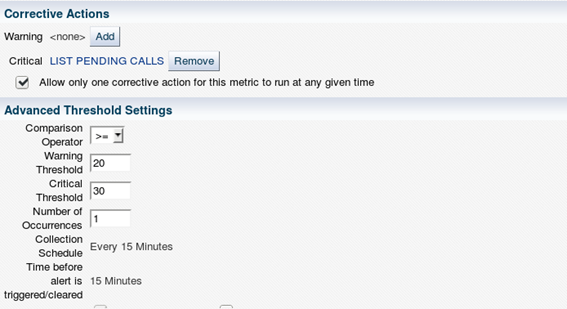
Select the credentials to be used, and click on “Continue”. Back at the metric edit page, the newly selected corrective action is now displayed for the “Critical” threshold:
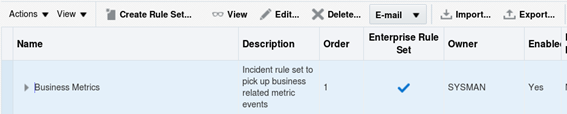
Click on the “Continue” button to save the settings and go back to the edit page of the “Monitoring Template”, then click on the “OK” button to save the “Monitoring Template”. Now it’s important to include the “Corrective Actions” in the incident rules, otherwise OEM wot't send notifications when this action is executed, to enable notifications go to “Setup -> Incidents -> Incident Rules”. The corrective action notification can be added to an existing rule set. Or simply create a new one to gather only corrective actions events. Below is an example of how to add these notifications to an existing set: Select the desired “Rule Set” and click on the “Edit” button, then select the specific rule that will notify whenever the corrective action is executed and click on “Edit” again, or simply add a new rule to the existing rule set.
Select the credentials to be used, and click on “Continue”. Back at the metric edit page, the newly selected corrective action is now displayed for the “Critical” threshold:
Click on the “Continue” button to save the settings and go back to the edit page of the “Monitoring Template”, then click on the “OK” button to save the “Monitoring Template”. Now it’s important to include the “Corrective Actions” in the incident rules, otherwise OEM wot't send notifications when this action is executed, to enable notifications go to “Setup -> Incidents -> Incident Rules”. The corrective action notification can be added to an existing rule set. Or simply create a new one to gather only corrective actions events. Below is an example of how to add these notifications to an existing set: Select the desired “Rule Set” and click on the “Edit” button, then select the specific rule that will notify whenever the corrective action is executed and click on “Edit” again, or simply add a new rule to the existing rule set.
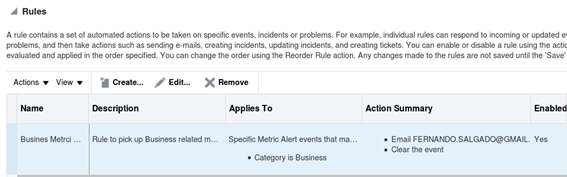
Once inside the rule edit, the existing metric for which OEM should send notifications when the “Corrective action” is executed:

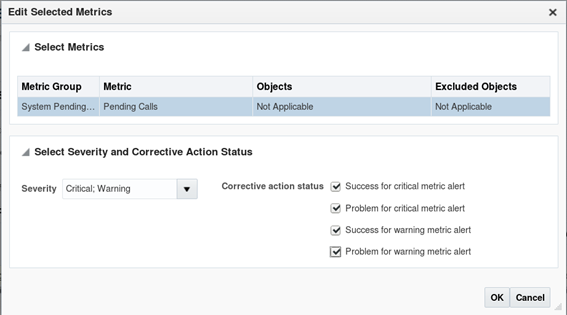
Now select if you want to be notified about either successful or failed executions of the corrective action and for which thresholds :

After selecting the correct options, click the “OK” button, and now OEM will display the following:
Check the next parameters of the rule by clicking on the “Next” button and then save it by clicking on the “Continue” button on the last page. After that, save the “Rule Set” by clicking the “Save” button. Don’t forget this step, otherwise all changes to the “Rule Set” will be lost.

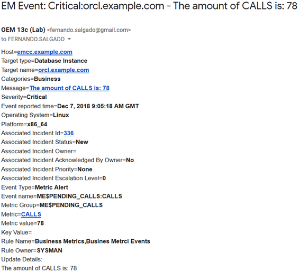
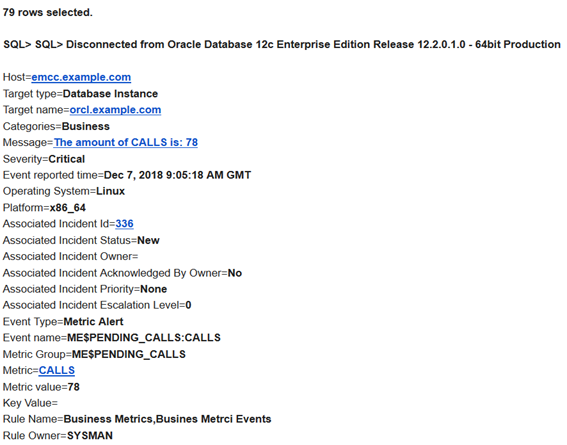
Now OEM is all set to send notifications whenever a corrective action is executed for the “Pending Calls” metric. Just push the monitoring template to the desired targets and then whenever an event is raised for that metric, OEM will send the following notifications:

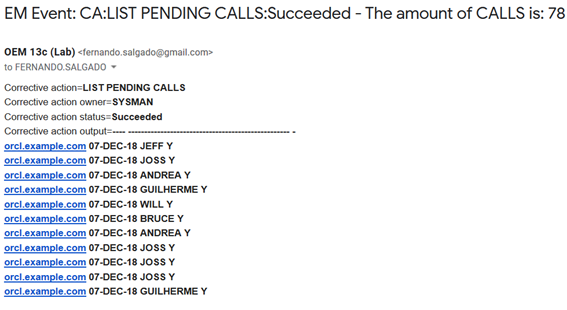
The first one is just the alert based on the threshold we have set, and the following one is the “Corrective Action” (CA), that was executed, displaying the name of the action “LIST PENDING CALLS”, the status “Successful”, and the alert that triggered the action “The amount of CALLS is: 78”:

......

Stay tuned for the next blog post which will cover specific recommendations from Oracle for best practices and Automatic Incident Creation.
Ready to optimize your Oracle Database for the future?
Topics:
Oracle
Share this
- Technical Track (816)
- Oracle (488)
- Database (229)
- MySQL (144)
- Cloud (133)
- Microsoft SQL Server (124)
- Open Source (84)
- Google Cloud (82)
- Microsoft Azure (67)
- Amazon Web Services (AWS) (63)
- Big Data (50)
- Cassandra (44)
- Google Cloud Platform (44)
- DevOps (38)
- Linux (28)
- Pythian (27)
- PostgreSQL (26)
- Podcasts (25)
- Site Reliability Engineering (23)
- Performance (22)
- Docker (21)
- Oracle E-Business Suite (21)
- DBA (18)
- Oracle Cloud Infrastructure (OCI) (18)
- MongoDB (17)
- Security (17)
- Hadoop (16)
- BigQuery (15)
- Amazon RDS (14)
- Automation (14)
- Exadata (14)
- Oracleebs (14)
- Snowflake (14)
- Ansible (13)
- Oracle Database (13)
- Oracle Exadata (13)
- ASM (12)
- Data (12)
- LLM (12)
- Artificial Intelligence (AI) (11)
- GenAI (11)
- Kubernetes (11)
- Machine Learning (11)
- Advanced Analytics (10)
- Datascape Podcast (10)
- Oracle Applications (10)
- Replication (10)
- Authentication, SSO and MFA (8)
- ChatGPT (8)
- Cloud Migration (8)
- Infrastructure (8)
- Monitoring (8)
- Percona (8)
- Analytics (7)
- Apache (7)
- Apache Cassandra (7)
- Data Governance (7)
- High Availability (7)
- Mariadb (7)
- Microsoft Azure SQL Database (7)
- Myrocks (7)
- Oracle EBS (7)
- Python (7)
- Rman (7)
- SAP (7)
- Series (7)
- AWR (6)
- Airflow (6)
- Apache Beam (6)
- Data Guard (6)
- Innodb (6)
- Migration (6)
- Oracle Enterprise Manager (OEM) (6)
- Orchestrator (6)
- RocksDB (6)
- Azure Synapse Analytics (5)
- Covid-19 (5)
- Data Enablement (5)
- Disaster Recovery (5)
- Microsoft (5)
- Performance Tuning (5)
- Scala (5)
- Serverless (5)
- Cloud Security (4)
- Cloud Spanner (4)
- CockroachDB (4)
- Data Management (4)
- Data Pipeline (4)
- Data Security (4)
- Data Strategy (4)
- Data Visualization (4)
- Databases (4)
- Dataflow (4)
- Generative AI (4)
- Google (4)
- Google BigQuery (4)
- Oracle Autonomous Database (Adb) (4)
- Oracle Cloud (4)
- Oracle Enterprise Manager (4)
- Redhat (4)
- Ssl (4)
- Windows (4)
- Xtrabackup (4)
- Amazon Relational Database Service (Rds) (3)
- Apex (3)
- Cloud Database (3)
- Cloud FinOps (3)
- Data Analytics (3)
- Data Migrations (3)
- Database Migration (3)
- Digital Transformation (3)
- ERP (3)
- Google Chrome (3)
- Google Cloud Sql (3)
- Google Workspace (3)
- Heterogeneous Database Migration (3)
- Oracle Live Sql (3)
- Oracle Rac (3)
- Perl (3)
- Power Bi (3)
- Prometheus (3)
- Remote Teams (3)
- Slob (3)
- Tensorflow (3)
- Terraform (3)
- Amazon Data Migration Service (2)
- Amazon Ec2 (2)
- Anisble (2)
- Apache Flink (2)
- Apache Kafka (2)
- Apexexport (2)
- Ashdump (2)
- Aurora (2)
- Azure Data Factory (2)
- Cloud Armor (2)
- Cloud Data Fusion (2)
- Cloud Hosting (2)
- Cloud Infrastructure (2)
- Cloud Shell (2)
- Cloud Sql (2)
- Conferences (2)
- Cosmos Db (2)
- Cosmosdb (2)
- Cost Management (2)
- Data Discovery (2)
- Data Integration (2)
- Data Quality (2)
- Data Streaming (2)
- Database Administrator (2)
- Database Consulting (2)
- Database Monitoring (2)
- Database Performance (2)
- Database Troubleshooting (2)
- Dataguard (2)
- Dataops (2)
- Enterprise Data Platform (EDP) (2)
- Events (2)
- Fusion Middleware (2)
- Gemini (2)
- Graphite (2)
- Infrastructure As Code (2)
- Innodb Cluster (2)
- Innodb File Structure (2)
- Innodb Group Replication (2)
- Liquibase (2)
- NLP (2)
- Nosql (2)
- Oracle Data Guard (2)
- Oracle Datase (2)
- Oracle Flashback (2)
- Oracle Forms (2)
- Oracle Installation (2)
- Oracle Io Testing (2)
- Podcast (2)
- Rdbms (2)
- Redshift (2)
- Remote DBA (2)
- Remote Sre (2)
- S3 (2)
- Single Sign-On (2)
- Webinars (2)
- X5 (2)
- AI (1)
- Actifio (1)
- Adop (1)
- Advanced Data Services (1)
- Afd (1)
- Alloydb (1)
- Amazon (1)
- Amazon Aurora Backtrack (1)
- Amazon Efs (1)
- Amazon Redshift (1)
- Amazon S3 (1)
- Amazon Sagemaker (1)
- Amazon Vpc Flow Logs (1)
- Analysis (1)
- Analytical Models (1)
- Anthos (1)
- Application Migration (1)
- Ash (1)
- Asmlib (1)
- Atp (1)
- Autonomous (1)
- Awr Data Mining (1)
- Awr Mining (1)
- Azure Data Lake (1)
- Azure Data Lake Analytics (1)
- Azure Data Lake Store (1)
- Azure Data Migration Service (1)
- Azure OpenAI (1)
- Azure Sql Data Warehouse (1)
- Batches In Cassandra (1)
- Business Insights (1)
- Business Intelligence (1)
- Chown (1)
- Chrome Security (1)
- Cloud Browser (1)
- Cloud Build (1)
- Cloud Consulting (1)
- Cloud Cost Optimization (1)
- Cloud Data Warehouse (1)
- Cloud Database Management (1)
- Cloud Dataproc (1)
- Cloud Foundry (1)
- Cloud Networking (1)
- Cloud SQL Replica (1)
- Cloud Scheduler (1)
- Cloud Services (1)
- Cloud Strategies (1)
- Compliance (1)
- Conversational AI (1)
- Cyber Security (1)
- Data Analysis (1)
- Data Analytics Platform (1)
- Data Box (1)
- Data Classification (1)
- Data Cleansing (1)
- Data Encryption (1)
- Data Engineering (1)
- Data Estate (1)
- Data Insights (1)
- Data Integrity (1)
- Data Leader (1)
- Data Lifecycle Management (1)
- Data Lineage (1)
- Data Masking (1)
- Data Mesh (1)
- Data Migration (1)
- Data Migration Assistant (1)
- Data Migration Service (1)
- Data Mining (1)
- Data Monetization (1)
- Data Policy (1)
- Data Profiling (1)
- Data Protection (1)
- Data Retention (1)
- Data Safe (1)
- Data Sheets (1)
- Data Summit (1)
- Data Vault (1)
- Data Warehouse (1)
- Database Consultant (1)
- Database Link (1)
- Database Management (1)
- Database Migrations (1)
- Database Modernization (1)
- Database Provisioning (1)
- Database Provisioning Failed (1)
- Database Replication (1)
- Database Schemas (1)
- Database Upgrade (1)
- Databricks (1)
- Datascape 59 (1)
- DeepSeek (1)
- Docker-Composer (1)
- Duet AI (1)
- Edp (1)
- Etl (1)
- Gcp Compute (1)
- Gcp-Spanner (1)
- Global Analytics (1)
- Google Analytics (1)
- Google Cloud Architecture Framework (1)
- Google Cloud Data Services (1)
- Google Cloud Partner (1)
- Google Cloud Spanner (1)
- Google Cloud VMware Engine (1)
- Google Compute Engine (1)
- Google Dataflow (1)
- Google Datalab (1)
- Google Grab And Go (1)
- Graph Algorithms (1)
- Graph Inferences (1)
- Graph Theory (1)
- GraphQL (1)
- Health Check (1)
- Healthcheck (1)
- Information (1)
- Infrastructure As A Code (1)
- Innobackupex (1)
- Innodb Concurrency (1)
- Innodb Flush Method (1)
- It Industry (1)
- Kubeflow (1)
- LMSYS Chatbot Arena (1)
- Linux Host Monitoring (1)
- Linux Storage Appliance (1)
- Looker (1)
- MMLU (1)
- Managed Services (1)
- Migrate (1)
- Neo4J (1)
- Newsroom (1)
- Nifi (1)
- OPEX (1)
- Odbcs (1)
- Odbs (1)
- On-Premises (1)
- Open Source Database (1)
- Ora-01852 (1)
- Ora-7445 (1)
- Oracle Cursor (1)
- Oracle Database@Google Cloud (1)
- Oracle Exadata Smart Scan (1)
- Oracle Licensing (1)
- Oracle Linux Virtualization Manager (1)
- Oracle Oda (1)
- Oracle Openworld (1)
- Oracle Parallelism (1)
- Oracle RMAN (1)
- Oracle Rdbms (1)
- Oracle Real Application Clusters (1)
- Oracle Reports (1)
- Oracle Security (1)
- Perfomrance (1)
- Performance Schema (1)
- Policy (1)
- Prompt Engineering (1)
- Public Cloud (1)
- Pythian News (1)
- Rdb (1)
- Replication Error (1)
- Retail (1)
- SAP HANA Cloud (1)
- Securing Sql Server (1)
- Serverless Computing (1)
- Sso (1)
- Tenserflow (1)
- Teradata (1)
- Vertex AI (1)
- Videos (1)
- Workspace Security (1)
- Xbstream (1)
- August 2025 (1)
- July 2025 (3)
- June 2025 (1)
- May 2025 (3)
- March 2025 (2)
- February 2025 (1)
- January 2025 (2)
- December 2024 (1)
- October 2024 (2)
- September 2024 (7)
- August 2024 (4)
- July 2024 (2)
- June 2024 (6)
- May 2024 (3)
- April 2024 (2)
- February 2024 (1)
- January 2024 (11)
- December 2023 (10)
- November 2023 (9)
- October 2023 (11)
- September 2023 (9)
- August 2023 (6)
- July 2023 (2)
- June 2023 (13)
- May 2023 (4)
- April 2023 (6)
- March 2023 (10)
- February 2023 (6)
- January 2023 (5)
- December 2022 (10)
- November 2022 (10)
- October 2022 (10)
- September 2022 (13)
- August 2022 (16)
- July 2022 (12)
- June 2022 (13)
- May 2022 (11)
- April 2022 (4)
- March 2022 (5)
- February 2022 (4)
- January 2022 (14)
- December 2021 (16)
- November 2021 (11)
- October 2021 (6)
- September 2021 (11)
- August 2021 (6)
- July 2021 (9)
- June 2021 (4)
- May 2021 (8)
- April 2021 (16)
- March 2021 (16)
- February 2021 (6)
- January 2021 (12)
- December 2020 (12)
- November 2020 (17)
- October 2020 (11)
- September 2020 (10)
- August 2020 (11)
- July 2020 (13)
- June 2020 (6)
- May 2020 (9)
- April 2020 (18)
- March 2020 (21)
- February 2020 (13)
- January 2020 (15)
- December 2019 (10)
- November 2019 (11)
- October 2019 (12)
- September 2019 (16)
- August 2019 (15)
- July 2019 (10)
- June 2019 (16)
- May 2019 (20)
- April 2019 (21)
- March 2019 (14)
- February 2019 (18)
- January 2019 (18)
- December 2018 (5)
- November 2018 (16)
- October 2018 (12)
- September 2018 (20)
- August 2018 (27)
- July 2018 (31)
- June 2018 (34)
- May 2018 (28)
- April 2018 (27)
- March 2018 (17)
- February 2018 (8)
- January 2018 (20)
- December 2017 (14)
- November 2017 (4)
- October 2017 (1)
- September 2017 (3)
- August 2017 (5)
- July 2017 (4)
- June 2017 (2)
- May 2017 (7)
- April 2017 (7)
- March 2017 (8)
- February 2017 (8)
- January 2017 (5)
- December 2016 (3)
- November 2016 (4)
- October 2016 (8)
- September 2016 (9)
- August 2016 (10)
- July 2016 (9)
- June 2016 (8)
- May 2016 (13)
- April 2016 (16)
- March 2016 (13)
- February 2016 (11)
- January 2016 (6)
- December 2015 (11)
- November 2015 (11)
- October 2015 (5)
- September 2015 (16)
- August 2015 (4)
- July 2015 (1)
- June 2015 (3)
- May 2015 (6)
- April 2015 (5)
- March 2015 (5)
- February 2015 (4)
- January 2015 (3)
- December 2014 (7)
- October 2014 (4)
- September 2014 (6)
- August 2014 (6)
- July 2014 (16)
- June 2014 (7)
- May 2014 (6)
- April 2014 (5)
- March 2014 (4)
- February 2014 (10)
- January 2014 (6)
- December 2013 (8)
- November 2013 (12)
- October 2013 (9)
- September 2013 (6)
- August 2013 (7)
- July 2013 (9)
- June 2013 (7)
- May 2013 (7)
- April 2013 (4)
- March 2013 (7)
- February 2013 (4)
- January 2013 (4)
- December 2012 (6)
- November 2012 (8)
- October 2012 (9)
- September 2012 (3)
- August 2012 (5)
- July 2012 (5)
- June 2012 (7)
- May 2012 (11)
- April 2012 (1)
- March 2012 (8)
- February 2012 (1)
- January 2012 (6)
- December 2011 (8)
- November 2011 (5)
- October 2011 (9)
- September 2011 (6)
- August 2011 (4)
- July 2011 (1)
- June 2011 (1)
- May 2011 (5)
- April 2011 (2)
- February 2011 (2)
- January 2011 (2)
- December 2010 (1)
- November 2010 (7)
- October 2010 (3)
- September 2010 (8)
- August 2010 (2)
- July 2010 (4)
- June 2010 (7)
- May 2010 (2)
- April 2010 (1)
- March 2010 (3)
- February 2010 (3)
- January 2010 (2)
- November 2009 (6)
- October 2009 (6)
- August 2009 (3)
- July 2009 (3)
- June 2009 (3)
- May 2009 (2)
- April 2009 (8)
- March 2009 (6)
- February 2009 (4)
- January 2009 (3)
- November 2008 (3)
- October 2008 (7)
- September 2008 (6)
- August 2008 (9)
- July 2008 (9)
- June 2008 (9)
- May 2008 (9)
- April 2008 (8)
- March 2008 (4)
- February 2008 (3)
- January 2008 (3)
- December 2007 (2)
- November 2007 (7)
- October 2007 (1)
- August 2007 (4)
- July 2007 (3)
- June 2007 (8)
- May 2007 (4)
- April 2007 (2)
- March 2007 (2)
- February 2007 (5)
- January 2007 (8)
- December 2006 (1)
- November 2006 (3)
- October 2006 (4)
- September 2006 (3)
- July 2006 (1)
- May 2006 (2)
- April 2006 (1)
- July 2005 (1)
No Comments Yet
Let us know what you think