



In my previous post I showed you how to use dbt to expedite data preparation tasks on Google BigQuery. This time, I’ll show you how to integrate those dbt pipelines into workflows that load, validate and transform data.
We’ll use two serverless, pay-per-use products to simplify the solution and reduce costs: Google Cloud Run and Google Workflows. Cloud Run is a scalable computer environment for containerized applications. Applications must provide HTTP endpoints so that operations can be invoked via HTTP requests. On the other hand, Cloud Workflows is an orchestrator for HTTP-based cloud services. You can easily define workflows in YAML with error handling, conditional steps and retry logic.
This post is divided into two parts. In part one, we’ll take a look at how to define and deploy Cloud Run services. Further, in part two we’ll see how to define and deploy Google Workflows to orchestrate those services.
Overview
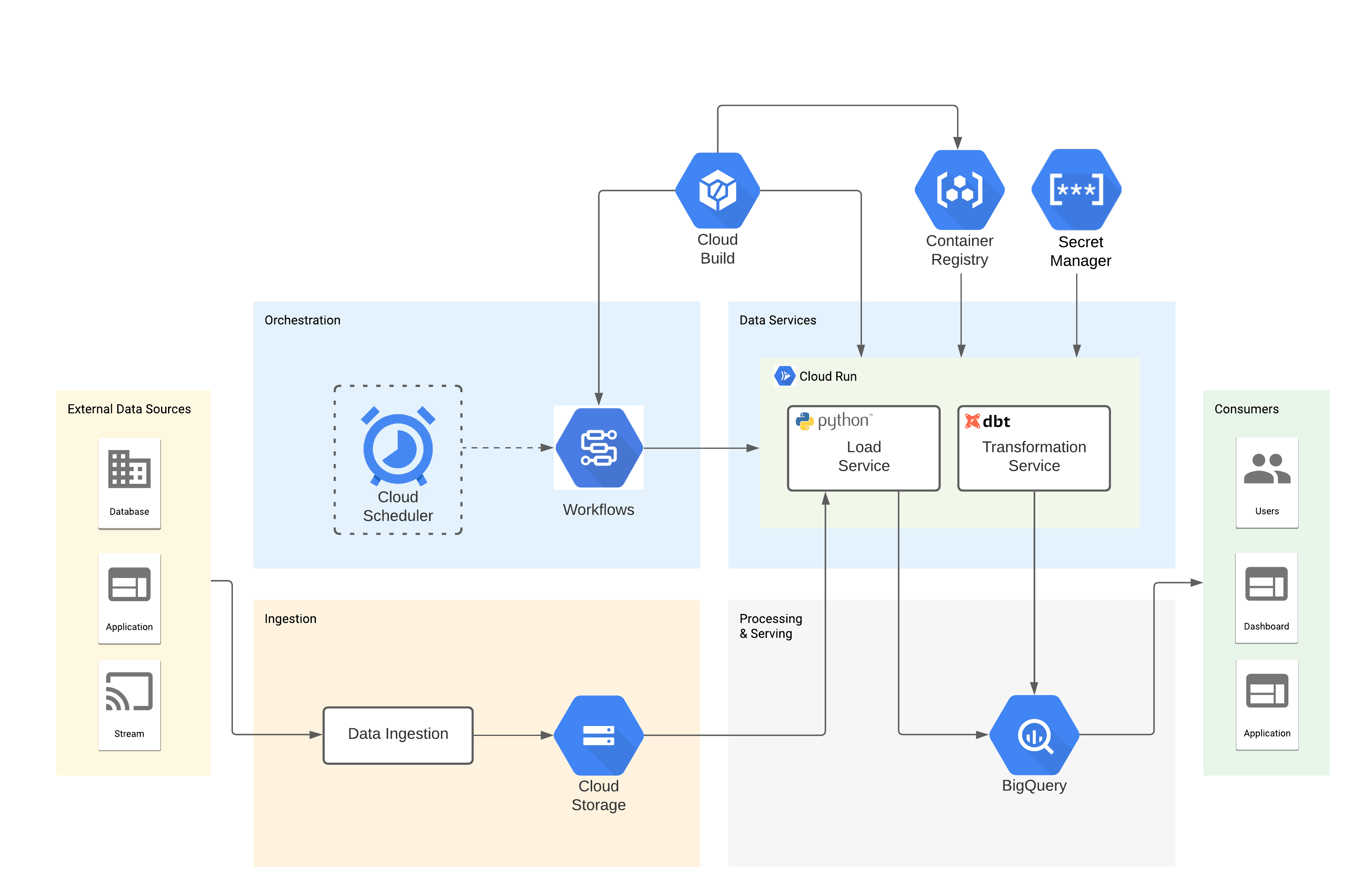
The solution consists of two Cloud Run services: bq-load-svc loads CSV data from GCS into BigQuery and bq-dbt-svc performs data transformations using dbt CLI. Additionally, three Google Workflows orchestrate both services, executing steps in the right order and handling validation errors. Finally, Google Cloud Build builds and deploys the artifacts, Google Container Registry stores the images for the services and Google Secret Manager holds the credentials to BigQuery.
Here’s a diagram showing the components of the solution:
dbt project
The dbt project for this solution is practically the same as the one in my previous post. It uses the same macros, models and tests to prepare/validate raw data before loading it into the data warehouse. The difference is that src_usda.yml now contains BigQuery load job configuration parameters in the “meta” key. This is a great feature, as a result you don’t need to add extra configuration files to your solution. For example, the code below shows the definition for the stdref_fd_group source table:
# src_usda.yml

version: 2

sources:
  - name: usda
    tables:
      - name: stdref_fd_group
        meta:
          load_job_config:
            source_format: 'CSV'
            field_delimiter: '^'
            quote_character: '~'
            write_disposition: 'WRITE_TRUNCATE'
            create_disposition: 'CREATE_IF_NEEDED'
        columns:
          - name: fdgrp_cd
          - name: fdgrp_desc
...
bq-dbt-svc
The service provides a way to interact with the dbt project through HTTP requests. It is a Flask app that implements two endpoints: source and dbt.
The source endpoint fetches the definition of a table in src_usda.yml and returns it as JSON, while the dbt endpoint executes the dbt CLI in a subprocess and returns the results as JSON. The dbt endpoint is similar to the cli_args option of the dbt rpc server.
In fact, I thought about using the dbt rpc server as dbt service, but it keeps its state in memory, making it unsuitable for Cloud Run. As a matter of fact, applications need to be stateless containers, since Cloud Run may stop container instances after a period of inactivity or create multiple instances under heavy loads. The code below shows the function that handles the requests for the dbt endpoint:
# main.py

# Execute a dbt command
@app.route("/dbt", methods=["POST"])
def run():
    app.logger.info("Started processing request on endpoint {}".format(
        request.base_url))

    command = ["dbt"]
    arguments = []

    # Parse the request data
    request_data = request.get_json()

    app.logger.info("Request data: {}".format(request_data))

    if request_data:
        if "cli" in request_data.get("params", {}):
            arguments = request_data["params"]["cli"].split(" ")
            command.extend(arguments)

    # Add an argument for the project dir if not specified
    if not any("--project-dir" in c for c in command):
        project_dir = os.environ.get("DBT_PROJECT_DIR", None)
        if project_dir:
            command.extend(["--project-dir", project_dir])

    # Execute the dbt command
    result = subprocess.run(command,
                            text=True,
                            stdout=subprocess.PIPE,
                            stderr=subprocess.STDOUT)

    # Format the response
    response = {
        "result": {
            "status": "ok" if result.returncode == 0 else "error",
            "args": result.args,
            "return_code": result.returncode,
            "command_output": result.stdout,
        }
    }

    app.logger.info("Command output: {}".format(
        response["result"]["command_output"]))
    app.logger.info("Command status: {}".format(response["result"]["status"]))
    app.logger.info("Finished processing request on endpoint {}".format(
        request.base_url))

    return response, 200
Here’s an example of calling the dbt endpoint locally to compile the staging models:
curl -X POST \
    -H 'Content-Type: application/json' \
    -d '{"params": {"cli": "compile --project-dir=/workspaces/bq-dbt-poc/bq-dbt-svc/dbt --models=models/staging/usda/*"}}' \
    http://172.17.0.2:8080/dbt | jq .

{
  "result": {
    "args": [
      "dbt",
      "compile",
      "--project-dir=/workspaces/bq-dbt-poc/bq-dbt-svc/dbt",
      "--models=models/staging/usda/*"
    ],
    "command_output": "Running with dbt=0.19.1\nFound 13 models, 6 tests, 0 snapshots, 4 analyses, 357 macros, 4 operations, 0 seed files, 4 sources, 0 exposures\n\n20:06:38 | Concurrency: 8 threads (target='dev')\n20:06:38 | \n20:06:39 | Done.\n",
    "return_code": 0,
    "status": "ok"
  }
}
Finally, below is an example of the Dockerfile. As you can see, both the Flask app and the dbt project are deployed into the Docker image:
FROM fishtownanalytics/dbt:0.19.1

ENV PYTHONUNBUFFERED True
ENV APP_HOME /bq-dbt-svc
ENV PORT 8080
ENV DBT_PROFILES_DIR ${APP_HOME}/profiles
ENV DBT_PROJECT_DIR ${APP_HOME}/dbt
ENV FLASK_SERVICE_DIR ${APP_HOME}/flask

# Deploy the code

WORKDIR ${APP_HOME}

COPY dbt/ ${DBT_PROJECT_DIR}/
COPY profiles/profiles.yml ${DBT_PROFILES_DIR}/
COPY flask ${FLASK_SERVICE_DIR}/

# Install dbt dependencies

WORKDIR ${DBT_PROJECT_DIR}

RUN dbt deps

# Install flask service dependencies

WORKDIR ${FLASK_SERVICE_DIR}

RUN python -m venv venv \
    && venv/bin/python -m pip install -r requirements.txt

# Start the flask service

ENTRYPOINT exec venv/bin/python -m gunicorn \
    --bind :${PORT} \
    --workers 1 \
    --threads 8 \
    --timeout 0 \
    main:app
bq-load-svc
The service loads CSV files from GCS into BigQuery tables. It’s a Flask app that listens for HTTP POST requests on the load endpoint. After receiving a request, it parses the JSON in its body and launches a BigQuery load job. The code below shows the function that handles the requests for the load endpoint:
# main.py

# Load a GCS file into BigQuery
@app.route("/load", methods=['POST'])
def run():
    app.logger.info("Started processing request on endpoint {}".format(
        request.base_url))

    # Parse the request data
    request_data = request.get_json()

    app.logger.info("Request data: {}".format(request_data))

    request_params = request_data.get("params", {})
    source_definition = request_params.get("source_definition", None)
    source_file_uri = request_params.get("source_file_uri", None)
    project_id = request_params.get("project_id", None)
    dataset_id = request_params.get("dataset_id", None)

    # Verification of missing parameters
    if not (source_definition and source_file_uri and project_id and
            dataset_id):
        if not source_definition:
            return error_response(
                "The 'source_definition' parameter is required")

        if not source_file_uri:
            return error_response("The 'source_file_uri' parameter is required")

        if not project_id:
            return error_response("The 'project_id' parameter is required")

        if not dataset_id:
            return error_response("The 'dataset_id' parameter is required")

    # Load job configuration
    table_name = source_definition.get("table", {}).get("name", None)
    if not table_name:
        return error_response(
            "No table name specified in 'source_definition.table.name'")

    client = bigquery.Client(project=project_id)
    table_ref = client.dataset(dataset_id).table(table_name)

    table_load_config = source_definition.get("table", {}).get("meta", {}).get(
        "load_job_config", {})
    job_config = bigquery.LoadJobConfig(**table_load_config)

    # Configure table schema
    _schema = []
    table_columns = source_definition.get("table", {}).get("columns", [])
    for c in table_columns:
        if not c.get("name", None):
            return error_response(
                "No name specified for column in 'source_definition.table.columns'"
            )

        field = bigquery.SchemaField(
            c["name"],
            c.get("meta", {}).get("data_type", "string"))
        _schema.append(field)
    job_config.schema = _schema

    try:
        job = client.load_table_from_uri(source_file_uri,
                                         table_ref,
                                         job_config=job_config)
        job.result()  # Wait for the table load to complete
        response = {"result": {"status": "ok"}}

    except Exception as e:
        response = {"result": {"status": "error", "message": e.message}}

    finally:
        app.logger.info("Finished processing request on endpoint {}".format(
            request.base_url))

        if response["result"]["status"] == "ok":
            return response, 200
        else:
            return response, 500
Here’s an example of calling the load endpoint locally to load the gs://gcs-ingestion/SR-Leg_ASC/FD_GROUP.txt file into the stdref_fd_group table:
read -r -d '' DATA << EOM
{
    "params": {
        "project_id": "bigquery-sandbox",
        "dataset_id": "bq_demo_ldg",
        "source_file_uri": "gs://gcs-ingestion/SR-Leg_ASC/FD_GROUP.txt",
        "source_definition": {
            "name": "usda",
            "table": {
                "columns": [
                    {
                        "name": "fdgrp_cd"
                    },
                    {
                        "name": "fdgrp_desc"
                    }
                ],
                "meta": {
                    "load_job_config": {
                        "create_disposition": "CREATE_IF_NEEDED",
                        "field_delimiter": "^",
                        "quote_character": "~",
                        "source_format": "CSV",
                        "write_disposition": "WRITE_TRUNCATE"
                    }
                },
                "name": "stdref_fd_group"
            }
        }
    }
}
EOM

curl -X POST \
    -H 'Content-Type: application/json' \
    -d $DATA \
    http://172.17.0.2:8080/load | jq .
```

Response:
```json
{
  "result": {
    "status": "ok"
  }
}
The content of the source_definition property comes from calling the source endpoint on the bq-dbt-svc service. I put together the JSON for the example, but as we’ll see in part two, a workflow will take care of calling bq-dbt-svc and building the request for bq-load-svc.
Deployment to Google Cloud (GCP)
Deploying the Cloud Run services to GCP is straightforward. The code below shows the Cloud Build config for bq-dbt-svc. First, it builds the docker image and publishes it on the Container Registry. Second, it deploys the container image to Cloud Run with the parameters specified. Finally, it adds an IAM policy binding to the role roles/run.invoker for the service account so that Workflows can invoke the service. The –update-secrets argument mounts the bq-dbt-sa-key secret in Secret Manager as a volume in the container. The secret is the JSON key for the service account, and dbt CLI uses it to authenticate to BigQuery.
# cb-bq-dbt-svc.yml

steps:
- name: 'gcr.io/cloud-builders/docker'
  args: [ 'build', '-t', 'gcr.io/$PROJECT_ID/bq-dbt-svc', '.' ]
- name: 'gcr.io/cloud-builders/docker'
  args: ['push', 'gcr.io/$PROJECT_ID/bq-dbt-svc']
- name: 'gcr.io/google.com/cloudsdktool/cloud-sdk'
  entrypoint: gcloud
  args: ['beta', 'run', 'deploy', 'bq-dbt-svc',
          '--image', 'gcr.io/$PROJECT_ID/bq-dbt-svc',
          '--region', 'us-central1',
          '--platform', 'managed',
          '--port', '8080',
          '--cpu', '1',
          '--memory', '512Mi',
          '--concurrency', '1',
          '--service-account', 'bq-dbt-sa@bigquery-sandbox.iam.gserviceaccount.com',
          '--update-secrets', '/bq-dbt-svc/keys/sa-key.json=bq-dbt-sa-key:latest',
          '--no-allow-unauthenticated']
- name: 'gcr.io/google.com/cloudsdktool/cloud-sdk'
  entrypoint: gcloud
  args: ['beta', 'run', 'services', 'add-iam-policy-binding', 'bq-dbt-svc',
          '--region', 'us-central1',
          '--member', 'serviceAccount:bq-dbt-sa@bigquery-sandbox.iam.gserviceaccount.com',
          '--role', 'roles/run.invoker']
images:
 - 'gcr.io/$PROJECT_ID/bq-dbt-svc'
The command below starts the deployment by submitting the build config to Cloud Build:
gcloud builds submit ./bq-dbt-svc \
  --config=./cloud-build/services/cb-bq-dbt-svc.yml \
  --project bigquery-sandbox
Make sure the service account has the IAM policy bindings below, otherwise it will not be able to access all the components:
gcloud projects add-iam-policy-binding bigquery-sandbox --member=serviceAccount:bq-dbt-sa@bigquery-sandbox.iam.gserviceaccount.com --role=roles/bigquery.dataOwner
gcloud projects add-iam-policy-binding bigquery-sandbox --member=serviceAccount:bq-dbt-sa@bigquery-sandbox.iam.gserviceaccount.com --role=roles/bigquery.jobUser
gcloud projects add-iam-policy-binding bigquery-sandbox --member=serviceAccount:bq-dbt-sa@bigquery-sandbox.iam.gserviceaccount.com --role=roles/secretmanager.secretAccessor
gcloud projects add-iam-policy-binding bigquery-sandbox --member=serviceAccount:bq-dbt-sa@bigquery-sandbox.iam.gserviceaccount.com --role=roles/storage.objectViewer
gcloud projects add-iam-policy-binding bigquery-sandbox --member=serviceAccount:bq-dbt-sa@bigquery-sandbox.iam.gserviceaccount.com --role=roles/logging.logWriter
gcloud projects add-iam-policy-binding bigquery-sandbox --member=serviceAccount:bq-dbt-sa@bigquery-sandbox.iam.gserviceaccount.com --role=roles/workflows.invoker
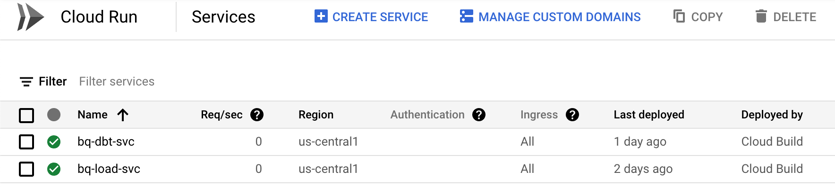
Here’s a screenshot of the two services after being deployed to GCP:
Conclusion
In this post we saw how to define and deploy two data services to Cloud Run. We can now load files from GCS to BigQuery or apply data transformations with dbt by sending HTTP requests. Moreover, we don’t need to provision any infrastructure and the services can scale up under heavy loads. In part two, we will see how to use Google Workflows to orchestrate the calls to these services.
Thanks for reading! Please leave a comment if you have any thoughts or questions and don’t forget to sign up for updates.
Data Analytics Consulting Services
Ready to make smarter, data-driven decisions?
Share this
Share this

The Era of the AI Teammate: Key Takeaways from Google Next 2026

.svg)
.svg)