Share this
SQL Server Statistics: Maintenance and Best Practices
by Alexandre Hamel on Feb 14, 2014 12:00:00 AM
What are Statistics?
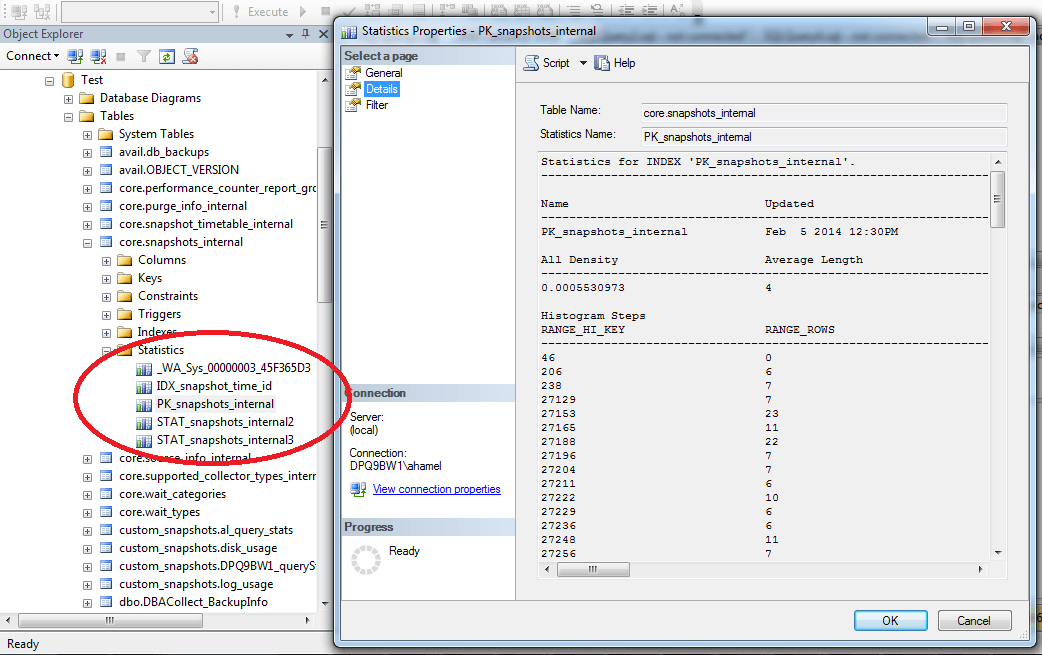
There are multiple paths a database can use to answer a query, some of them being faster and more efficient than others. It is the job of the query optimizer to evaluate and choose the best path, or execution plan, for a given query. Using the available indexes may not always be the most efficient plan. For example, if 95% of the values for a column are the same, an index scan will probably be more efficient than using the index on that column. Statistics are SQL Server objects which contain metrics on the data count and distribution within a column or columns used by the optimizer to help it make that choice. They are used to estimate the count of rows. Index statistics: Created automatically when an index (both clustered and non-clustered) is created. These will have the same name as the index and will exist as long as the index exists. Column statistics: Created manually by the DBA using the ‘CREATE STATISTICS’ command, or automatically if the “Auto Create Statistics” option is set to “True”. Column statistics can be created, modified and dropped at will. Statistics contain two different types of information about the data; density and distribution. Density is simply the inverse of the count of distinct values for the column or columns. The distribution is a representation of the data contained in the first column of the statistic. This information is stored in a histogram; the histogram contains up to 200 steps with a lower and upper limit and contains the count of values that fall between both limits. To view this histogram, go to the details tab of the statistic’s properties or use the command DBCC SHOW_STATISTICS. The screenshot below shows the histogram of an index statistic; the RANGE_HI_KEY is the upper limit of the step, the RANGE_HI_KEY of the previous step + 1 is the lower limit, and the RANGE_ROWS is the count of rows between the limits.
Statistics Maintenance and Best Practices
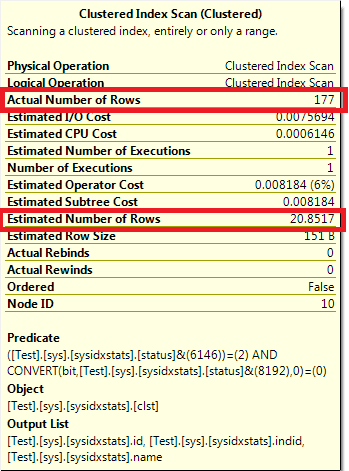
When the data in the database changes the statistics become stale and outdated. When examining a query execution plan, a large discrepancy between the Actual Number of Rows and the Estimated Number of Rows is an indication of outdated stats. Outdated statistics can lead the optimizer in choosing inefficient execution plan and can dramatically affect overall performance. Steps must therefore be taken in order to keep statistics up to date.
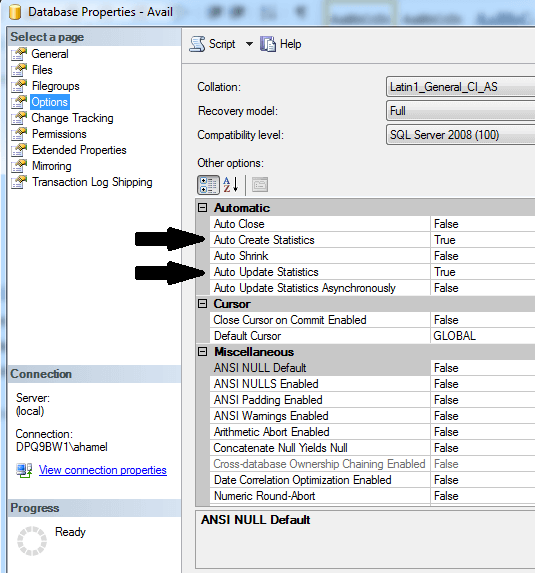
Keep Auto Create Statistics enabled: This database property allows SQL Server to automatically create stats for a single non-indexed column if they are missing when it is used in a where or join condition. This ensures the optimizer will have the necessary information to choose a plan. The statistics automatically created by SQL Server will start with _WA_ in their name.
Keep Auto Update Statistics enabled: This database property allows SQL Server to automatically update the statistics when they are deemed outdated. The update occurs before executing a query if certain conditions are met, or after the query is executed if
Auto Update Statistics Asynchronously is used instead. The three conditions that will trigger an update if one is met are: -Table had 0 rows and increases to one or more rows. -Table had less than 500 rows and there is an increase of 500 rows or more since the last update -Table has over 500 rows and there is an increase of 500 + 20% of the table size since the last update
Maintenance plan: You can also proactively update the statistics yourself using TSQL (sp_updatestats for all stats in a database or UPDATE STATISTICS for a single one) or a maintenance plan task. Scheduling the statistics maintenance during off hours will help reduce the need to update statistics during peak times. The need and frequency of this proactive maintenance will depend on your environment; frequent data changes causes the statistics to become outdated more quickly. You can also specify the sample size used to update the statistic; Ex:
UPDATE STATISTICS TableName(StatsName) WITH FULLSCAN: Costs more time and resources but will ensure that statistics are accurate.
UPDATE STATISTICS TableName(StatsName) WITH SAMPLE 50 PERCENT: Will only use half the rows and extrapolate the rest, meaning the updating will be faster, but the statistics may not be accurate. Rebuilding an index will also update index statistics with full scan (column stats will not be updated, and an index reorg will do the update). Note however that updating statistics forces queries to recompile; you must therefore decide when the cost of the overhead for the recompiles is worth having the latest statistics.
Unused Statistics: Statistics comes with a cost, and just as with indexes, too many of them can lead to issues like increasing the cost of statistics maintenance, and can make the optimizer’s job more difficult. Updating statistics for a large database can easily take hours, even days, to complete. When
Auto Create Statistics is enabled, stats can be created even for a one time query. A table could end up having a large number of statistics that serve no purpose. It is wise to review and clean up the statistics as part of general maintenance. Identifying unused statistics can be difficult since, unlike indexes, SQL Server does not record statistics usage. However you can identify the statistics that satisfy one of the thresholds for the automatic update above but still hasn't been updated; this is a good indication of unused statistics. In addition to unused stats, you may find overlapping stats which are covered by other statistics. The following script from Kendal Van Dyke will identify all single column statistics that are covered by an existing index statistic (share the same leading column) in a database and generates the TSQL commands to drop them. [code lang="sql"] WITH autostats ( object_id, stats_id, name, column_id ) AS ( SELECT sys.stats.object_id , sys.stats.stats_id , sys.stats.name , sys.stats_columns.column_id FROM sys.stats INNER JOIN sys.stats_columns ON sys.stats.object_id = sys.stats_columns.object_id AND sys.stats.stats_id = sys.stats_columns.stats_id WHERE sys.stats.auto_created = 1 AND sys.stats_columns.stats_column_id = 1 ) SELECT OBJECT_NAME(sys.stats.object_id) AS [Table] , sys.columns.name AS [Column] , sys.stats.name AS [Overlapped] , autostats.name AS [Overlapping] , 'DROP STATISTICS [' + OBJECT_SCHEMA_NAME(sys.stats.object_id) + '].[' + OBJECT_NAME(sys.stats.object_id) + '].[' + autostats.name + ']' FROM sys.stats INNER JOIN sys.stats_columns ON sys.stats.object_id = sys.stats_columns.object_id AND sys.stats.stats_id = sys.stats_columns.stats_id INNER JOIN autostats ON sys.stats_columns.object_id = autostats.object_id AND sys.stats_columns.column_id = autostats.column_id INNER JOIN sys.columns ON sys.stats.object_id = sys.columns.object_id AND sys.stats_columns.column_id = sys.columns.column_id WHERE sys.stats.auto_created = 0 AND sys.stats_columns.stats_column_id = 1 AND sys.stats_columns.stats_id != autostats.stats_id AND OBJECTPROPERTY(sys.stats.object_id, 'IsMsShipped') = 0 [/code] Source:
https://www.kendalvandyke.com/2010/09/tuning-tip-identifying-overlapping.html
Common Mistakes
Statistics update after Index Rebuild: As mentioned previously, the index rebuild (not reorg) will also update index statistics using full scan. Scheduling stats maintenance after the index maintenance will cause duplicate work. In addition, if the stats maintenance is using a small sample size, the new updated stats will overwrite the ones that were just updated with full scan, meaning their values will be less accurate. Scheduling it after an index reorg however is fine. Relying on Auto Update: As seen above, the threshold which triggers the auto update is around 20% of the total row count. This is fine for small tables, but larger tables require a lot of data changes before the update is triggered, during which the stats can become outdated. Not specifying the sample size: While updating, choosing the right sample size is important to keep statistics accurate. While the cost of using full scan is higher, in some situations it is required, especially for very large databases. Running EXEC sp_updatestats @resample = 'resample' will update all statistics using the last sample used. If you do not specify the resample, it will update them using the default sample. The default sample is determined by SQL server and is a fraction of the total row count in a table. We have recently run into an issue where a DBA executed “EXEC sp_updatestats” on a 1 terabyte database, which caused all statistics to be updated with the default sample. Due to the size of the database, the default sample is simply not enough to represent the data distribution in the database and caused all queries to use bad execution plans which caused major performance issues. Only a full scan update of the statistics provided accurate statistics for this database, but it takes a very long time to run. Luckily there was a QA server where the database was restored before the stats update and with almost identical data. We were able to script the statistics from the QA server and recreate them on production using their binary representation (see WITH STATS_STREAM). This solution is not recommended and was only used as a last resort. This incident shows the importance of statistics and implementing proper maintenance appropriate for the environment. Updating too often: Not only is there a cost in updating statistics, remember that it also causes queries to recompile. Updating statistics should be done only as required, and a schedule appropriate for your environment should be used. The frequency depends on the amount of data changes in the database, more changes require more frequent stats update.Conclusion
Statistics are a crucial element in the overall performance of a database and require proper maintenance and attention. In addition, each environment is unique and has different needs regarding statistics maintenance. For more information regarding statistics, see https://technet.microsoft.com/en-us/library/ms190397.aspx.Share this
- Technical Track (816)
- Oracle (488)
- Database (229)
- MySQL (144)
- Cloud (133)
- Microsoft SQL Server (124)
- Open Source (84)
- Google Cloud (82)
- Microsoft Azure (67)
- Amazon Web Services (AWS) (63)
- Big Data (50)
- Cassandra (44)
- Google Cloud Platform (44)
- DevOps (38)
- Linux (28)
- Pythian (27)
- PostgreSQL (26)
- Podcasts (25)
- Site Reliability Engineering (23)
- Performance (22)
- Docker (21)
- Oracle E-Business Suite (21)
- DBA (18)
- Oracle Cloud Infrastructure (OCI) (18)
- MongoDB (17)
- Security (17)
- Hadoop (16)
- BigQuery (15)
- Amazon RDS (14)
- Automation (14)
- Exadata (14)
- Oracleebs (14)
- Snowflake (14)
- Ansible (13)
- Oracle Database (13)
- Oracle Exadata (13)
- ASM (12)
- Data (12)
- LLM (12)
- Artificial Intelligence (AI) (11)
- GenAI (11)
- Kubernetes (11)
- Machine Learning (11)
- Advanced Analytics (10)
- Datascape Podcast (10)
- Oracle Applications (10)
- Replication (10)
- Authentication, SSO and MFA (8)
- ChatGPT (8)
- Cloud Migration (8)
- Infrastructure (8)
- Monitoring (8)
- Percona (8)
- Analytics (7)
- Apache (7)
- Apache Cassandra (7)
- Data Governance (7)
- High Availability (7)
- Mariadb (7)
- Microsoft Azure SQL Database (7)
- Myrocks (7)
- Oracle EBS (7)
- Python (7)
- Rman (7)
- SAP (7)
- Series (7)
- AWR (6)
- Airflow (6)
- Apache Beam (6)
- Data Guard (6)
- Innodb (6)
- Migration (6)
- Oracle Enterprise Manager (OEM) (6)
- Orchestrator (6)
- RocksDB (6)
- Azure Synapse Analytics (5)
- Covid-19 (5)
- Data Enablement (5)
- Disaster Recovery (5)
- Microsoft (5)
- Performance Tuning (5)
- Scala (5)
- Serverless (5)
- Cloud Security (4)
- Cloud Spanner (4)
- CockroachDB (4)
- Data Management (4)
- Data Pipeline (4)
- Data Security (4)
- Data Strategy (4)
- Data Visualization (4)
- Databases (4)
- Dataflow (4)
- Generative AI (4)
- Google (4)
- Google BigQuery (4)
- Oracle Autonomous Database (Adb) (4)
- Oracle Cloud (4)
- Oracle Enterprise Manager (4)
- Redhat (4)
- Ssl (4)
- Windows (4)
- Xtrabackup (4)
- Amazon Relational Database Service (Rds) (3)
- Apex (3)
- Cloud Database (3)
- Cloud FinOps (3)
- Data Analytics (3)
- Data Migrations (3)
- Database Migration (3)
- Digital Transformation (3)
- ERP (3)
- Google Chrome (3)
- Google Cloud Sql (3)
- Google Workspace (3)
- Heterogeneous Database Migration (3)
- Oracle Live Sql (3)
- Oracle Rac (3)
- Perl (3)
- Power Bi (3)
- Prometheus (3)
- Remote Teams (3)
- Slob (3)
- Tensorflow (3)
- Terraform (3)
- Amazon Data Migration Service (2)
- Amazon Ec2 (2)
- Anisble (2)
- Apache Flink (2)
- Apache Kafka (2)
- Apexexport (2)
- Ashdump (2)
- Aurora (2)
- Azure Data Factory (2)
- Cloud Armor (2)
- Cloud Data Fusion (2)
- Cloud Hosting (2)
- Cloud Infrastructure (2)
- Cloud Shell (2)
- Cloud Sql (2)
- Conferences (2)
- Cosmos Db (2)
- Cosmosdb (2)
- Cost Management (2)
- Data Discovery (2)
- Data Integration (2)
- Data Quality (2)
- Data Streaming (2)
- Database Administrator (2)
- Database Consulting (2)
- Database Monitoring (2)
- Database Performance (2)
- Database Troubleshooting (2)
- Dataguard (2)
- Dataops (2)
- Enterprise Data Platform (EDP) (2)
- Events (2)
- Fusion Middleware (2)
- Gemini (2)
- Graphite (2)
- Infrastructure As Code (2)
- Innodb Cluster (2)
- Innodb File Structure (2)
- Innodb Group Replication (2)
- Liquibase (2)
- NLP (2)
- Nosql (2)
- Oracle Data Guard (2)
- Oracle Datase (2)
- Oracle Flashback (2)
- Oracle Forms (2)
- Oracle Installation (2)
- Oracle Io Testing (2)
- Podcast (2)
- Rdbms (2)
- Redshift (2)
- Remote DBA (2)
- Remote Sre (2)
- S3 (2)
- Single Sign-On (2)
- Webinars (2)
- X5 (2)
- AI (1)
- Actifio (1)
- Adop (1)
- Advanced Data Services (1)
- Afd (1)
- Alloydb (1)
- Amazon (1)
- Amazon Aurora Backtrack (1)
- Amazon Efs (1)
- Amazon Redshift (1)
- Amazon S3 (1)
- Amazon Sagemaker (1)
- Amazon Vpc Flow Logs (1)
- Analysis (1)
- Analytical Models (1)
- Anthos (1)
- Application Migration (1)
- Ash (1)
- Asmlib (1)
- Atp (1)
- Autonomous (1)
- Awr Data Mining (1)
- Awr Mining (1)
- Azure Data Lake (1)
- Azure Data Lake Analytics (1)
- Azure Data Lake Store (1)
- Azure Data Migration Service (1)
- Azure OpenAI (1)
- Azure Sql Data Warehouse (1)
- Batches In Cassandra (1)
- Business Insights (1)
- Business Intelligence (1)
- Chown (1)
- Chrome Security (1)
- Cloud Browser (1)
- Cloud Build (1)
- Cloud Consulting (1)
- Cloud Cost Optimization (1)
- Cloud Data Warehouse (1)
- Cloud Database Management (1)
- Cloud Dataproc (1)
- Cloud Foundry (1)
- Cloud Networking (1)
- Cloud SQL Replica (1)
- Cloud Scheduler (1)
- Cloud Services (1)
- Cloud Strategies (1)
- Compliance (1)
- Conversational AI (1)
- Cyber Security (1)
- Data Analysis (1)
- Data Analytics Platform (1)
- Data Box (1)
- Data Classification (1)
- Data Cleansing (1)
- Data Encryption (1)
- Data Engineering (1)
- Data Estate (1)
- Data Insights (1)
- Data Integrity (1)
- Data Leader (1)
- Data Lifecycle Management (1)
- Data Lineage (1)
- Data Masking (1)
- Data Mesh (1)
- Data Migration (1)
- Data Migration Assistant (1)
- Data Migration Service (1)
- Data Mining (1)
- Data Monetization (1)
- Data Policy (1)
- Data Profiling (1)
- Data Protection (1)
- Data Retention (1)
- Data Safe (1)
- Data Sheets (1)
- Data Summit (1)
- Data Vault (1)
- Data Warehouse (1)
- Database Consultant (1)
- Database Link (1)
- Database Management (1)
- Database Migrations (1)
- Database Modernization (1)
- Database Provisioning (1)
- Database Provisioning Failed (1)
- Database Replication (1)
- Database Schemas (1)
- Database Upgrade (1)
- Databricks (1)
- Datascape 59 (1)
- DeepSeek (1)
- Docker-Composer (1)
- Duet AI (1)
- Edp (1)
- Etl (1)
- Gcp Compute (1)
- Gcp-Spanner (1)
- Global Analytics (1)
- Google Analytics (1)
- Google Cloud Architecture Framework (1)
- Google Cloud Data Services (1)
- Google Cloud Partner (1)
- Google Cloud Spanner (1)
- Google Cloud VMware Engine (1)
- Google Compute Engine (1)
- Google Dataflow (1)
- Google Datalab (1)
- Google Grab And Go (1)
- Graph Algorithms (1)
- Graph Inferences (1)
- Graph Theory (1)
- GraphQL (1)
- Health Check (1)
- Healthcheck (1)
- Information (1)
- Infrastructure As A Code (1)
- Innobackupex (1)
- Innodb Concurrency (1)
- Innodb Flush Method (1)
- It Industry (1)
- Kubeflow (1)
- LMSYS Chatbot Arena (1)
- Linux Host Monitoring (1)
- Linux Storage Appliance (1)
- Looker (1)
- MMLU (1)
- Managed Services (1)
- Migrate (1)
- Neo4J (1)
- Newsroom (1)
- Nifi (1)
- OPEX (1)
- Odbcs (1)
- Odbs (1)
- On-Premises (1)
- Open Source Database (1)
- Ora-01852 (1)
- Ora-7445 (1)
- Oracle Cursor (1)
- Oracle Database@Google Cloud (1)
- Oracle Exadata Smart Scan (1)
- Oracle Licensing (1)
- Oracle Linux Virtualization Manager (1)
- Oracle Oda (1)
- Oracle Openworld (1)
- Oracle Parallelism (1)
- Oracle RMAN (1)
- Oracle Rdbms (1)
- Oracle Real Application Clusters (1)
- Oracle Reports (1)
- Oracle Security (1)
- Perfomrance (1)
- Performance Schema (1)
- Policy (1)
- Prompt Engineering (1)
- Public Cloud (1)
- Pythian News (1)
- Rdb (1)
- Replication Error (1)
- Retail (1)
- SAP HANA Cloud (1)
- Securing Sql Server (1)
- Serverless Computing (1)
- Sso (1)
- Tenserflow (1)
- Teradata (1)
- Vertex AI (1)
- Videos (1)
- Workspace Security (1)
- Xbstream (1)
- August 2025 (1)
- July 2025 (3)
- June 2025 (1)
- May 2025 (3)
- March 2025 (2)
- February 2025 (1)
- January 2025 (2)
- December 2024 (1)
- October 2024 (2)
- September 2024 (7)
- August 2024 (4)
- July 2024 (2)
- June 2024 (6)
- May 2024 (3)
- April 2024 (2)
- February 2024 (1)
- January 2024 (11)
- December 2023 (10)
- November 2023 (9)
- October 2023 (11)
- September 2023 (9)
- August 2023 (6)
- July 2023 (2)
- June 2023 (13)
- May 2023 (4)
- April 2023 (6)
- March 2023 (10)
- February 2023 (6)
- January 2023 (5)
- December 2022 (10)
- November 2022 (10)
- October 2022 (10)
- September 2022 (13)
- August 2022 (16)
- July 2022 (12)
- June 2022 (13)
- May 2022 (11)
- April 2022 (4)
- March 2022 (5)
- February 2022 (4)
- January 2022 (14)
- December 2021 (16)
- November 2021 (11)
- October 2021 (6)
- September 2021 (11)
- August 2021 (6)
- July 2021 (9)
- June 2021 (4)
- May 2021 (8)
- April 2021 (16)
- March 2021 (16)
- February 2021 (6)
- January 2021 (12)
- December 2020 (12)
- November 2020 (17)
- October 2020 (11)
- September 2020 (10)
- August 2020 (11)
- July 2020 (13)
- June 2020 (6)
- May 2020 (9)
- April 2020 (18)
- March 2020 (21)
- February 2020 (13)
- January 2020 (15)
- December 2019 (10)
- November 2019 (11)
- October 2019 (12)
- September 2019 (16)
- August 2019 (15)
- July 2019 (10)
- June 2019 (16)
- May 2019 (20)
- April 2019 (21)
- March 2019 (14)
- February 2019 (18)
- January 2019 (18)
- December 2018 (5)
- November 2018 (16)
- October 2018 (12)
- September 2018 (20)
- August 2018 (27)
- July 2018 (31)
- June 2018 (34)
- May 2018 (28)
- April 2018 (27)
- March 2018 (17)
- February 2018 (8)
- January 2018 (20)
- December 2017 (14)
- November 2017 (4)
- October 2017 (1)
- September 2017 (3)
- August 2017 (5)
- July 2017 (4)
- June 2017 (2)
- May 2017 (7)
- April 2017 (7)
- March 2017 (8)
- February 2017 (8)
- January 2017 (5)
- December 2016 (3)
- November 2016 (4)
- October 2016 (8)
- September 2016 (9)
- August 2016 (10)
- July 2016 (9)
- June 2016 (8)
- May 2016 (13)
- April 2016 (16)
- March 2016 (13)
- February 2016 (11)
- January 2016 (6)
- December 2015 (11)
- November 2015 (11)
- October 2015 (5)
- September 2015 (16)
- August 2015 (4)
- July 2015 (1)
- June 2015 (3)
- May 2015 (6)
- April 2015 (5)
- March 2015 (5)
- February 2015 (4)
- January 2015 (3)
- December 2014 (7)
- October 2014 (4)
- September 2014 (6)
- August 2014 (6)
- July 2014 (16)
- June 2014 (7)
- May 2014 (6)
- April 2014 (5)
- March 2014 (4)
- February 2014 (10)
- January 2014 (6)
- December 2013 (8)
- November 2013 (12)
- October 2013 (9)
- September 2013 (6)
- August 2013 (7)
- July 2013 (9)
- June 2013 (7)
- May 2013 (7)
- April 2013 (4)
- March 2013 (7)
- February 2013 (4)
- January 2013 (4)
- December 2012 (6)
- November 2012 (8)
- October 2012 (9)
- September 2012 (3)
- August 2012 (5)
- July 2012 (5)
- June 2012 (7)
- May 2012 (11)
- April 2012 (1)
- March 2012 (8)
- February 2012 (1)
- January 2012 (6)
- December 2011 (8)
- November 2011 (5)
- October 2011 (9)
- September 2011 (6)
- August 2011 (4)
- July 2011 (1)
- June 2011 (1)
- May 2011 (5)
- April 2011 (2)
- February 2011 (2)
- January 2011 (2)
- December 2010 (1)
- November 2010 (7)
- October 2010 (3)
- September 2010 (8)
- August 2010 (2)
- July 2010 (4)
- June 2010 (7)
- May 2010 (2)
- April 2010 (1)
- March 2010 (3)
- February 2010 (3)
- January 2010 (2)
- November 2009 (6)
- October 2009 (6)
- August 2009 (3)
- July 2009 (3)
- June 2009 (3)
- May 2009 (2)
- April 2009 (8)
- March 2009 (6)
- February 2009 (4)
- January 2009 (3)
- November 2008 (3)
- October 2008 (7)
- September 2008 (6)
- August 2008 (9)
- July 2008 (9)
- June 2008 (9)
- May 2008 (9)
- April 2008 (8)
- March 2008 (4)
- February 2008 (3)
- January 2008 (3)
- December 2007 (2)
- November 2007 (7)
- October 2007 (1)
- August 2007 (4)
- July 2007 (3)
- June 2007 (8)
- May 2007 (4)
- April 2007 (2)
- March 2007 (2)
- February 2007 (5)
- January 2007 (8)
- December 2006 (1)
- November 2006 (3)
- October 2006 (4)
- September 2006 (3)
- July 2006 (1)
- May 2006 (2)
- April 2006 (1)
- July 2005 (1)
No Comments Yet
Let us know what you think