



Concurrent processing is one of the key elements of any E-Business Suite system. It provides scheduling and queuing functionality for background jobs, and it's used by most of the application modules. As many things depend on concurrent processing, it's important to make sure that the configuration is tuned for your requirements and hardware specification. This is the first article in a series about the performance of concurrent processing. We'll take a closer look at the internals of concurrent managers, the settings that affect their performance, and the ways of diagnosing performance and configuration issues. Today we'll start with an overview of the internal workflow of a concurrent manager process. Enjoy the reading!
Scoping the concurrent processing framework
There are few things that need to be clear before we start:
- This is only about how the concurrent processing framework (the concurrent managers) works and not about the concurrent requests executed in the framework.
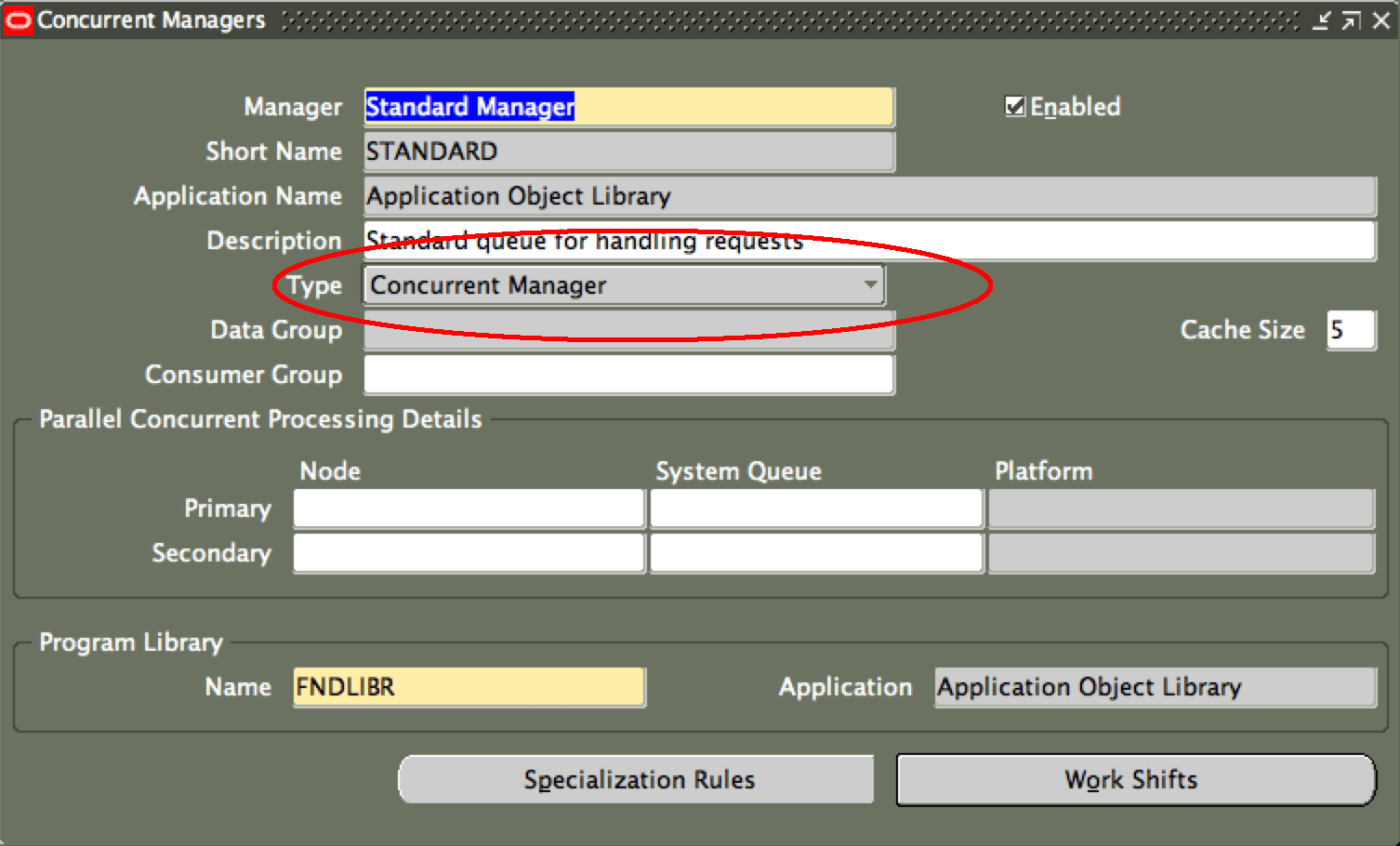
- There are multiple types of concurrent managers in EBS - internal manager, conflict resolution manager, workflow agent listener service, standard manager, etc. Their roles are different, and in this post, I'll discuss only managers that pick up scheduled concurrent requests from the "queue" and execute them - or specifically all managers that have a type of "Concurrent Manager" set in Concurrent managers' definition form. Typical examples of these managers are "Standard Manager", "Inventory Manager", and probably your own custom concurrent managers created for processing specific types of concurrent requests.
It is important to understand the internal workflow of a concurrent manager because otherwise, it's hard to realize how a configuration change actually affects the system. Several years ago, I had to implement an online change of a specialization rule, and it triggered a bounce of all Standard Manager processes - that's when I realized I had to understand how it worked and since then I have spent lots of hours looking into internals of concurrent managers. I'm not saying that everything is 100% clear for me now - there are too many little things that matter in certain situations. This series of posts will be more about concepts. I hope you'll find it useful. So how does a concurrent manager process work? Here is a diagram I created to explain it: 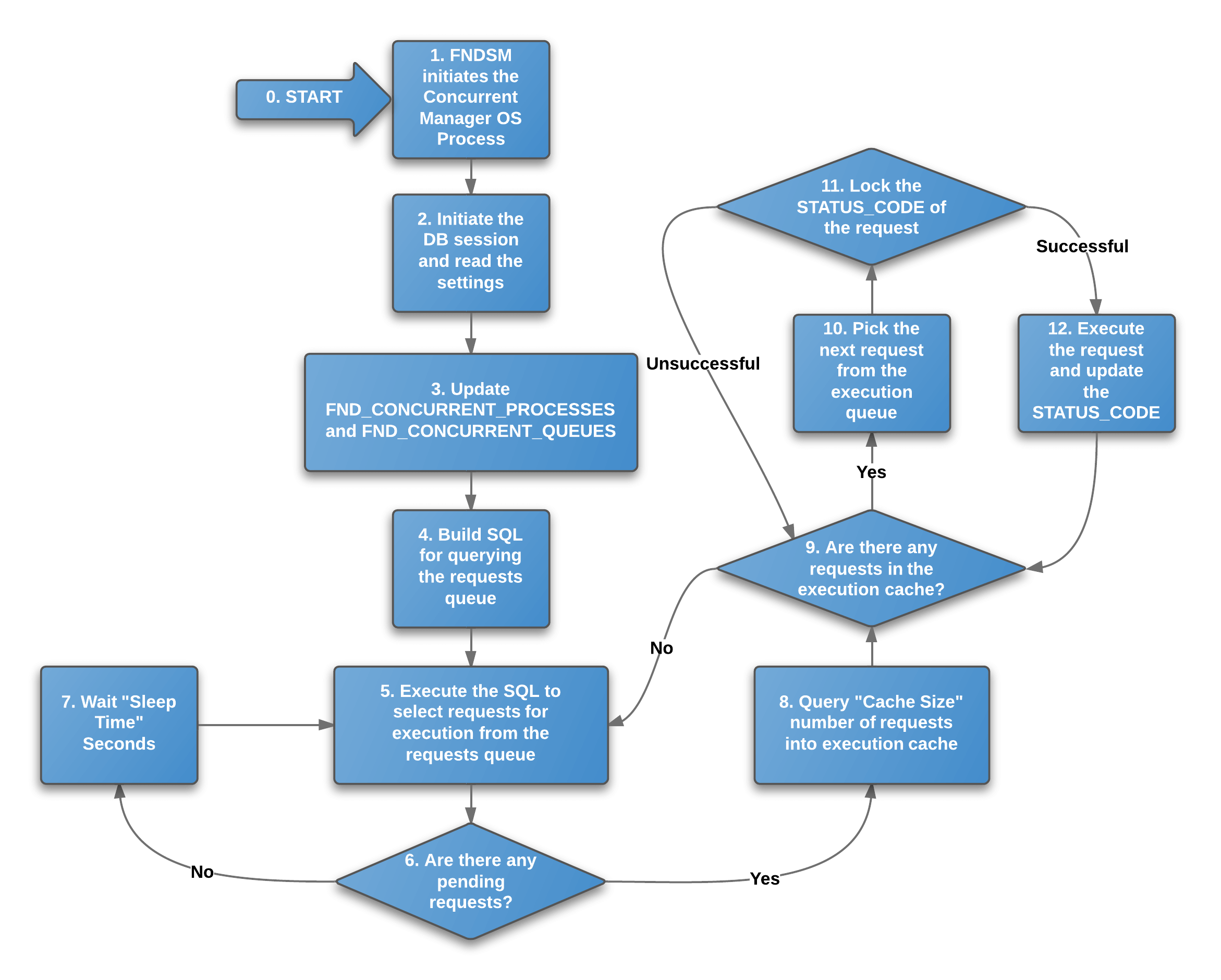
The internal workflow of a concurrent manager process
Internal workflow of a concurrent manager process[/caption] I've numbered each step of the diagram to provide more details about them:
- This is where the story begins. There is no EXIT state in the diagram as the managers normally process requests in an infinite loop. Obviously, there is a way for a concurrent manager process to receive the command to quit when the managers need to be shut down, but that's not included here for simplicity.
- Internal Concurrent Manager (ICM) requests the Service Manager (FNDSM) to start up the Concurrent Manager process. For the Standard Manager processes, the binary executable FNDLIBR is started. For the Inventory Manager, it's INVLIBR. There are others too.
- The manager process connects to the database and reads the settings (e.g profile options, sleep seconds, cache size).
- The process saves information about itself in FND_CONCURRENT_PROCESSES table (os process id, database name, instance name, DB session identifiers, logfile path and name, and others). It also updates FND_CONCURRENT_QUEUES by increasing the value of RUNNING_PROCESSES.
- The concurrent manager process collects information from the database to build the SQL for querying the FND_CONCURRENT_REQUESTS table. The query will be used every time the manager process looks for scheduled concurrent requests. This is the only time the manager process reads the Specialization Rules (which programs it is allowed to execute) from the database. Keep in mind that if the specialization rules are changed while the managers are running, they are bounced without warning as that is the only way to update the specialization rules cached by the manager process.
- The SQL (from step 4) is executed to collect information about pending concurrent requests from FND_CONCURRENT_REQUESTS table.
- The results are checked to verify if any requests are pending for execution.
- If no requests are pending for execution, the manager process sleeps and then goes to step 5. The "Sleep Seconds" parameter of the "Work Shifts" settings of the concurrent manager determines how long the process sleeps before FND_CONCURRENT_REQUESTS table is queried again. This is the only time the "sleep seconds" setting is used.
- If there is at least one concurrent request pending for execution, the concurrent manager process caches rowids for the FND_CONCURRENT_REQUESTS rows of pending concurrent requests. The "Cache Size" setting of the concurrent manager specifies how many rowids to cache.
- The cached list of rowids is checked to verify if there are any unprocessed concurrent requests (rows in FND_CONCURRENT_REQUESTS table) left. If none are left - the processing returns to step 5 and the FND_CONCURRENT_REQUESTS table is queried again.
- The next unprocessed rowid is picked from the process cache, and the processing starts.
- Concurrent manager process executes a SELECT-for-UPDATE statement to lock the STATUS_CODE in FND_CONCURRENT_PROCESSES for the request it's about to process. This is the mechanism to ensure that each concurrent request is executed only once and only by one manager process even if many processes are running simultaneously. The SELECT-for-UPDATE statement can complete with "ORA-00054: resource busy and acquire with NOWAIT specified" or "0 rows updated" if another manager process has started processing the request already.
- If the STATUS_CODE of the request was locked successfully, the concurrent manager executes the concurrent request. The processing moves to step 9 where the cached list of concurrent requests (rowids) is being checked again.
Summary of competition and tuning
The workflow is not very complex, but it's important to remember that there are normally multiple concurrent manager processes running at the same time, and they are competing for the requests to run. This competition introduces another dimension of tuning for settings, like number of concurrent manager processes, sleep seconds, or cache size. Stay tuned for the next post in the series to find out more!
Oracle EBS Consulting Services
Ready to optimize your Oracle EBS for the future?
Share this
Share this
EBS 12.2 issues seen in the wild

.svg)
.svg)