


In this post we will build a
toy example NiFi processor which is still quite efficient and has powerful capabilities. Processor logic is straightforward: it will read incoming files line by line, apply given function to transform each line into key-value pairs, group them by key, write values to output files and transfer them into specified relationships based on group key. As a starting point I used
nifi-processor-bundle-scala. You can deploy it right away with
sbt.
Relationships We have 3 permanent relationships specified in trait RouterRelationships:
 The use file with following content to test it: [code language="javascript"] {"type":"red","payload":{"id":27,"data":410}} {"type":"black","payload":{"id":28,"data":621}} {"type":"red","payload":{"id":29,"data":614}} {"type":"green","payload":{"id":30,"data":545}} {"type":"black","payload":{"id":31,"data":52}} {"type":"red","payload":{"id":32,"data":932}} {"type":"green","payload":{"id":33,"data":897}} {"type":"red","payload":{"id":34,"data":943}} {"type":"green","payload":{"id":35,"data":314}} {BAD ROW !!! "type":"red","payload":{"id":36,"data":713}} {"type":"black","payload":{"id":37,"data":444}} {"type":"green","payload":{"id":38,"data":972}} {"type":"black","payload":{"id":39,"data":988}} {"type":"black","payload":{"id":40,"data":996}} {"type":"red","payload":{"id":41,"data":741,"SOMETHING":42}} {"type":"red","payload":{"id":42,"data":82}} {"type":"black","payload":{"id":43,"data":616}} {"type":"black","payload":{"id":44,"data":135}} {"type":"black","payload":{"id":45,"data":549}} [/code] A moment after put this file into input directory it should be processed and you can find 2 files for red and green keys under
unmatched location, one file for
black and one
incompatible with only bad row: [code language="javascript"]{BAD ROW !!! "type":"red","payload":{"id":36,"data":713}}[/code] As further development processing can be moved from main thread into
akka router with pull of workers. It should be more carefully taken about failures (what if sink creation failed?) and actor restarts.
The use file with following content to test it: [code language="javascript"] {"type":"red","payload":{"id":27,"data":410}} {"type":"black","payload":{"id":28,"data":621}} {"type":"red","payload":{"id":29,"data":614}} {"type":"green","payload":{"id":30,"data":545}} {"type":"black","payload":{"id":31,"data":52}} {"type":"red","payload":{"id":32,"data":932}} {"type":"green","payload":{"id":33,"data":897}} {"type":"red","payload":{"id":34,"data":943}} {"type":"green","payload":{"id":35,"data":314}} {BAD ROW !!! "type":"red","payload":{"id":36,"data":713}} {"type":"black","payload":{"id":37,"data":444}} {"type":"green","payload":{"id":38,"data":972}} {"type":"black","payload":{"id":39,"data":988}} {"type":"black","payload":{"id":40,"data":996}} {"type":"red","payload":{"id":41,"data":741,"SOMETHING":42}} {"type":"red","payload":{"id":42,"data":82}} {"type":"black","payload":{"id":43,"data":616}} {"type":"black","payload":{"id":44,"data":135}} {"type":"black","payload":{"id":45,"data":549}} [/code] A moment after put this file into input directory it should be processed and you can find 2 files for red and green keys under
unmatched location, one file for
black and one
incompatible with only bad row: [code language="javascript"]{BAD ROW !!! "type":"red","payload":{"id":36,"data":713}}[/code] As further development processing can be moved from main thread into
akka router with pull of workers. It should be more carefully taken about failures (what if sink creation failed?) and actor restarts.
RelUnmatched
-
: here will be transferred all files for the keys that don't have related dynamic relationships configured;
RelFailure
-
: here will be transferred incoming flow file if there is any failure happened during the processing;
RelIncompatible
-
: we will collect all lines that couldn't be processed into one file and move it here.
String=>(String,String) type. Other properties are dynamic and define relationships as described above. We have to implement
getSupportedDynamicPropertyDescriptor and
onPropertyModified methods in our processor class.
onTrigger Here is where all processing logic lives. Once non-null flow file comes, we try to get compiled processing function from cache or actually compile it: [code language="scala"] val processorCode = context.getProperty(PROCESSOR).getValue val transform = compile(processorCode).get [/code] Then we make preparations for RoutingSink (we will touch it later): create
Sink that takes care of creating output flow files, prepare key-value and key classes for routing, and finally create an instance of RoutingSink: [code language="scala"] val groupBy = RoutingSink.create[KeyValue, KeyType, FlowFile](FlowFileSink, _.keyType) [/code] After this we are ready to read line-by-line input file, transform lines into key-value pairs and send them to Sink. [code language="scala"] val br = new BufferedReader(new InputStreamReader(in)) var line: String = null while ( { line = br.readLine() line != null }) { val kv = Try { val (k, v) = transform(line) GoodKeyValue(k, v) }.getOrElse(ErrorKeyValue(line)) groupBy.add(kv) } in.close() [/code] After all we close it, getting list of output flow files and manage file transferring to correspondent relationships: [code language="scala"] val files = groupBy.close() files.foreach { case (ErrorKeyType, file) => session.transfer(file, RelIncompatible) case (DataKeyType(name), file) => val rel = dynamicRelationships.get.getOrElse(name, RelUnmatched) session.transfer(file, rel) } [/code]
RoutingSink RoutingSink is the akka actor based hand made implementation of routing worker pool were each worker processes only data for a one key. Worker actor creates an instance of its own Sink and adds all incoming data into it. Router actor performs housekeeping work and communications.
Build and deploy In order to build the processor, please run
mvn compile test package. It will also execute
tests before building nar file. After packaging you should find nar file
nifi-akka-bundle/nifi-akka-nar/target/nifi-akka-nar-1.0.nar. To use the processor in NiFi copy this file into
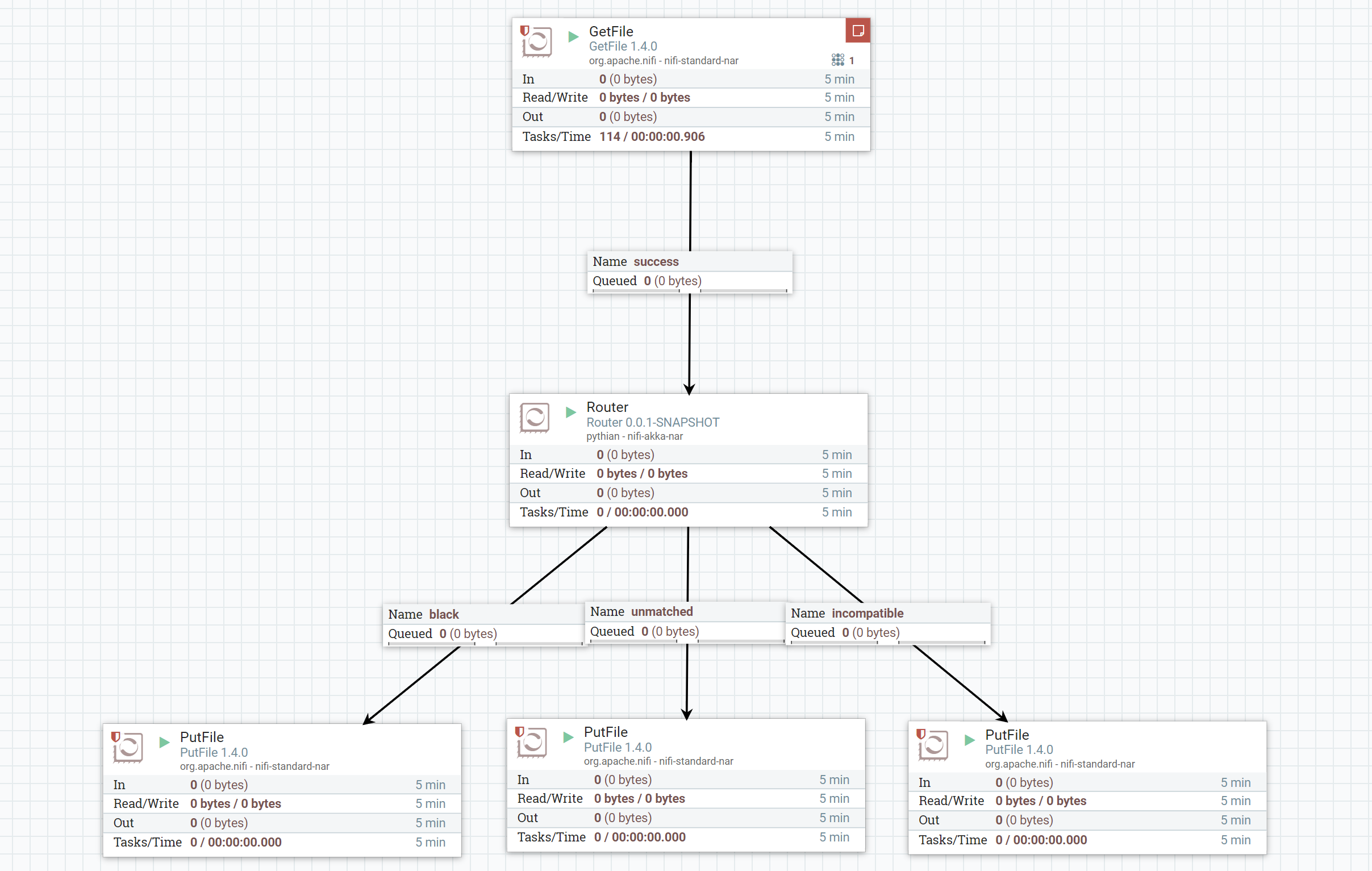
lib directory. Make sure you have the same NiFi version that you used for processor building (at the moment of writing this article it was 1.4.0). Start NiFi and try to create something simple as at the picture below. Add 1 one property for dynamic relationship "black", add the following code for json decomposing: [code language="scala"] import pythian.nifi.processors.LineProcessor.GSON import com.google.gson.JsonObject (line: String) => { val jo = GSON.fromJson(line, classOf[JsonObject]) val tpe = jo.get("type").getAsString val payload = jo.get("payload") val data = GSON.toJson(payload) (tpe, data) } [/code] Add a few GetFile and PutFile processors and start it:
The use file with following content to test it: [code language="javascript"] {"type":"red","payload":{"id":27,"data":410}} {"type":"black","payload":{"id":28,"data":621}} {"type":"red","payload":{"id":29,"data":614}} {"type":"green","payload":{"id":30,"data":545}} {"type":"black","payload":{"id":31,"data":52}} {"type":"red","payload":{"id":32,"data":932}} {"type":"green","payload":{"id":33,"data":897}} {"type":"red","payload":{"id":34,"data":943}} {"type":"green","payload":{"id":35,"data":314}} {BAD ROW !!! "type":"red","payload":{"id":36,"data":713}} {"type":"black","payload":{"id":37,"data":444}} {"type":"green","payload":{"id":38,"data":972}} {"type":"black","payload":{"id":39,"data":988}} {"type":"black","payload":{"id":40,"data":996}} {"type":"red","payload":{"id":41,"data":741,"SOMETHING":42}} {"type":"red","payload":{"id":42,"data":82}} {"type":"black","payload":{"id":43,"data":616}} {"type":"black","payload":{"id":44,"data":135}} {"type":"black","payload":{"id":45,"data":549}} [/code] A moment after put this file into input directory it should be processed and you can find 2 files for red and green keys under
unmatched location, one file for
black and one
incompatible with only bad row: [code language="javascript"]{BAD ROW !!! "type":"red","payload":{"id":36,"data":713}}[/code] As further development processing can be moved from main thread into
akka router with pull of workers. It should be more carefully taken about failures (what if sink creation failed?) and actor restarts.
On this page
Share this
Share this
Apache beam pipelines with Scala: part 1 - template
![]()
Apache beam pipelines with Scala: part 1 - template
Dec 12, 2017 12:00:00 AM
3
min read
Minimal Twitter to Google Pub/Sub example with Scala
![]()
Minimal Twitter to Google Pub/Sub example with Scala
Dec 13, 2017 12:00:00 AM
1
min read
Apache beam pipelines With Scala: Part 2 - Side Input
![]()
Apache beam pipelines With Scala: Part 2 - Side Input
Dec 12, 2017 12:00:00 AM
3
min read

.svg)
.svg)