The performance of any Oracle database heavily relies on query execution(s). The reasons for any SQL statement’s execution plan changes could include a variety of actions, like gathering optimizer statistics (table, index, schema etc.) changing optimizer parameters, schema definitions, adding indexes etc. As experienced Oracle DBAs, we should be aware of the fact that the above mentioned actions meant to improve SQL performance will not always guarantee positive results. So in this case, many of us would try to freeze execution plans (Stored Outlines) or lock the optimizer statistics. However, doing so prevents such environments/databases of taking advantage of new optimizer functionality or access paths, which would improve the SQL statements performance. That is where SQL Plan Management comes in very handy... SQL Plan Management (SPM) provides a framework for completely transparent controlled execution plan evolution. With SPM the optimizer automatically manages execution plans and ensures only known or verified plans are used. When a new plan is found for a SQL statement it will not be used until it has been verified by the database to have comparable or better performance than the current plan. ---------------------- Next, I will explain the steps for forcing a bad query to use a better execution plan by loading SQL Plans into SPM using AWR.
Identifying the Slow Query
We have the following scenario: - Oracle 11.2.0.3 version single instance database - Performance issue caused by the following bad query: with initial explain plan :
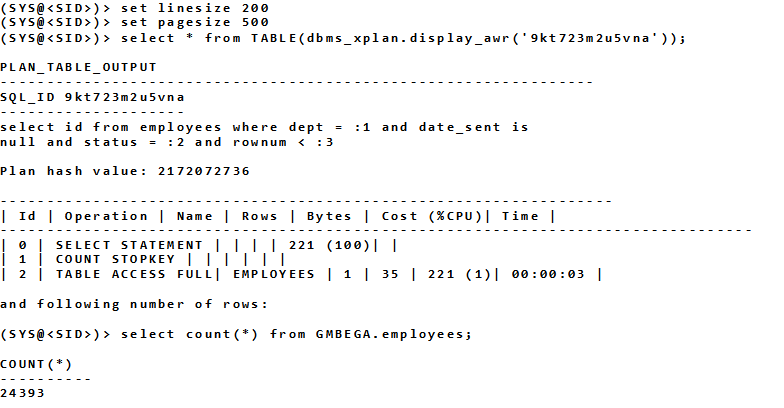
As shown in the Plan output, a full table scan was used, resulting in excessive IO for this query. It seemed this query needed an index to reduce the IO. Therefore I have added two indexes on 'status' and 'prevobjectid' columns for the EMPLOYEES table, gathered table statistics and then checked again the explain plan. We will see now that due to index creation the DISPLAY_AWR program shows a newly generated explain plan with improved cost using an index range scan versus the full table scan used by the initial plan (Plan hash value: 2172072736).
Now we have obtained a new, better execution plan in AWR for the SQL statement, but our next question would be, “How can we make sure it will be the only plan picked by the Cost Based Optimizer for future executions”? The answer: “Create a SQL Tuning Set for the SQL, then create a new SQL Baseline from the STS so the Optimize will choose the preferred Execution Plan”. Each time a SQL statement is compiled, the optimizer first uses a cost-based search method to build a best-cost plan, then tries to find a matching plan in the SQL plan baseline.
If a match is found, the optimizer will proceed using this plan. Otherwise, it evaluates the cost of each accepted plan in the SQL plan baseline and selects the plan with the lowest cost.
Steps for loading SQL Plans
Here are the steps for loading SQL Plans into SPM using AWR by implementing SQL Baselines for the bad query.
Step 1: Set up a SQL Baseline using known-good plan, sourced from AWR snapshots. To do so, SQL Plan Management must be active and the easiest condition to checking optimizer_use_sql_plan_baselines which needs to be TRUE.
Step 2: Create SQL Tuning Set (STS).
A
SQL tuning set (STS) is a database object that includes one or more SQL statements along with their execution statistics and execution context, and could include a user priority ranking. You can load SQL statements into a SQL tuning set from different SQL sources, such as AWR, the shared SQL area, or customized SQL provided by the user. An STS includes: - A set of SQL statements - Associated execution context, such as user schema, application module name and action, list of bind values, and the cursor compilation environment - Associated basic execution statistics, such as elapsed time, CPU time, buffer gets, disk reads, rows processed, cursor fetches, the number of executions, the number of complete executions, optimizer cost, and the command type - Associated execution plans and row source statistics for each SQL statement (optional) The concept of SQL tuning sets, along with the DBMS_SQLTUNE package to manipulate them, was introduced in Oracle 10g as part of the
Automatic SQL Tuning functionality. Oracle 11g makes further use of SQL tuning sets with the SQL Performance Analyzer, which compares the performance of the statements in a tuning set before and after a database change.
The database change can be as major or minor as you like, such as:
- Database, operating system, or hardware upgrades.
- Database, operating system, or hardware configuration changes.
- Database initialization parameter changes.
- Schema changes, such as adding indexes or materialized views.
- Refreshing optimizer statistics.
- Creating or changing SQL profiles.
Now I create a SQL Tuning Set based on the slow query with a SQL_ID of 9kt723m2u5vna.
Step 3: Populate STS from AWR. Now I will locate the AWR snapshots required to populate the STS, and load the STS based on those snapshot ID’s and the SQL_ID.
Step 4: List out SQL Tuning Set contents. Now I can query the STS to verify it contains the expected data.
Step 5: List out SQL Tuning Set contents Though I have created and verified the STS, the Baseline has not yet been created.
Step 6: Load desired plan from STS as SQL Plan Baseline Now I will load the known good plan that uses the newly created index into the Baseline.
Step 7: List out the Baselines again. Now verify the Baseline contains the desired plan.
Step 8. Flush the current bad SQL Plan. After loading the baseline, the current cursor must be flushed from the cache to make sure the new plan will be used on next execution of the sql_id 9kt723m2u5vna
Conclusion
As this blog post demonstrates, SQL Plan Management (SPM) allows database users to maintain stable yet optimal performance for a set of SQL statements and baselines seem to be a definite step in the right direction. Baselines can be captured from multiple sources, SPM allowing new plans to be used if they perform better than the baseline fact that could improve the overall application/system functionality.
Oracle Database Consulting Services
Ready to optimize your Oracle Database for the future?




.svg)
.svg)