



When learning ProxySQL, we have seen some confusion around the configuration and especially around the usage of the configuration file. In this post, we will explain how ProxySQL treats its internal configuration and its configuration file.
 Remember:
The proxysql.cnf
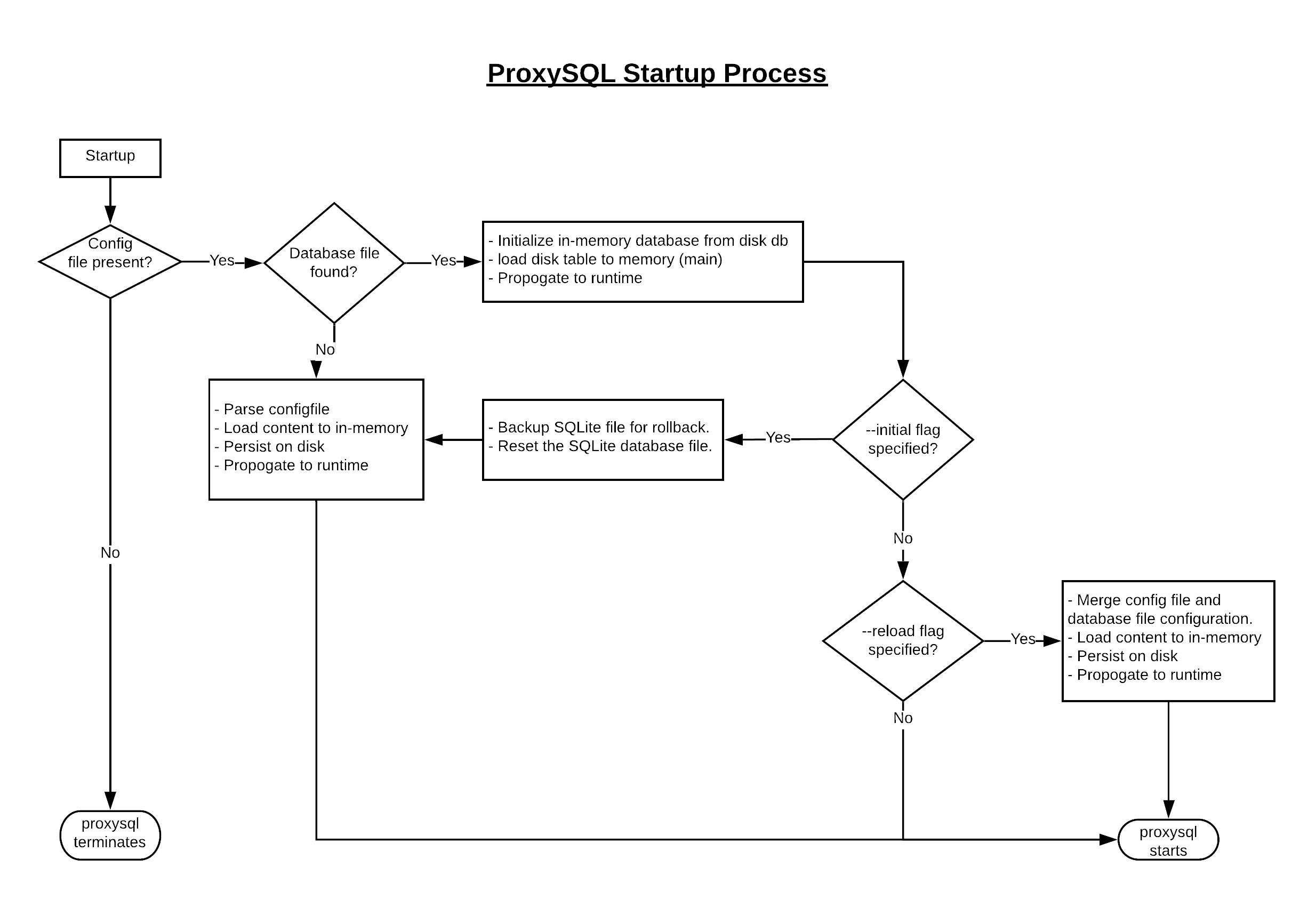
For the initial startup, the configuration is loaded from the /etc/proxysql.cnf file. At this time, the configuration file will be parsed and the settings will be stored in the embedded SQLite database. From this point onwards, the settings will be accessed from the SQLite database. However, there are four configuration settings which are always parsed from the config file, even when the SQLite database is present. This places a requirement for the configuration file to always be in the place, if missing, ProxySQL terminates.- datadir: The path of ProxySQL datadir which stores database file, logs.
- restart_on_missing_heartbeats (new in 1.4.4): If MySQL threads miss restart_on_missing_heartbeats (number of) heartbeats, proxysql will raise a SIGABRT signal and restart. Default is 10.
- execute_on_exit_failure (new in 1.4.4): If set, ProxySQL's parent process will execute the defined script every time ProxySQL crashes. It is recommended to use this setting to generate an alert or log the event.
- errorlog (new in 2.0.0): The file to be used as error-log. Defaults to ${datadir}/proxysql.log
LOAD <XYZ> FROM CONFIG FILEConsider the following image depicting the proxysql startup process:
The ProxySQL Configuration Layers
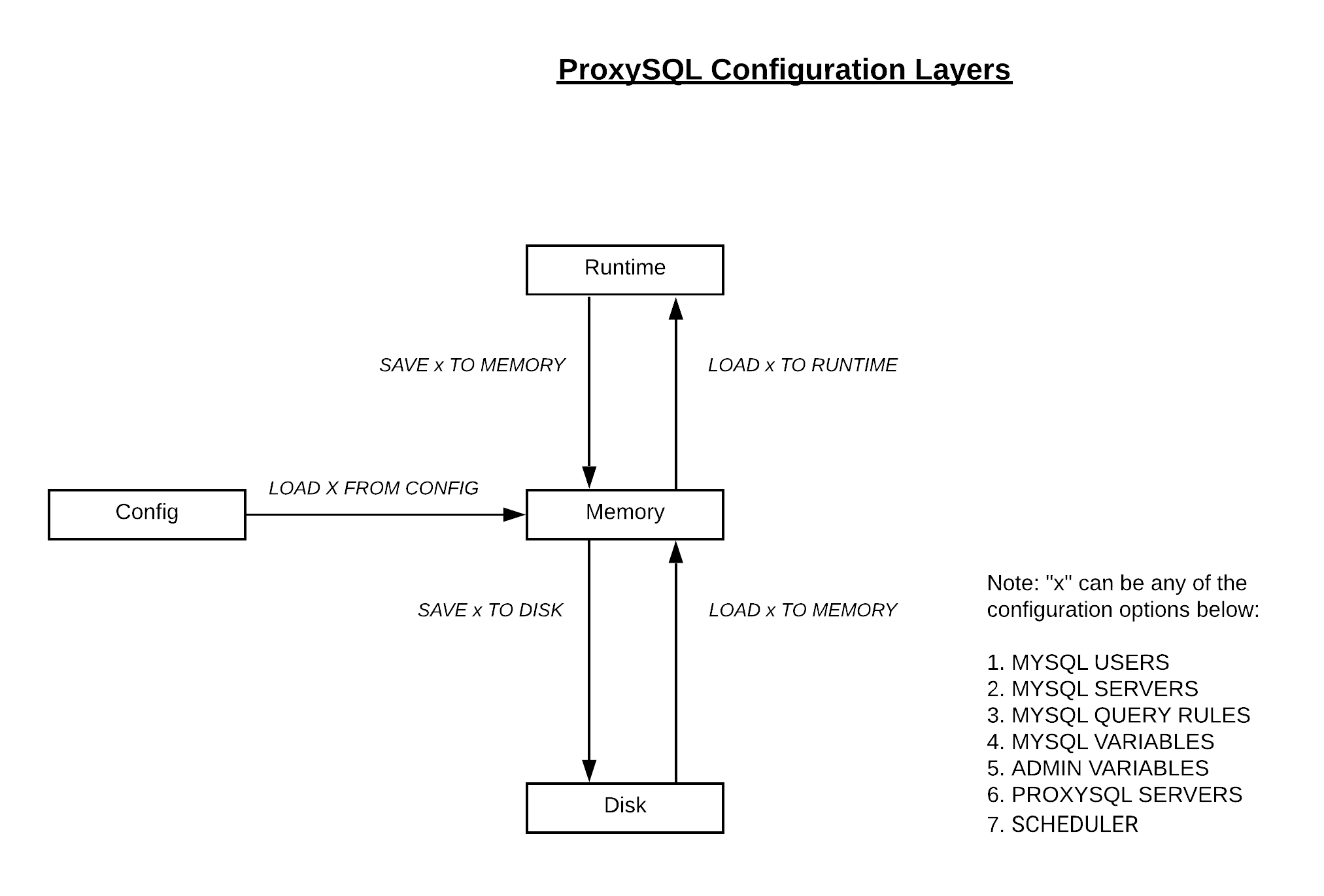
Lets now take a look at an important aspect of configuration. The configuration loaded from proxysql.cnf file or added from admin module flows through the ProxySQL configuration system. The ProxySQL configuration system is made up of 4 layers:- CONFIG: This is the initial layer representing the configuration file (proxysql.cnf) from which the configuration is loaded to MEMORY.
- MEMORY: This layer represents the in-memory database maintained by ProxySQL. (This is not the running configuration!)
- DISK: This layer persists the configuration on disk. ProxySQL uses an SQLite database file to store its configuration.
- RUNTIME: The configuration can be loaded to RUNTIME layer which is the configuration used by ProxySQL actively.
Remember:
- Until the configuration is in RUNTIME layer, it won’t go into effect.
- Until you move the configuration changes to DISK, the changes won’t persist proxysql restarts/reload.
Initial Configuration
Now let's explore the configuration options. Every proxysql setup comes with a default configuration file with default credentials. It is recommended to change at least the default admin credentials before starting the proxysql service in production. The default proxysql configuration file can be found on its repo: https://github.com/sysown/proxysql/blob/v2.0.7/etc/proxysql.cnf The default proxysql configuration file (/etc/proxysql.cnf) starts with two important parameters: datadir and errorlog. These are pretty much self-explanatory. The contents of datadir include the ProxySQL’s database, error log and stats database. - admin_variables Two important settings here are admin_credentials and mysql_ifaces. 1. admin_credentials are the semi-colon separated user:password pairs that can administer the ProxySQL. Eg: admin_credentils=”admin_user1:admin_pass1; admin_user2;admin_pass2” Note: ProxySQL supports encrypted passwords even in the configuration file using the mysql_native_password encryption 2. mysql_ifaces specifies the list of host:port entries or socket on which the admin interface accept connections. - mysql_variables Among other variables, the following are the noteworthy variables which I would look at changing:- Interfaces: This interface is for the incoming MySQL connection requests. It consists of semi-colon separated list of host:port entries or sockets.
- Monitor_username / monitor_password are the variables specifying a monitoring user with at-least USAGE privileges to connect, ping and test MySQL read_only status. You may need a REPLICATION CLIENT privilege for this user if replication lag needs to be monitored.
The following sections are largely handled from the admin interface rather than the configuration file. - mysql_servers - mysql_users - mysql_query_rules - scheduler - mysql_replication_hostgroups - mysql_galera_hostgroups (from ProxySQL 2.x) - mysql_group_replication_hostgroups (from ProxySQL 2.x) - proxysql_servers (from ProxySQL 1.4.x) Covering variables is beyond the scope of this post. However, ProxySQL documentation is well-maintained, so have a look at it for more details on the configuration variables. Reference
MySQL Database Consulting
Looking to optimize your MySQL use?
On this page
Share this
Share this
How To Export Collections in SCCM to CSV Using Powershell
![]()
How To Export Collections in SCCM to CSV Using Powershell
Apr 30, 2020 12:00:00 AM
1
min read
Configuring MySQL in a Docker Container
![]()
Configuring MySQL in a Docker Container
Nov 6, 2020 12:00:00 AM
3
min read
How to Perform an Oracle E-Business Suite + Java Web Start

How to Perform an Oracle E-Business Suite + Java Web Start
Jul 13, 2022 12:00:00 AM
3
min read

.svg)
.svg)