


In this blog post we'll cover how AutoClose works, and why it's recommended to disable this property. At the time that the SQL Server service is started, the operating system logs to find the location of the master system database, and requests exclusive lock of the data and log files. After that, SQL Server performs the reading in view of sys.master_files system and finds all the data files (.mdf, .NDF) and transaction log (.ldf) from all databases stored on the instance, and also requests the exclusive lock these files to initialize each of the databases. The first situation in which the AutoClose property can influence the performance drop is in the acquisition of this exclusive lock on the data and log files. If the property is off, this lock is held since service startup until you stop, however if the property is enabled, from the time when there is no more activity in the database, this lock is released and the data and log files are available to any other process. Initially this situation may seem very interesting, because we could manipulate the data and log files and perform some administrative tasks, such as a backup. Now imagine that during any backup, an application needs to access the database, what would happen? The SQL Server would return an error alerting the impossibility of acquiring exclusive lock on files and the database initialization would fail. Another big performance problem resulting from use of the AutoClose property is related to the use of the Memory Cache and Buffer areas, Plan Cache. Whenever a query is performed, generates an execution plan that is kept in an area of memory called the Plan Cache. This area of memory is to store the generated execution plans so that they can be reused if the query is executed again. After the execution plan generation, all search operators are executed and the data pages selected by the query are stored in an area of memory called Cache Buffer. This area of memory is to store the pages of data so that you don't have to perform new accesses to the disk subsystem and thus optimize the next i/o requests. When the AutoClose property is enabled and there are no more connections to the database, all the data pages and execution plans that are in memory will be deleted, thus creating a big drop of performance. We ran a small demonstration just to be clear on this behavior. Initially you will enable the AutoClose property in the AdventureWorks2012 database, as script below: [code language="sql"] USE master GO ALTER DATABASE [AdventureWorks2012] SET AUTO_CLOSE ON WITH NO_WAIT GO [/code] Then let's perform some queries in the database AdventureWorks2012, as script below: [code language="sql"] USE AdventureWorks2012 GO SELECT * FROM Person.person GO SELECT * FROM Sales.salesorderheader [/code] After the execution of queries, it is possible to analyze, through the DMV sys.dm os_buffer_descriptors, the amount of data pages that have been allocated in memory to the database AdventureWorks2012, as illustrated on
Figure 1:
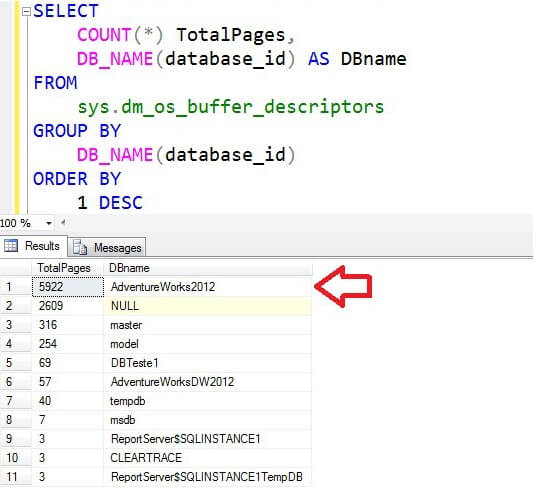 Figure 1 - Data pages that have been allocated in memory With the DMVs sys.dm_exec_cached_plans and sys.dm_exec_sql_text we can check execution plans that were stored in memory for queries executed, as illustrated on
Figure 2.
Figure 1 - Data pages that have been allocated in memory With the DMVs sys.dm_exec_cached_plans and sys.dm_exec_sql_text we can check execution plans that were stored in memory for queries executed, as illustrated on
Figure 2.
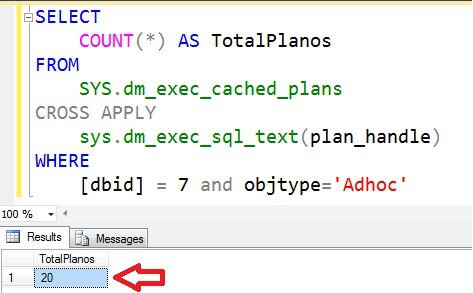 Figure 2 - Execution plans stored in memory So when all connections to the database AdventureWorks2012 are finished, all the memory areas will be cleaned, as the image below: [code language="sql"] --Amount of data pages in memory SELECT Count (*) TotalPages, DB_NAME (database_id) DBname FROM sys.dm_os_buffer_descriptors GROUP BY Db_name (database_id) ORDER BY 1 DESC --Amount of in-memory execution plans SELECT COUNT (*) TotalPlanos FROM SYS.dm_sys.dm_exec_cached_plans CROSS APPLY sys.dm_exec_sql_text sys.dm (plan_handle) Where [dbid] = 7 and objtype = ' Adhoc ' [/code]
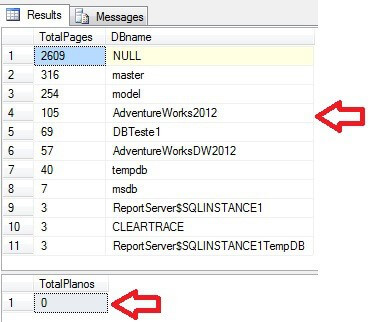 Figure 3 - Memory usage after close all connections With this demonstration is extremely simple to conclude that the AutoClose property is always disabled due to performance problems that can bring to a high performance database.
Figure 1 - Data pages that have been allocated in memory With the DMVs sys.dm_exec_cached_plans and sys.dm_exec_sql_text we can check execution plans that were stored in memory for queries executed, as illustrated on
Figure 2.
Figure 2 - Execution plans stored in memory So when all connections to the database AdventureWorks2012 are finished, all the memory areas will be cleaned, as the image below: [code language="sql"] --Amount of data pages in memory SELECT Count (*) TotalPages, DB_NAME (database_id) DBname FROM sys.dm_os_buffer_descriptors GROUP BY Db_name (database_id) ORDER BY 1 DESC --Amount of in-memory execution plans SELECT COUNT (*) TotalPlanos FROM SYS.dm_sys.dm_exec_cached_plans CROSS APPLY sys.dm_exec_sql_text sys.dm (plan_handle) Where [dbid] = 7 and objtype = ' Adhoc ' [/code]
Figure 3 - Memory usage after close all connections With this demonstration is extremely simple to conclude that the AutoClose property is always disabled due to performance problems that can bring to a high performance database.
On this page
Share this
Share this
A serverless audio transcription pipeline
![]()
A serverless audio transcription pipeline
Nov 14, 2017 12:00:00 AM
4
min read
Connecting to Oracle with SQL Server 2005 x64
![]()
Connecting to Oracle with SQL Server 2005 x64
Jul 3, 2009 12:00:00 AM
3
min read
Cloudscape podcast episode 7: August 2018
![]()
Cloudscape podcast episode 7: August 2018
Aug 9, 2018 12:00:00 AM
1
min read

.svg)
.svg)