



One of my recent blogs was dedicated to
rlwrap utility used in my daily life as a DBA. I want to follow the subject and introduce, or maybe bring back, another extremely useful program. Let's imagine you are working on an environment in ssh console and need to start a command interactively. The problem is the network is unstable, the execution is going to take some time, and any interruption may potentially lead to an inconsistent state for your application or data set. Sounds familiar, doesn't it? It can be activities like applying a patch to your database home, or executing a script cleaning old data and inserting new. Of course you can create a job or script and run in background mode. But what if we had another option? It is called
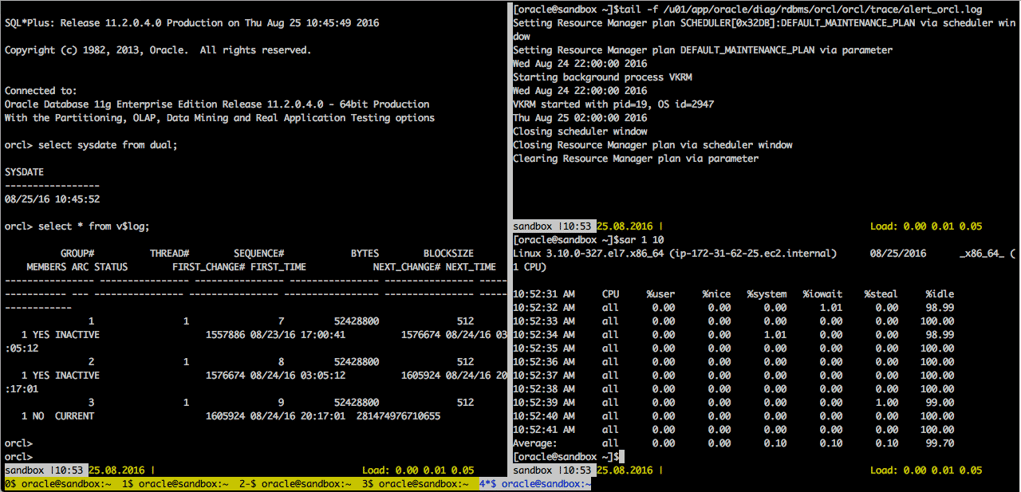
"GNU screen" and I have used it for many years. It is a terminal window multiplexer with many useful options. Let's have a look and try it out. Where can we find it? The utility included to standard yum repository for Oracle Linux, Red Hat and, I believe, for other Linux distributions too. So, let's install the utility and see what we can do with it. The installation is simple : [code lang="text"] [root@sandbox ~]#yum install screen Loaded plugins: amazon-id, rhui-lb, search-disabled-repos ........................................... Installed: screen.x86_64 0:4.1.0-0.23.20120314git3c2946.el7_2 Complete! [root@sandbox ~]# [/code] Simple like that. Now we can start our first screen session. Just type "screen" and press enter: [code lang="text"] [oracle@sandbox ~]$screen [/code] You are getting the usual terminal screen and can run your program from there. Everything looks exactly the same from the first glance, but in reality you are now inside your "GNU screen" session. If you are somehow disconnected from the network you can start a new ssh connection and attach back to your running screen session. It will be still running and there you will see exactly the same session you suddenly left before. Or you can detach yourself from the screen session just pressing "Ctrl-a" and "d" . By default the prefix for all screen commands inside a screen session is "Ctrl-a". You can change the default prefix defining the "escape" parameter in /etc/screenrc or ~/.screenrc file. Also you may use the command "screen -e " to start your screen with another prefix (meta key) if you don't like ctrl-a. You can list and find your session later using screen -ls or checking the directory /var/run/screen/. Of course the "screen -ls" is much simper. [code lang="text"] [oracle@sandbox ~]$screen -e ^bb [detached from 5959.pts-0.sandbox] [oracle@sandbox ~]$screen -ls There is a screen on: 5959.pts-0.sandbox (Detached) 1 Socket in /var/run/screen/S-oracle. [oracle@sandbox ~]$ll /var/run/screen/S-oracle/ total 0 srw-------. 1 oracle oinstall 0 Aug 25 10:08 5959.pts-0.sandbox [oracle@sandbox ~]$ [/code] To attach yourself back to the session you can just run "screen -x"(if you have only one running screen session) or "screen -r ": [code lang="text"] [oracle@sandbox ~]$screen -r 5959.pts-0.sandbox [/code] And, of course, you can have several different screen sessions running simultaneously. You may like to name them starting with parameter -S and one can be for patching when the other can be for a completely different activity. [code lang="text"] [oracle@sandbox ~]$screen -S patching [detached from 8852.patching] [oracle@sandbox ~]$screen -S clean_data_script [detached from 8867.clean_data_script] [oracle@sandbox ~]$screen -ls There are screens on: 8852.patching (Detached) 8867.clean_data_script (Detached) 2 Sockets in /tmp/screens/S-oracle. [oracle@sandbox ~]$ [/code] You can start your patching when you are at the office and continue your work later attaching to exactly the same screen from your home. I think it is brilliant. Now you are not pinned to one place and have flexibility. Also your most important activity doesn't depend on an unstable internet connections. As a bonus you may ask somebody to attach to the same session and, as result, enjoy collaboration with your teammates troubleshooting a problem or sharing your experience. Also keep in mind screen is a terminal multiplexer. What it gives us is the ability to fire up several terminal windows inside one screen session and switch between them. Inside the screen session you press Ctrl-a c to create a new window or windows and switch between the windows using Ctrl-a n (you can find other options in the documentation for screen). One more thing you may like is the ability to split your screen to two or three parts and have, for example, running a sqlplus session, tail for an alert log output and a performance tool at the same time like :
 An extremely useful option for those who wants to script some actions is the ability to send a command to any of your running screen sessions using the "-X" parameter. For example you can send command "top" to a screen session "patching" to page 3 using : [code lang="text"] [oracle@sandbox ~]$ screen -S 6236.patching -p 3 -X 'top\r' [/code] I received some useful advice from my colleagues while I was writing this blog post. The first one was about using the option "-L" which enables output logging for your screen session. You can also enable it inside your screen pressing ctrl-a H. It may come handy if you want to see what was happening when you was detached from the session. The second piece of advice was about solution or workaround when your session cannot start when running on a pseudo tty : [code lang="text"] [otochkin@sandbox ~]$ su - oracle Password: [oracle@sandbox ~]$ screen Cannot open your terminal '/dev/pts/0' - please check. [oracle@bigdatalite ~]$ [/code] What you can do is to use the "script" command and redirect output to either "/dev/null" or to another location if you need it. [code lang="text"] [oracle@sandbox ~]$ script -c 'screen' /dev/null Script started, file is /dev/null [detached] Script done, file is /dev/null [oracle@sandbox ~]$ screen -ls There is a screen on: 30932.pts-1.sandbox (Detached) 1 Socket in /var/run/screen/S-oracle. [oracle@sandbox ~]$ [/code] The workaround may help you when you are connected to a server with personal account but need to create a screen session for the oracle user or for any other user you are switching to by the "su" command. As I've said, you can easily install the utility from your yum repository. But if you want the latest and greatest, you can try to download it from https://ftp.gnu.org/gnu/screen and compile by yourself. It may help if you hit a bug or find some new useful feature in the changelog for the latest version. When I was writing the blog the version in Red Hat repository was 4.0.1 vs 4.4.0 on gnu.org . I hope you will find this utility useful for you. Explore, enjoy, and stay tuned. In one of my next blogs I plan to write about another utility with similar options.
An extremely useful option for those who wants to script some actions is the ability to send a command to any of your running screen sessions using the "-X" parameter. For example you can send command "top" to a screen session "patching" to page 3 using : [code lang="text"] [oracle@sandbox ~]$ screen -S 6236.patching -p 3 -X 'top\r' [/code] I received some useful advice from my colleagues while I was writing this blog post. The first one was about using the option "-L" which enables output logging for your screen session. You can also enable it inside your screen pressing ctrl-a H. It may come handy if you want to see what was happening when you was detached from the session. The second piece of advice was about solution or workaround when your session cannot start when running on a pseudo tty : [code lang="text"] [otochkin@sandbox ~]$ su - oracle Password: [oracle@sandbox ~]$ screen Cannot open your terminal '/dev/pts/0' - please check. [oracle@bigdatalite ~]$ [/code] What you can do is to use the "script" command and redirect output to either "/dev/null" or to another location if you need it. [code lang="text"] [oracle@sandbox ~]$ script -c 'screen' /dev/null Script started, file is /dev/null [detached] Script done, file is /dev/null [oracle@sandbox ~]$ screen -ls There is a screen on: 30932.pts-1.sandbox (Detached) 1 Socket in /var/run/screen/S-oracle. [oracle@sandbox ~]$ [/code] The workaround may help you when you are connected to a server with personal account but need to create a screen session for the oracle user or for any other user you are switching to by the "su" command. As I've said, you can easily install the utility from your yum repository. But if you want the latest and greatest, you can try to download it from https://ftp.gnu.org/gnu/screen and compile by yourself. It may help if you hit a bug or find some new useful feature in the changelog for the latest version. When I was writing the blog the version in Red Hat repository was 4.0.1 vs 4.4.0 on gnu.org . I hope you will find this utility useful for you. Explore, enjoy, and stay tuned. In one of my next blogs I plan to write about another utility with similar options.
On this page
Share this
Share this
Explaining Azure Data Factory Mapping Data Flows – SQL On The Edge Episode 20
Explaining Azure Data Factory Mapping Data Flows – SQL On The Edge Episode 20
Jun 18, 2019 12:00:00 AM
2
min read
Analyze index validate structure - the dark side
![]()
Analyze index validate structure - the dark side
May 13, 2016 12:00:00 AM
10
min read
Big mining gets a boost from big data

Big mining gets a boost from big data
May 14, 2019 12:00:00 AM
2
min read

.svg)
.svg)