



Problem
There's no doubt that storage is one of the key components to SQL Server performance and availability for both large and small SQL Server instances. With today's increases in server and virtual server processing power and large-scale memory support, storage and I/O can easily become the bottleneck for overall system throughput. To gain the maximum of our storage configuration, we need to ensure that our SQL Server instance is configured as per Storage Best Practices. I previously followed a checklist for ensuring that my file placement is correct, my auto-growth settings are correct, etc. I don’t know about you, but this was boring and monotonous for me. Now, wouldn't it be amazing to take that checklist and automate the entire SQL Server storage review?
Solution
The PowerShell Script that can be found on my Public Github Repository will evaluate your Instance storage configuration and generate an HTML report for you, highlighting the pressure points in red. The script already has help associated with it so you can download and simply use help to figure out how to use the script. Alternatively, you can download it to a PS-Scripts folder and provide parameters as shown below. [code lang="powershell"] PS C:\PS-Scripts>.\Get-SQLStorageReview -computer ServerName -instance ServerName\SQLInstance -report C:\temp\ServerName.html [/code] Note - please ensure that you are on the server while executing the script. The script currently doesn't support collecting information for multiple servers at once. Verified on following platforms
- PowerShell v2.0 and higher versions
- Microsoft SQL Server 2008 and higher versions
- Windows Server 2008 and higher versions
Actual script
Click the below link to download the Powershell Script. SQL Server Storage Review Script How to Execute the Script? I am keeping things simple by keeping everything on desktop, but you can choose the location of your liking.
- Copy the file to desktop
- Open PowerShell console as Administrator and set the execution policy to remotesigned
- Execute the script with required parameters
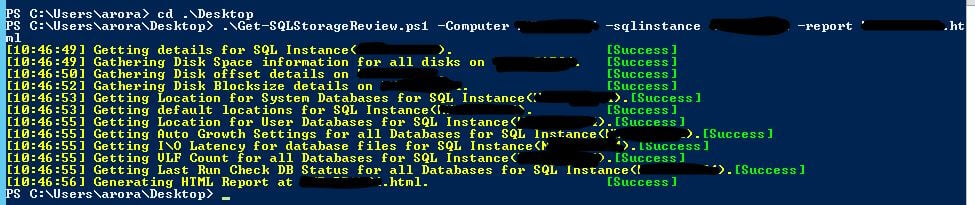 What Output to Expect? Below is a sample output that you can expect from the script.
StorageReviewSample
What Output to Expect? Below is a sample output that you can expect from the script.
StorageReviewSample
Upgrades
I will be working on a v2.0 of this script that will also try and summarize all the findings and make recommendations. I don't have an ETA yet but it will be available as soon as I am done writing it.
When you need to do a similar task more than once you should always think about automating it.
On this page
Share this
Share this
SQL Server: More light shed on "non-yielding scheduler" and Indexes stats
![]()
SQL Server: More light shed on "non-yielding scheduler" and Indexes stats
Nov 12, 2009 12:00:00 AM
4
min read
SQL server:opening errorlog:Failed to retrieve data for this request
![]()
SQL server:opening errorlog:Failed to retrieve data for this request
Oct 25, 2011 12:00:00 AM
2
min read
SQL Server 2017 automatic tuning
![]()
SQL Server 2017 automatic tuning
Jun 19, 2018 12:00:00 AM
2
min read

.svg)
.svg)