




Background
When working on a view composed of SELECT statements on other views, it can be difficult to know what the complete SQL text looks like.
Most of the time, seeing the entire expanded SQL may not be necessary. However, When trying to improve a SQL statement's performance, the expanded SQL can be very useful.
The following demo was created on an Oracle 19.12 database.
The client is Linux. Some of these scripts may require adjustments for the differences in how lines are terminated if the scripts are run on Windows.
Several of the tables and views used in this article are rather contrived and do not fit any good design pattern. They are simply for demonstration purposes.
dbms_utility.expand_sql_text
The DBMS_UTILITY package has a procedure EXPAND_SQL_TEXT. As per the documentation:
This procedure recursively replaces any view references in the input SQL query with the corresponding view subquery.
I will use dbms_utility.expand_sql_text to expand some simple SQL statements into the full SQL that is used by Oracle.
There are so many features in Oracle it is quite easy to overlook some useful features. This may be the case for you, as it was for me, as the expand_sql_text procedure was added to Oracle long ago, in version 12.1.
The scripts used in this blog may be found at oracle-dbms-utility-expand-sql
create-tables.sql
This script just selects from the ALL_OBJECTS view to create several smaller test tables.
The test tables each contain some part of the columns found in the ALL_OBJECTS view and together make up a subset of that view.
These are the 'contrived' tables referred to previously.
@@ create-tables

 Table dropped.
 Table dropped.
 ...

 TEST_OBJECTS
 Table created.

 XP_OBJECT_ID
 Table created.

 XP_OBJECT_NAMES
 Table created.

 XP_OBJECT_DATES
 Table created.

 XP_OBJECT_TYPES
 Table created.

 XP_OBJECT_STATUS
 Table created.

 Commit complete.
create-views.sql
Now, create some views on the new tables, as well as some views on views.
Each of the tables has a view select * from TABLE_NAME. The other views JOIN these views.
@@ create-views
 XP_OBJECT_ID_V
 View created.

 XP_OBJECT_DATES_V
 View created.

 XP_OBJECT_NAMES_V
 View created.

 XP_OBJECT_TYPES_V
 View created.

 XP_OBJECT_STATUS_V
 View created.

 XP_OBJECT_ID_TYPE_V
 View created.

 XP_OBJECT_ID_NAME_V
 View created.

 XP_OBJECT_ID_STATUS_V
 View created.

 XP_OBJECT_ID_DATES_V
 View created.

 XP_OBJECTS_V
 View created.
Permissions
The simplest way to run these scripts is from an account that has DBA privileges otherwise, it may fail.
While I could ferret out the necessary privileges, that is not the focus of this article, and so determining the exact privileges required is left as an exercise for the reader.
From OH/rdbms/admin/dbmsutil.sql script:
   -  ORA-24256 will be raised if the current user does not have SELECT
    privileges on all the views and tables recursively referenced in the
    input sql text. It will also be raised if the user does not have
    EXECUTE privileges on all functions and types referenced from within
    views that are expanded as well as any other reason a valid query could
    not be expanded. The ORA-24256's error message text contains information
    regarding the particular restriction that wasn't satisfied.
    -  ORA-24251 will be raised if the input_sql text is not a select statement.
    -  ORA-00900 will be raised if the input is not valid.
    -  ORA-29477 will be raised if the input lob size exceeds the maximum size
    of 4GB -1.
get-view.sql
Now for a demo of dbms_utility.expand_sql_text
Here is a simple demonstration:
@get-view 'select * from dual'
 SELECT "A1"."DUMMY" "DUMMY" FROM "SYS"."DUAL" "A1"
 SQL#
Now for one of the views created previously:
@get-view 'select * from XP_OBJECT_ID_V'
 SELECT "A1"."OWNER" "OWNER","A1"."OBJECT_ID" "OBJECT_ID" FROM  (SELECT "A2"."OWNER" "OWNER","A2"."OBJECT_ID" "OBJECT_ID" FROM "JKSTILL"."XP_OBJECT_ID" "A2") "A1"
 SQL#
So far, so good. That view was simply a selection on a single table.
Let's see what happens when 1+ views are referenced in the SQL:
 @get-view 'select * from XP_OBJECT_ID_TYPE_V'
 SELECT "A1"."OWNER" "OWNER","A1"."OBJECT_ID" "OBJECT_ID","A1"."OBJECT_TYPE" "OBJECT_TYPE" FROM  (SELECT "A2"."QCSJ_C000000000400000_0" "OWNER","A2"."QCSJ_C000000000400002_1" "OBJECT_ID","A2"."OBJECT_TYPE_4" "OBJECT_TYPE" FROM  (SELECT "A4"."OWNER" "QCSJ_C000000000400000_0","A4"."OBJECT_ID" "QCSJ_C000000000400002_1","A3"."OWNER" "QCSJ_C000000000400001","A3"."OBJECT_ID" "QCSJ_C000000000400003","A3"."OBJECT_TYPE" "OBJECT_TYPE_4" FROM  (SELECT "A5"."OWNER" "OWNER","A5"."OBJECT_ID" "OBJECT_ID" FROM "JKSTILL"."XP_OBJECT_ID" "A5") "A4", (SELECT "A6"."OWNER" "OWNER","A6"."OBJECT_ID" "OBJECT_ID","A6"."OBJECT_TYPE" "OBJECT_TYPE" FROM "JKSTILL"."XP_OBJECT_TYPES" "A6") "A3" WHERE "A3"."OBJECT_ID"="A4"."OBJECT_ID") "A2") "A1"
 #SQL
OK, that is rather difficult to read.
From now on, the Shell script get-view.sh will be used, which logs in to the database, gets the expanded SQL text and runs it through a formatter.
Note: you will need to change the credentials in the script if you run this yourself.
Let's try it:
$  ./get-view.sh  'select * from XP_OBJECT_ID_TYPE_V'

 SELECT
    A1.OWNER OWNER
    ,A1.OBJECT_ID OBJECT_ID
    ,A1.OBJECT_TYPE OBJECT_TYPE
 FROM
 (
    SELECT
       A2.QCSJ_C000000000400000_0 OWNER
       ,A2.QCSJ_C000000000400002_1 OBJECT_ID
       ,A2.OBJECT_TYPE_4 OBJECT_TYPE
    FROM
    (
    SELECT
          A4.OWNER QCSJ_C000000000400000_0
          ,A4.OBJECT_ID QCSJ_C000000000400002_1
          ,A3.OWNER QCSJ_C000000000400001
          ,A3.OBJECT_ID QCSJ_C000000000400003
          ,A3.OBJECT_TYPE OBJECT_TYPE_4
    FROM
    (
       SELECT
             A5.OWNER OWNER
             ,A5.OBJECT_ID OBJECT_ID
       FROM JKSTILL.XP_OBJECT_ID A5
    ) A4,
    (
       SELECT
             A6.OWNER OWNER
             ,A6.OBJECT_ID OBJECT_ID
             ,A6.OBJECT_TYPE OBJECT_TYPE
       FROM JKSTILL.XP_OBJECT_TYPES A6
    ) A3
    WHERE A3.OBJECT_ID=A4.OBJECT_ID
    ) A2
 ) A1
That is much easier to read.
The formatter format-sql.pl is not a full-functioned formatter, but it works for this blog's scripts.
When 1+ objects (including tables, not just views) are referenced in the SQL, Oracle may create unique column names for a number of referenced columns:
For example:
 $ cat >  t1.sql
 select
      o.owner
      , o.object_id
      , s.status
      , s.temporary
      , s.generated
 from xp_object_id o
 join xp_object_status s
 on s.object_id = o.object_id
 ^D

 $  ./get-view.sh  "$(cat t1.sql | tr '\n' ' ')" | expand -t3

 SELECT
    A1.QCSJ_C000000000300000_0 OWNER
    ,A1.QCSJ_C000000000300002_1 OBJECT_ID
    ,A1.STATUS_4 STATUS
    ,A1.TEMPORARY_5 TEMPORARY
    ,A1.GENERATED_6 GENERATED
 FROM
 (
    SELECT
    A3.OWNER QCSJ_C000000000300000_0
       ,A3.OBJECT_ID QCSJ_C000000000300002_1
    ,A2.OWNER QCSJ_C000000000300001
       ,A2.OBJECT_ID QCSJ_C000000000300003
    ,A2.STATUS STATUS_4
       ,A2.TEMPORARY TEMPORARY_5
       ,A2.GENERATED GENERATED_6
    FROM JKSTILL.XP_OBJECT_ID A3,JKSTILL.XP_OBJECT_STATUS A2 WHERE A2.OBJECT_ID=A3.OBJECT_ID
 ) A1
Why would Oracle create these column aliases? Consider the following SQL snippet from the previous output:
SELECT
          A4.OWNER QCSJ_C000000000400000_0
          ,A4.OBJECT_ID QCSJ_C000000000400002_1
          ,A3.OWNER QCSJ_C000000000400001
          ,A3.OBJECT_ID QCSJ_C000000000400003
          ,A3.OBJECT_TYPE OBJECT_TYPE_4
The column OBJECT_NAME appears twice in each of the A3 and A4 inline views. The unique names are used to disambiguate the column names.
There appears to be some threshold at which Oracle decides to create aliases for all column names rather than just those that require it.
The following SQL is a query on two of the tables in the OE Order Entry schema that is included with Oracle Demos.
create or replace view expand_sql_test
 as
 select o.order_id, o.order_date,o.customer_id
         , i.line_item_id, i.product_id
 from oe.orders o
 join oe.order_items i on i.order_id = o.order_id
 order by o.order_id, i.line_item_id
The expanded view:
$  ./get-view.sh 'select * from oe.expand_sql_test

 SELECT
    A1.ORDER_ID ORDER_ID
    ,A1.ORDER_DATE ORDER_DATE
    ,A1.CUSTOMER_ID CUSTOMER_ID
    ,A1.LINE_ITEM_ID LINE_ITEM_ID
    ,A1.PRODUCT_ID PRODUCT_ID
 FROM
 (
    SELECT
       A2.QCSJ_C000000000400000_0 ORDER_ID
       ,A2.ORDER_DATE_1 ORDER_DATE
       ,A2.CUSTOMER_ID_2 CUSTOMER_ID
       ,A2.LINE_ITEM_ID_4 LINE_ITEM_ID
       ,A2.PRODUCT_ID_5 PRODUCT_ID
    FROM
    (
       SELECT
          A4.ORDER_ID QCSJ_C000000000400000_0
          ,A4.ORDER_DATE ORDER_DATE_1
          ,A4.CUSTOMER_ID CUSTOMER_ID_2
          ,A3.ORDER_ID QCSJ_C000000000400001
          ,A3.LINE_ITEM_ID LINE_ITEM_ID_4
          ,A3.PRODUCT_ID PRODUCT_ID_5
       FROM OE.ORDERS A4,OE.ORDER_ITEMS A3 WHERE A3.ORDER_ID=A4.ORDER_ID
    ) A2

    ORDER
    BY
    A2.QCSJ_C000000000400000_0,A2.LINE_ITEM_ID_4
 ) A1
The only duplicate column name in this case was ORDER_ID.
This is also the only column for which dbms_utility.expand_sql_text created an alias.
If a copy is made of the ORDER_ITEMS table, and the ORDER_ID column is renamed, dbms_utility.expand_sqltext will not create an alias for any columns.
 create table order_items_test
 as
 select * from order_items
 /

 alter table order_items_test rename column order_id to items_order_id ;

 create or replace view expand_sql_test_2
 as
 select o.order_id, o.order_date,o.customer_id
         , i.line_item_id, i.product_id
 from oe.orders o
 join oe.order_items_test i on i.items_order_id = o.order_id
 order by o.order_id, i.line_item_id
 /
Expand the SQL Text
$  ./get-view.sh 'select * from oe.expand_sql_test_2'

 SELECT
    A1.ORDER_ID ORDER_ID
    ,A1.ORDER_DATE ORDER_DATE
    ,A1.CUSTOMER_ID CUSTOMER_ID
    ,A1.LINE_ITEM_ID LINE_ITEM_ID
    ,A1.PRODUCT_ID PRODUCT_ID
 FROM
 (
    SELECT
       A2.ORDER_ID_0 ORDER_ID
       ,A2.ORDER_DATE_1 ORDER_DATE
       ,A2.CUSTOMER_ID_2 CUSTOMER_ID
       ,A2.LINE_ITEM_ID_4 LINE_ITEM_ID
       ,A2.PRODUCT_ID_5 PRODUCT_ID
    FROM
    (
       SELECT
          A4.ORDER_ID ORDER_ID_0
          ,A4.ORDER_DATE ORDER_DATE_1
          ,A4.CUSTOMER_ID CUSTOMER_ID_2
          ,A3.ITEMS_ORDER_ID ITEMS_ORDER_ID
          ,A3.LINE_ITEM_ID LINE_ITEM_ID_4
          ,A3.PRODUCT_ID PRODUCT_ID_5
       FROM OE.ORDERS A4,OE.ORDER_ITEMS_TEST A3 WHERE A3.ITEMS_ORDER_ID=A4.ORDER_ID
    ) A2

    ORDER
    BY
    A2.ORDER_ID_0,A2.LINE_ITEM_ID_4
 ) A1
The Full SQL Text
Getting back now to the original test tables and views, there is one view that joins all other views: XP_OBJECTS_V. Let's see what the expanded SQL looks like:
$  ./get-view.sh "select * from xp_objects_v"

 SELECT
    A1.OWNER OWNER
    ,A1.OBJECT_ID OBJECT_ID
    ,A1.OBJECT_TYPE OBJECT_TYPE
    ,A1.OBJECT_NAME OBJECT_NAME
    ,A1.STATUS STATUS
    ,A1.CREATED CREATED
    ,A1.LAST_DDL_TIME LAST_DDL_TIME
 FROM
 (
    SELECT
       A2.QCSJ_C000000000400000_0 OWNER
       ,A2.QCSJ_C000000000400002_1 OBJECT_ID
       ,A2.OBJECT_TYPE_2 OBJECT_TYPE
       ,A2.OBJECT_NAME_5 OBJECT_NAME
       ,A2.STATUS_8 STATUS
       ,A2.CREATED_11 CREATED
       ,A2.LAST_DDL_TIME_12 LAST_DDL_TIME
    FROM
    (
       SELECT
          A4.QCSJ_C000000000400000_0 QCSJ_C000000000400000_0
          ,A4.QCSJ_C000000000400002_1 QCSJ_C000000000400002_1
          ,A4.OBJECT_TYPE_2 OBJECT_TYPE_2
          ,A4.QCSJ_C000000000400001_3 QCSJ_C000000000400001
          ,A4.QCSJ_C000000000400003_4 QCSJ_C000000000400003
          ,A4.OBJECT_NAME_5 OBJECT_NAME_5
          ,A4.OWNER_6 QCSJ_C000000000800000
          ,A4.OBJECT_ID_7 QCSJ_C000000000800002
          ,A4.STATUS_8 STATUS_8
          ,A3.OWNER QCSJ_C000000000800001
          ,A3.OBJECT_ID QCSJ_C000000000800003
          ,A3.CREATED CREATED_11
          ,A3.LAST_DDL_TIME LAST_DDL_TIME_12
       FROM
       (
          SELECT
             A6.QCSJ_C000000000400000_0 QCSJ_C000000000400000_0
             ,A6.QCSJ_C000000000400002_1 QCSJ_C000000000400002_1
             ,A6.OBJECT_TYPE_2 OBJECT_TYPE_2
             ,A6.QCSJ_C000000000400001_3 QCSJ_C000000000400001_3
             ,A6.QCSJ_C000000000400003_4 QCSJ_C000000000400003_4
             ,A6.OBJECT_NAME_5 OBJECT_NAME_5
             ,A5.OWNER OWNER_6
             ,A5.OBJECT_ID OBJECT_ID_7
             ,A5.STATUS STATUS_8
          FROM
          (
             SELECT
                A8.OWNER QCSJ_C000000000400000_0
                ,A8.OBJECT_ID QCSJ_C000000000400002_1
                ,A8.OBJECT_TYPE OBJECT_TYPE_2
                ,A7.OWNER QCSJ_C000000000400001_3
                ,A7.OBJECT_ID QCSJ_C000000000400003_4
                ,A7.OBJECT_NAME OBJECT_NAME_5
             FROM
             (
                SELECT
                   A9.QCSJ_C000000002600000_0 OWNER
                   ,A9.QCSJ_C000000002600002_1 OBJECT_ID
                   ,A9.OBJECT_TYPE_4 OBJECT_TYPE
                FROM
                (
                   SELECT
                      A11.OWNER QCSJ_C000000002600000_0
                      ,A11.OBJECT_ID QCSJ_C000000002600002_1
                      ,A10.OWNER QCSJ_C000000002600001
                      ,A10.OBJECT_ID QCSJ_C000000002600003
                      ,A10.OBJECT_TYPE OBJECT_TYPE_4
                   FROM
                   (
                      SELECT
                         A12.OWNER OWNER
                         ,A12.OBJECT_ID OBJECT_ID
                      FROM JKSTILL.XP_OBJECT_ID A12
                   ) A11,
                   (
                      SELECT
                         A13.OWNER OWNER
                         ,A13.OBJECT_ID OBJECT_ID
                         ,A13.OBJECT_TYPE OBJECT_TYPE
                      FROM JKSTILL.XP_OBJECT_TYPES A13
                   ) A10
                   WHERE A10.OBJECT_ID=A11.OBJECT_ID
                ) A9
             ) A8,
             (
                SELECT
                   A14.QCSJ_C000000002100000_0 OWNER
                   ,A14.QCSJ_C000000002100002_1 OBJECT_ID
                   ,A14.OBJECT_NAME_4 OBJECT_NAME
                FROM
                (
                   SELECT
                      A16.OWNER QCSJ_C000000002100000_0
                      ,A16.OBJECT_ID QCSJ_C000000002100002_1
                      ,A15.OWNER QCSJ_C000000002100001
                      ,A15.OBJECT_ID QCSJ_C000000002100003
                      ,A15.OBJECT_NAME OBJECT_NAME_4
                   FROM
                   (
                      SELECT
                         A17.OWNER OWNER
                         ,A17.OBJECT_ID OBJECT_ID
                      FROM JKSTILL.XP_OBJECT_ID A17
                   ) A16,
                   (
                      SELECT
                         A18.OWNER OWNER
                         ,A18.OBJECT_ID OBJECT_ID
                         ,A18.OBJECT_NAME OBJECT_NAME
                      FROM JKSTILL.XP_OBJECT_NAMES A18
                   ) A15
                   WHERE A15.OBJECT_ID=A16.OBJECT_ID
                ) A14
             ) A7
             WHERE A7.OBJECT_ID=A8.OBJECT_ID
          ) A6,
          (
             SELECT
                A19.QCSJ_C000000001600000_0 OWNER
                ,A19.QCSJ_C000000001600002_1 OBJECT_ID
                ,A19.STATUS_4 STATUS
                ,A19.TEMPORARY_5 TEMPORARY
                ,A19.GENERATED_6 GENERATED
             FROM
             (
                SELECT
                   A21.OWNER QCSJ_C000000001600000_0
                   ,A21.OBJECT_ID QCSJ_C000000001600002_1
                   ,A20.OWNER QCSJ_C000000001600001
                   ,A20.OBJECT_ID QCSJ_C000000001600003
                   ,A20.STATUS STATUS_4
                   ,A20.TEMPORARY TEMPORARY_5
                   ,A20.GENERATED GENERATED_6
                FROM
                (
                   SELECT
                      A22.OWNER OWNER
                      ,A22.OBJECT_ID OBJECT_ID
                   FROM JKSTILL.XP_OBJECT_ID A22
                ) A21,
                (
                   SELECT
                      A23.OWNER OWNER
                      ,A23.OBJECT_ID OBJECT_ID
                      ,A23.STATUS STATUS
                      ,A23.TEMPORARY TEMPORARY
                      ,A23.GENERATED GENERATED
                   FROM JKSTILL.XP_OBJECT_STATUS A23
                ) A20
                WHERE A20.OBJECT_ID=A21.OBJECT_ID
             ) A19
          ) A5
          WHERE A5.OBJECT_ID=A6.QCSJ_C000000000400002_1
       ) A4,
       (
          SELECT
             A24.QCSJ_C000000001100000_0 OWNER
             ,A24.QCSJ_C000000001100002_1 OBJECT_ID
             ,A24.CREATED_4 CREATED
             ,A24.LAST_DDL_TIME_5 LAST_DDL_TIME
             ,A24.TIMESTAMP_6 TIMESTAMP
          FROM
          (
             SELECT
                A26.OWNER QCSJ_C000000001100000_0
                ,A26.OBJECT_ID QCSJ_C000000001100002_1
                ,A25.OWNER QCSJ_C000000001100001
                ,A25.OBJECT_ID QCSJ_C000000001100003
                ,A25.CREATED CREATED_4
                ,A25.LAST_DDL_TIME LAST_DDL_TIME_5
                ,A25.TIMESTAMP TIMESTAMP_6
             FROM
             (
                SELECT
                   A27.OWNER OWNER
                   ,A27.OBJECT_ID OBJECT_ID
                FROM JKSTILL.XP_OBJECT_ID A27
             ) A26,
             (
                SELECT
                   A28.OWNER OWNER
                   ,A28.OBJECT_ID OBJECT_ID
                   ,A28.CREATED CREATED
                   ,A28.LAST_DDL_TIME LAST_DDL_TIME
                   ,A28.TIMESTAMP TIMESTAMP
                FROM JKSTILL.XP_OBJECT_DATES A28
             ) A25
             WHERE A25.OBJECT_ID=A26.OBJECT_ID
          ) A24
       ) A3
       WHERE A3.OBJECT_ID=A4.QCSJ_C000000000400002_1
    ) A2
 ) A1
That simple SELECT statement expanded into 196 lines of SQL!
You may have also noticed that nearly all of the columns referenced in the inline views have been aliased to a different name.
Now, imagine that you have been given the task of improving the performance of select * from xp_objects_v.
On the surface, it looks simple. But when you start digging into it, say by getting an execution plan or a SQL trace, you realize the SQL is much more complex than it first appeared.
For example, this query: select /*+ gather_plan_statistics */ count(*) from xp_objects_v where owner = 'SCOTT', has the following execution plan:
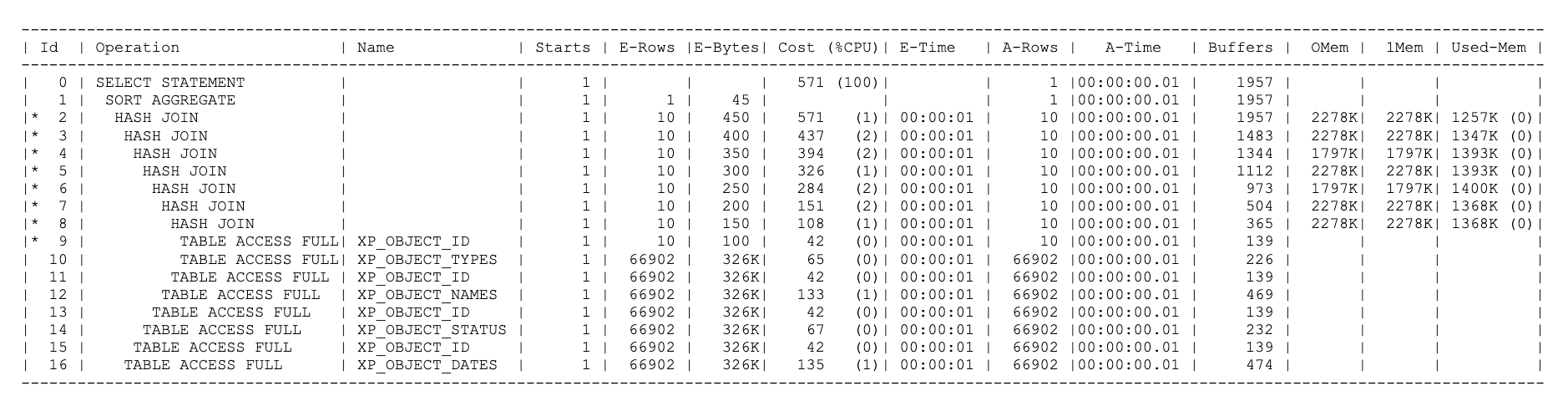
A TABLE ACCESS FULL on each table in the view will not provide optimal performance for this query.
It is also quite obvious that this is a view. Checking on the view definition, the following SQL is shown:
  1  select  text
   2  from all_views
   3* where view_name like 'XP_OBJECTS_V'
 /

 TEXT
 --------------------------------------------------------------------------------
 select
         t.owner
         , t.object_id
         , t.object_type
         , n.object_name
         , s.status
         , d.created
         , d.last_ddl_time
 from  xp_object_id_type_v t
 join xp_object_id_name_v n on n.object_id = t.object_id
 join xp_object_id_status_v s on s.object_id = t.object_id
 join xp_object_id_dates_v d on d.object_id = t.object_id


 1 row selected.
As you now know, that initial SQL statement does not tell the whole story, as the full SQL query is 196 lines of SQL.
While the column aliases created by dbms_utility.expand_sql_text may make the SQL somewhat difficult to read, that inconvenience is offset by the knowledge gained about the true nature of what at first appeared to be a simple SQL statement.
The expanded SQL will help you better understand the SQL execution plan, as almost nothing in the plan will correlate to select * from xp_objects_v;
The expanded SQL can also be executed directly from SQL*Plus. Having the full SQL does simplify the tuning effort somewhat.
Here is a link to documentation for full details: dbms_utility.expand_sql_text.
The next time you need to work on tuning the performance of a view, give dbms_utility.expand_sql_text a try to see what you are really working with.
Oracle Database Consulting Services
Ready to optimize your Oracle Database for the future?
Share this
Share this

Controlling Oracle Fetch Sizes with Oraaccess.xml


.svg)
.svg)