



A brief background on RAM cache or in-memory OLTP acceleration
In this post I will present a feature — to simplify let's call it RAM cache — introduced in Oracle Exadata Storage Server image 18.1. You've probably heard a lot about the new Oracle Exadata X8M and its Intel Optane DC Persistent Memory (PMem). This new feature + architecture allows the database processes running on the database servers to remotely read and write through a protocol called Remote Direct Memory Access (RDMA) from / to the PMem cards in the storage servers. You can find the detailed Oracle Exadata X8M deployment process here. It's true that RDMA has existed in the Oracle Exadata architecture from the beginning, as Oracle points out in their blog post titled, Introducing Exadata X8M: In-Memory Performance with All the Benefits of Shared Storage for both OLTP and Analytics:RDMA was introduced to Exadata with InfiniBand and is a foundational part of Exadata's high-performance architecture.
What you may not know, is there's a feature called in-memory OLTP acceleration (or simply RAM cache) which was introduced in the Oracle Exadata Storage Server image 18.1.0.0.0 when Oracle Exadata X7 was released. This feature allows read access to the storage server RAM on any Oracle Exadata system (X6 or higher) running that version or above. Although, this is not the same as PMem, since RAM is not persistent, it is still very cool since it allows you to take advantage of the RAM available in the storage servers.
Modern generations of Exadata storage servers come with a lot of RAM available. By comparison, X8 and X7 come with 192GB of RAM by default, as opposed to the 128GB of RAM that came with X6. Unfortunately, the RAM cache feature is only available on storage servers X6 or higher and these are the requirements:
- Oracle Exadata System Software 18c (18.1.0).
- Oracle Exadata Storage Server X6, X7 or X8.
- Oracle Database version 12.2.0.1 April 2018 DBRU, or 18.1 or higher.
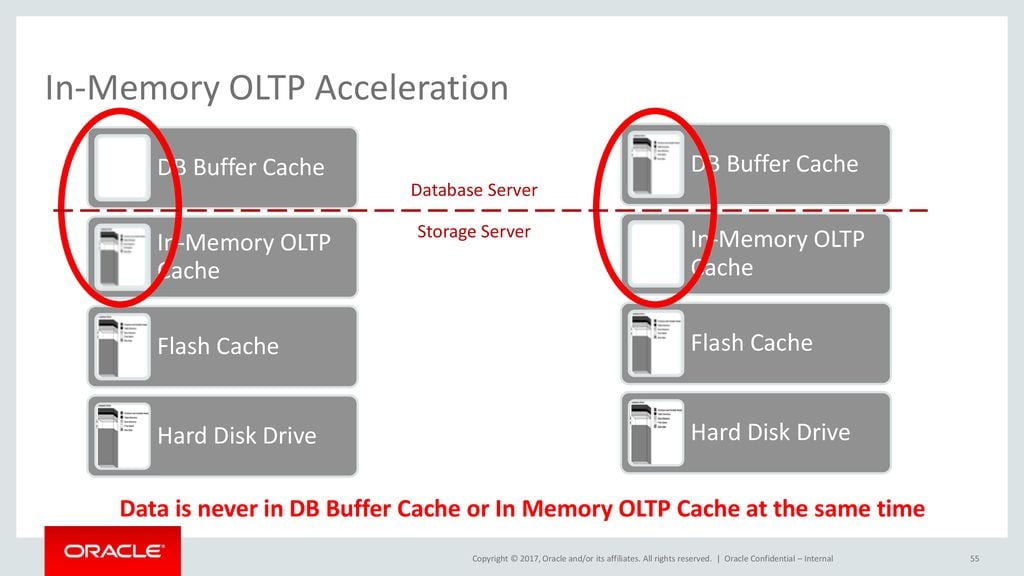
For OLTP workloads Exadata uniquely implements In-Memory OLTP Acceleration. This feature utilizes the memory installed in Exadata Storage Servers as an extension of the memory cache (buffer cache) on database servers. Specialized algorithms transfer data between the cache on database servers and in-memory cache on storage servers. This reduces the IO latency to 100 us for all IOs served from in-memory cache. Exadata’s (sic) uniquely keeps only one in-memory copy of data across database and storage servers, avoiding memory wastage from caching the same block multiple times. This greatly improves both efficiency and capacity and is only possible because of Exadata’s unique end-to-end integration.
How I set up RAM cache in the Exadata storage servers
As I mentioned previously, the recent generation of Oracle Exadata storage servers come with a lot of RAM. This RAM is normally not used at its fullest by the cellsrv services and features. Having said that, I normally take into consideration the amount of free memory (RAM) in the storage servers. First, I pick the storage server using the most RAM and do the math: freemem*0.7=RAM cache value. Next, I set the RAM cache to 70 percent of the free memory of the storage server using more RAM than the others. Note: I avoid using all the free memory for the RAM cache in case the storage server requires more memory for storage indexes or other needs in the future. Let's say my busiest storage server has 73GB of free memory. Applying the formula we get to: 73*0.7=51.1GB. Oracle Exadata architecture was built to spread the workload evenly across the entire storage grid, so you'll notice that the storage servers use pretty much the same amount of memory (RAM). Here comes the action and fun. We must first check how much memory is available in our storage servers by running this from dcli (make sure your cell_group file is up-to-date): [code] [root@exadbadm01 ~]# dcli -l root -g cell_group free -g [/code] In my case the cel01 is the storage server using more memory than others. Let's check some details of this storage server: [code] [root@exaceladm01 ~]# cellcli CellCLI: Release 19.2.7.0.0 - Production on Thu Aug 06 07:44:59 CDT 2020 Copyright (c) 2007, 2016, Oracle and/or its affiliates. All rights reserved. CellCLI> LIST CELL DETAIL name: exaceladm01 accessLevelPerm: remoteLoginEnabled bbuStatus: normal cellVersion: OSS_19.2.7.0.0_LINUX.X64_191012 cpuCount: 24/24 diagHistoryDays: 7 fanCount: 8/8 fanStatus: normal flashCacheMode: WriteBack flashCacheCompress: FALSE httpsAccess: ALL id: 1446NM508U interconnectCount: 2 interconnect1: bondib0 iormBoost: 0.0 ipaddress1: 192.168.10.13/22 kernelVersion: 4.1.12-124.30.1.el7uek.x86_64 locatorLEDStatus: off makeModel: Oracle Corporation SUN SERVER X7-2L High Capacity memoryGB: 94 metricHistoryDays: 7 notificationMethod: mail,snmp notificationPolicy: critical,warning,clear offloadGroupEvents: powerCount: 2/2 powerStatus: normal ramCacheMaxSize: 0 ramCacheMode: Auto ramCacheSize: 0 releaseImageStatus: success releaseVersion: 19.2.7.0.0.191012 rpmVersion: cell-19.2.7.0.0_LINUX.X64_191012-1.x86_64 releaseTrackingBug: 30393131 rollbackVersion: 19.2.2.0.0.190513.2 smtpFrom: "exadb Exadata" smtpFromAddr: exaadmin@loredata.com.br smtpPort: 25 smtpServer: mail.loredata.com.br smtpToAddr: support@loredata.com.br smtpUseSSL: FALSE snmpSubscriber: host=10.200.55.182,port=162,community=public,type=asr,asrmPort=16161 status: online temperatureReading: 23.0 temperatureStatus: normal upTime: 264 days, 8:48 usbStatus: normal cellsrvStatus: running msStatus: running rsStatus: running [/code] From the output above we can see that the parameter ramCacheMode is set to auto while ramCacheMaxSize and ramCacheSize are 0. These are the default values and mean the RAM cache feature is not enabled. This storage server has ~73GB of free / available memory (RAM): [code] [root@exaceladm01 ~]# free -m total used free shared buff/cache available Mem: 96177 15521 72027 4796 8628 75326 Swap: 2047 0 2047 [/code] Now we can enable the RAM cache feature by changing the parameter ramCacheMode to "On": [code] CellCLI> ALTER CELL ramCacheMode=on Cell exaceladm01 successfully altered [/code] Immediately after the change we check the free / available memory (RAM) in the storage server operation system: [code] [root@exaceladm01 ~]# free -m total used free shared buff/cache available Mem: 96177 15525 72059 4796 8592 75322 Swap: 2047 0 2047 [/code] Not much has changed, because the memory remains available for the storage server to use for RAM cache. However, when we enable the RAM cache feature, the storage server will not automatically allocate / use this memory. We can see that only 10GB was defined in the ramCacheMaxSize and ramCacheSize parameters: [code] CellCLI> LIST CELL DETAIL name: exaceladm01 accessLevelPerm: remoteLoginEnabled bbuStatus: normal cellVersion: OSS_19.2.7.0.0_LINUX.X64_191012 cpuCount: 24/24 diagHistoryDays: 7 fanCount: 8/8 fanStatus: normal flashCacheMode: WriteBack flashCacheCompress: FALSE httpsAccess: ALL id: 1446NM508U interconnectCount: 2 interconnect1: bondib0 iormBoost: 0.0 ipaddress1: 192.168.10.13/22 kernelVersion: 4.1.12-124.30.1.el7uek.x86_64 locatorLEDStatus: off makeModel: Oracle Corporation SUN SERVER X7-2L High Capacity memoryGB: 94 metricHistoryDays: 7 notificationMethod: mail,snmp notificationPolicy: critical,warning,clear offloadGroupEvents: powerCount: 2/2 powerStatus: normal ramCacheMaxSize: 10.1015625G ramCacheMode: On ramCacheSize: 10.09375G releaseImageStatus: success releaseVersion: 19.2.7.0.0.191012 rpmVersion: cell-19.2.7.0.0_LINUX.X64_191012-1.x86_64 releaseTrackingBug: 30393131 rollbackVersion: 19.2.2.0.0.190513.2 smtpFrom: "exadb Exadata" smtpFromAddr: exaadmin@loredata.com.br smtpPort: 25 smtpServer: mail.loredata.com.br smtpToAddr: support@loredata.com.br smtpUseSSL: FALSE snmpSubscriber: host=10.200.55.182,port=162,community=public,type=asr,asrmPort=16161 status: online temperatureReading: 23.0 temperatureStatus: normal upTime: 264 days, 8:49 usbStatus: normal cellsrvStatus: running msStatus: running rsStatus: running [/code] To confirm we can run the following query from cellcli: [code] CellCLI> LIST CELL ATTRIBUTES ramCacheMaxSize,ramCacheMode, ramCacheSize 10.1015625G On 10.09375G [/code] To reduce the memory used by the RAM cache feature we can simply change the ramCacheMaxSize parameter: [code] CellCLI> ALTER CELL ramCacheMaxSize=5G; Cell exaceladm01 successfully altered [/code] If we check the values of the RAM cache parameters we will see this: [code] CellCLI> LIST CELL ATTRIBUTES ramCacheMaxSize,ramCacheMode, ramCacheSize 5G On 0 [/code] As soon as the database blocks start being copied to the RAM cache we will see the ramCacheSize value increasing: [code] CellCLI> LIST CELL ATTRIBUTES ramCacheMaxSize,ramCacheMode, ramCacheSize 5G On 3.9250G [/code] Increasing a bit more: [code] CellCLI> ALTER CELL ramCacheMaxSize=15G; Cell exaceladm01 successfully altered [/code] When checking, you'll notice it takes a while for the cellsrv to populate the RAM cache with blocks copied from the flash cache: [code] CellCLI> LIST CELL ATTRIBUTES ramCacheMaxSize,ramCacheMode, ramCacheSize 15G On 0 CellCLI> LIST CELL ATTRIBUTES ramCacheMaxSize,ramCacheMode, ramCacheSize 15G On 11.8125G CellCLI> LIST CELL ATTRIBUTES ramCacheMaxSize,ramCacheMode, ramCacheSize 15G On 15G [/code] Re-setting to auto makes everything clear again: [code] CellCLI> ALTER CELL ramCacheMode=Auto Cell exaceladm01 successfully altered CellCLI> LIST CELL ATTRIBUTES ramCacheMaxSize,ramCacheMode, ramCacheSize 0 Auto 0 [/code] Now we adjust to the value we got from our calculation of 70 percent of the free memory: [code] CellCLI> ALTER CELL ramCacheMode=On Cell exaceladm01 successfully altered CellCLI> ALTER CELL ramCacheMaxSize=51G Cell exaceladm01 successfully altered CellCLI> LIST CELL ATTRIBUTES ramCacheMaxSize,ramCacheMode, ramCacheSize 51G On 32.8125G CellCLI> LIST CELL ATTRIBUTES ramCacheMaxSize,ramCacheMode, ramCacheSize 51G On 35.2500G CellCLI> LIST CELL ATTRIBUTES ramCacheMaxSize,ramCacheMode, ramCacheSize 51G On 51G [/code] With that configuration in place, if we want to be notified if the storage server is running out memory we can quickly create a threshold based on the cell memory utilization (CL_MEMUT) metric to notify us when the memory utilization goes beyond 95 percent: [code] CellCLI> CREATE THRESHOLD CL_MEMUT.interactive comparison=">", critical=95 [/code]Conclusion
To sum up, RAM cache (aka, in-memory OLTP acceleration) is a feature available only on Oracle Exadata Database Machine X6 or higher with at least the 18.1 image. In addition, it's available for the Oracle Database 12.2.0.1 with April 2018 DBRU or higher. This feature helps extend the database buffer cache to the free RAM in the storage servers, but only for read operations, since RAM is not persistent. For persistent memory, Oracle introduced the Persistent Memory Cache with Oracle Exadata Database Machine X8M. It's worth mentioning that a database will only leverage RAM cache when there is pressure on the database buffer cache. The data blocks present in the RAM cache are persistently stored in the storage server's flash cache. When a server process on the database side requests a block that is no longer stored in the database buffer cache, but is in the RAM cache, the cellsrv will send this block from the RAM cache to the buffer cache for the server process to read it. It is faster to read from the RAM cache instead of reading it from the flash cache or disk. While the in-memory OLTP acceleration feature is not a magic solution, it is a plus for our Exadata system. Since we almost always see free memory in the storage server, this is a way of optimizing the resources we've already paid for. This feature is already in the Exadata licenses, so there is no extra cost option, and it is not related to the database in-memory option. Having Exadata is all you need. Happy caching! See you next time! Franky
References:
- https://www.loredata.com.br/blog/exadata-how-to-enable-ram-cache-in-the-storage-servers
- https://docs.oracle.com/en/engineered-systems/exadata-database-machine/dbmmn/maintaining-exadata-storage-servers.html#GUID-344A8D7D-AFCD-4B44-ABDD-EAF65483163A
- https://docs.oracle.com/en/engineered-systems/exadata-database-machine/dbmso/new-features-exadata-system-software-release-18.html#GUID-2FA29E52-D72B-4235-8B1E-57B38966EB11
- https://blogs.oracle.com/exadata/exadata-x8m
- https://www.oracle.com/technetwork/database/exadata/exadata-x7-2-ds-3908482.pdf
- https://slideplayer.com/slide/14351522/
Oracle Database Consulting Services
Ready to optimize your Oracle Database for the future?
Share this
Share this
Unofficial Oracle Database Appliance FAQ


.svg)
.svg)