


Update 2015-May-11: Jean-Michael
dug up another Amazon Web Services document that offers up a different definition of virtual cores that may affect license requirements on AWS at least First of all a disclaimer: I don't work for Oracle nor do I speak for them. I believe this information to be correct, but for licensing questions, Oracle themselves have the final word. With that out of the way, followers of this blog may have seen some of the results from my testing of actual CPU capacity with public clouds like
Amazon Web Services,
Microsoft Azure, and
Google Compute Engine. In each of these cases, a CPU "core" was actually measured to be equivalent to an x86 HyperThread, or half a physical core. So when provisioning public cloud resources, it's important to include twice as many CPU cores as the equivalent physical hardware. The low price and elasticity of public cloud infrastructure can however offset this differential, and still result in a cost savings over physical hardware. One place this difference in CPU core calculation can have a significant impact, however, is software licensing. In this post I'll look at Oracle database licensing in particular.
Oracle databases can be licensed using many metrics, including unlimited use agreements, embedded licenses, evaluation/developer licenses, partner licenses, and many more. But for those without a special agreement in place with Oracle, there are two ways to license products: Named User Plus (NUP) and processor licenses. NUP licenses are per-seat licenses which have a fixed cost per physical user or non-user device. The definition of a user is very broad, however. Quoting the Oracle
Software Investment Guide:
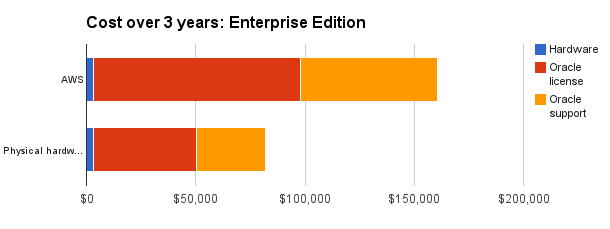
 If we were to use Oracle Enterprise edition (excluding any options or discounts), that becomes an extra $157,700. Not small change anymore.
So before you make the jump to put your Oracle databases on a public cloud, check your CPU core counts to avoid unexpected licensing surprises.
If we were to use Oracle Enterprise edition (excluding any options or discounts), that becomes an extra $157,700. Not small change anymore.
So before you make the jump to put your Oracle databases on a public cloud, check your CPU core counts to avoid unexpected licensing surprises.
Named User Plus includes both humans and non-human operated devices. All human users and non-human operated devices that are accessing the program must be licensed. A non-human operated device can be many things, such as a temperature-monitoring device. It is important to note that if the device is operated by a person, then this person must be licensed. As described in illustration #1, the 400 employees who are operating the 30 forklifts must be licensed because the forklift is not a “non-human operated device”.So, if the application has any connection outside the organization (batch data feeds and public web users would be examples), it's very difficult to fit the qualifications to count as NUP licenses. Now, this leaves per-processor licenses, using processor cores that can potentially run the database software as licensing metric. When running in a public cloud, however, there is an immediate issue, which is your Oracle instance could presumably run on any of the thousands of servers owned by the cloud provider, so unique physical processors are virtually impossible to count. Fortunately, Oracle has provided a way to properly license Oracle software in public cloud environments: Licensing Oracle Software in the Cloud Computing Environment. It sets out a few requirements, including:
- Amazon EC2, Amazon S3, and Microsoft Azure are covered under the policy.
- There are limits to the counting of sockets and the number of cores per instance for Standard Edition and Standard Edition One.
- m3.2xlarge
- 8 virtual / 4 physical CPU cores (from an E5-2670 processor at 2.6GHz)
- 30GB RAM
- 2x80GB local SSD storage
- 3-year term
- A single quad-core E5-2623 v3 processor at 3GHz
- 32GB RAM
- Oracle standard edition one
- 2x120GB local SSD
- 3-year 24x7 4hr on-site service
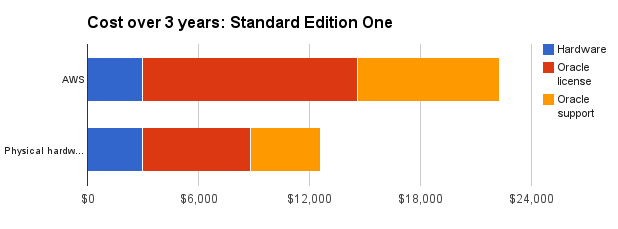 If we were to use Oracle Enterprise edition (excluding any options or discounts), that becomes an extra $157,700. Not small change anymore.
 So before you make the jump to put your Oracle databases on a public cloud, check your CPU core counts to avoid unexpected licensing surprises.
On this page
Share this
Share this
Using Oracle Linux Virtualization Manager (OLVM) to Restrict Cores

Using Oracle Linux Virtualization Manager (OLVM) to Restrict Cores
Feb 17, 2023 12:00:00 AM
5
min read
How to Reduce Exadata Core Count
![]()
How to Reduce Exadata Core Count
Sep 25, 2019 12:00:00 AM
1
min read
Pythian and Oracle Big Data Appliance

Pythian and Oracle Big Data Appliance
Dec 9, 2025 3:00:26 PM
11
min read

.svg)
.svg)