


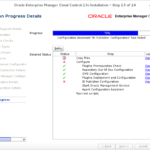
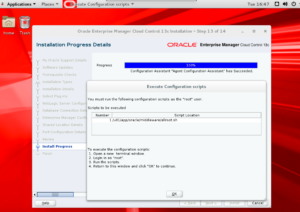
 This is going to be a short post as there wasn't much information on this type of failure when searching for it. Also, the IP's are changed due to security reasons I was working on an Oracle EM13cR2 installation and when the installation reached 78%, it failed on the BI Publisher configuration. First, I looked at the CfmLogger log. [bash] INFO: oracle.sysman.top.oms:WLST offline debugging is in the file: /u01/app/oracle/middleware/cfgtoollogs/bip/bipca_20170613152059.log.wlst_20170613152122.trc INFO: oracle.sysman.top.oms:Securing BI Publisher to work with Enterprise Manager INFO: oracle.sysman.top.oms:Locking Enterprise Manager ... INFO: oracle.sysman.top.oms:OMS Console is locked. Access the console over HTTPS ports. INFO: oracle.sysman.top.oms:BI Publisher is locked. Access BI Publisher over HTTPS ports. INFO: oracle.sysman.top.oms:Restart OMS. INFO: oracle.sysman.top.oms:Restarting Enterprise Manager INFO: oracle.sysman.top.oms:Stopping Enterprise Manager, this can take some time ... INFO: oracle.sysman.top.oms:Starting BI Publisher ... INFO: oracle.sysman.top.oms:Failed to start Enterprise Manager. Diagnostic code 1. INFO: oracle.sysman.top.oms:See log at /u01/app/oracle/middleware/cfgtoollogs/bip/bipca_20170613152059.log for details. INFO: oracle.sysman.top.oms:Error extending domain INFO: oracle.sysman.top.oms:See log at /u01/app/oracle/middleware/cfgtoollogs/bip/bipca_20170613152059.log for details. INFO: oracle.sysman.top.oms:java.lang.Exception: See log at /u01/app/oracle/middleware/cfgtoollogs/bip/bipca_20170613152059.log for details. INFO: oracle.sysman.top.oms: at oracle.sysman.sdkImpl.core.ip.model.bipca.BIPCA.extendDomainWithBIP(BIPCA.java:3401) INFO: oracle.sysman.top.oms: at oracle.sysman.sdkImpl.core.ip.model.bipca.BIPCA.main(BIPCA.java:1973) [/bash] When this led me to the bipca.log , it referenced the details below (which really didn't tell me much): [bash] [2017-05-09T21:55:17.585-07:00] [sysman] [ERROR] [] [oracle.sysman.bipca] [host: OracleEntMgr] [nwaddr: 192.168.51.10] [tid: 1] [userId: oracle] [ecid: a4412d2a-def5-49d8-ac27-1046c7243de9-00000001,0] [SRC_CLASS: oracle.sysman.sdkImpl.core.ip.model.bipca.BIPCA] [SRC_METHOD: handleFatalError] Error extending domain [2017-05-09T21:55:17.586-07:00] [sysman] [ERROR] [] [oracle.sysman.bipca] [host: OracleEntMgr] [nwaddr: 192.168.51.10] [tid: 1] [userId: oracle] [ecid: a4412d2a-def5-49d8-ac27-1046c7243de9-00000001,0] [SRC_CLASS: oracle.sysman.sdkImpl.core.ip.model.bipca.BIPCA] [SRC_METHOD: handleFatalError] Fatal error:[[ java.lang.Exception: See log at /u01/app/oracle/middleware/cfgtoollogs/bip/bipca_20170509214828.log for details. at oracle.sysman.sdkImpl.core.ip.model.bipca.BIPCA.extendDomainWithBIP(BIPCA.java:3401) at oracle.sysman.sdkImpl.core.ip.model.bipca.BIPCA.main(BIPCA.java:1973) [/bash] A review of the bipca trace file didn't tell me much about why the configuration was failing: [bash] 2017-05-24 09:26:51,250 FINE [1] com.oracle.cie.domain.jdbc.DatasourceXBeanAspectHelper - Selected DB vendor: Oracle 2017-05-24 09:26:51,250 FINE [1] com.oracle.cie.domain.jdbc.DatasourceXBeanAspectHelper - adding normal datasource: emgc-mgmt_view-pool 2017-05-24 09:26:51,250 FINE [1] com.oracle.cie.domain.jdbc.DatasourceXBeanAspectHelper - datasource: emgc-mgmt_view-pool component name: null 2017-05-24 09:26:51,251 FINE [1] com.oracle.cie.domain.jdbc.DatasourceXBeanAspectHelper - Found normal datasource: emgc-sysman-pool 2017-05-24 09:26:51,253 FINE [1] com.oracle.cie.domain.jdbc.DatasourceXBeanAspectHelper - Decomposing url: jdbc:oracle:thin:@(DESCRIPTION=(ADDRESS_LIST=(ADDRESS=(PROTOCOL=TCP)(HOST=dbhost)(PORT=1521)))(CONNECT_DATA=(SID=emrep))) for driver: oracle.jdbc.OracleDriver 2017-05-24 09:26:51,253 FINE [1] com.oracle.cie.domain.jdbc.DatasourceXBeanAspectHelper - There is an unsupported jdbc URL or JDBC driver is detected. See Stack trace: java.lang.NullPointerException at com.oracle.cie.domain.jdbc.DatasourceXBeanAspectHelper.decomposeURL(DatasourceXBeanAspectHelper.java:316) at java.lang.reflect.Method.invoke(Method.java:606) at weblogic.WLST.main(WLST.java:29) 2017-05-24 09:26:51,253 FINE [1] com.oracle.cie.domain.jdbc.DatasourceXBeanAspectHelper - Found normal datasource: jvmd-ds 2017-05-24 09:26:51,255 FINE [1] com.oracle.cie.domain.jdbc.DatasourceXBeanAspectHelper - Decomposing url: jdbc:oracle:thin:@(DESCRIPTION=(ADDRESS_LIST=(ADDRESS=(PROTOCOL=TCP)(HOST=dbhost)(PORT=1521)))(CONNECT_DATA=(SID=emrep))) for driver: oracle.jdbc.OracleDriver 2017-05-24 09:26:51,255 FINE [1] com.oracle.cie.domain.jdbc.DatasourceXBeanAspectHelper - There is an unsupported jdbc URL or JDBC driver is detected. See Stack trace: java.lang.NullPointerException at com.oracle.cie.domain.jdbc.DatasourceXBeanAspectHelper.decomposeURL(DatasourceXBeanAspectHelper.java:316) at org.python.pycode._pyx95.updateDomain$21(/tmp/WLSTOfflineIni822569357732826272.py:103) at org.python.pycode._pyx95.call_function(/tmp/WLSTOfflineIni822569357732826272.py) at org.python.core.PyTableCode.call(Unknown Source) at org.python.core.PyTableCode.call(Unknown Source) at org.python.core.PyFunction.__call__(Unknown Source) [/bash] After reading for a while and working back and forth with Oracle, we identified the problem. The host wasn't resolving via nslookup. Though we were able to ping it, what nslookup does is query a DNS domain nameserver to lookup and find IP address and it , so what we had to do was fix this : [bash] [oracle@dbhost ~]# nslookup dbhost Server: 128.101.1.256 Address: 128.101.1.256#53 Name: dbhost Address: 128.101.1.1 [/bash] Once we fixed this, we were able to install EM13cR2 successfully.
 Note:This was originally published on
rene-ace.com
Note:This was originally published on
rene-ace.com
On this page
Share this
Share this
How to Use EM CLI to Verify Data Guard Configurations
![]()
How to Use EM CLI to Verify Data Guard Configurations
Jul 22, 2021 12:00:00 AM
3
min read
Part Three: Deploying High Available Applications in Oracle Cloud Infrastructure – Instance Clone and Linux Storage Appliance

Part Three: Deploying High Available Applications in Oracle Cloud Infrastructure – Instance Clone and Linux Storage Appliance
Sep 20, 2021 12:00:00 AM
6
min read
How to Test Data Guard Fast-Start Failover by Shutting Down Primary Server
![]()
How to Test Data Guard Fast-Start Failover by Shutting Down Primary Server
Jan 20, 2020 12:00:00 AM
9
min read

.svg)
.svg)