


"Good artists copy, great artists steal" - Pablo Picasso
I am currently using Vagrant boxes from Mikael Sandström (oravirt) and unfortunately, it did not have X11 configured. Typically, using CLI is better for automation; however, there may come a time where it's better to have visual. This led to a journey to configure X11 for Vagrant box.
Environment Status: Two-Node RAC
Configuration is two nodes RAC:
dinh@CMWPHV1 MINGW64 /d/Vagrant/vagrant-vbox-rac (master) $ vagrant status Current machine states: racnode-dc1-2 running (virtualbox) racnode-dc1-1 running (virtualbox) This environment represents multiple VMs. The VMs are all listed above with their current state. For more information about a specific VM, run `vagrant status NAME`. Step 1: Installing Required X11 Packages
Install xorg-x11-apps, xauth, and xorg-x11-fonts* for all servers.
[vagrant@racnode-dc1-2 ~]$ sudo su - Last login: Fri Mar 29 14:38:39 CET 2019 on pts/0 [root@racnode-dc1-2 ~]# yum install xorg-x11-apps xauth xorg-x11-fonts* ==================================================================================================================================== Package Arch Version Repository Size ==================================================================================================================================== Installing: xorg-x11-apps x86_64 7.7-7.el7 ol7_latest 307 k xorg-x11-fonts-100dpi noarch 7.5-9.el7 ol7_latest 3.1 M xorg-x11-fonts-75dpi noarch 7.5-9.el7 ol7_latest 2.8 M xorg-x11-fonts-ISO8859-1-100dpi noarch 7.5-9.el7 ol7_latest 1.1 M xorg-x11-fonts-ISO8859-1-75dpi noarch 7.5-9.el7 ol7_latest 932 k xorg-x11-fonts-ISO8859-14-100dpi noarch 7.5-9.el7 ol7_latest 1.0 M xorg-x11-fonts-ISO8859-14-75dpi noarch 7.5-9.el7 ol7_latest 905 k xorg-x11-fonts-ISO8859-15-75dpi noarch 7.5-9.el7 ol7_latest 932 k xorg-x11-fonts-ISO8859-2-100dpi noarch 7.5-9.el7 ol7_latest 1.0 M xorg-x11-fonts-ISO8859-2-75dpi noarch 7.5-9.el7 ol7_latest 901 k xorg-x11-fonts-ISO8859-9-100dpi noarch 7.5-9.el7 ol7_latest 1.1 M xorg-x11-fonts-ISO8859-9-75dpi noarch 7.5-9.el7 ol7_latest 930 k xorg-x11-fonts-Type1 noarch 7.5-9.el7 ol7_latest 521 k xorg-x11-fonts-cyrillic noarch 7.5-9.el7 ol7_latest 396 k xorg-x11-fonts-ethiopic noarch 7.5-9.el7 ol7_latest 150 k xorg-x11-fonts-misc noarch 7.5-9.el7 ol7_latest 5.8 M Installing for dependencies: libfontenc x86_64 1.1.3-3.el7 ol7_latest 30 k libpng x86_64 2:1.5.13-7.el7_2 ol7_latest 212 k libxkbfile x86_64 1.0.9-3.el7 ol7_latest 82 k ttmkfdir x86_64 3.0.9-42.el7 ol7_latest 47 k xorg-x11-font-utils x86_64 1:7.5-21.el7 ol7_latest 104 k Transaction Summary ==================================================================================================================================== Install 16 Packages (+5 Dependent packages) Total download size: 22 M Installed size: 25 M Is this ok [y/d/N]: Y Complete! [root@racnode-dc1-2 ~]# Step 2: Configuring SSH and Oracle User Profile
Configure X11 for all servers.
[root@racnode-dc1-2 ~]# grep -i x11 /etc/ssh/sshd_config X11Forwarding yes #X11DisplayOffset 10 #X11UseLocalhost yes # X11Forwarding no [root@racnode-dc1-2 ~]# vi /etc/ssh/sshd_config [root@racnode-dc1-2 ~]# grep -i x11 /etc/ssh/sshd_config X11Forwarding yes X11DisplayOffset 10 X11UseLocalhost yes # X11Forwarding no [root@racnode-dc1-2 ~]# systemctl restart sshd.service [root@racnode-dc1-2 ~]# [oracle@racnode-dc1-2 ~]$ vi .bash_profile [oracle@racnode-dc1-2 ~]$ cat .bash_profile # .bash_profile # Get the aliases and functions if [ -f ~/.bashrc ]; then . ~/.bashrc fi # User specific environment and startup programs export PATH=$PATH:$HOME/.local/bin:$HOME/bin export DISPLAY=127.0.0.1:10.0 [oracle@racnode-dc1-2 ~]$ Step 3: Updating the Vagrantfile
Update Vagrantfile to add:
config.ssh.forward_agent = true config.ssh.forward_x11 = true Example: -------------------------------------------------------------------------------- # Create VM's Vagrant.configure(VAGRANTFILE_API_VERSION) do |config| config.ssh.insert_key = false config.ssh.forward_agent = true config.ssh.forward_x11 = true -------------------------------------------------------------------------------- Step 4: Reloading and Verifying the Configuration
Reload vagrant and verify X11 configuration:
dinh@CMWPHV1 MINGW64 /d/Vagrant/vagrant-vbox-rac (master) $ vagrant reload dinh@CMWPHV1 MINGW64 /d/Vagrant/vagrant-vbox-rac (master) $ vagrant ssh-config Host racnode-dc1-2 HostName 127.0.0.1 User vagrant Port 2222 *** UserKnownHostsFile /dev/null StrictHostKeyChecking no PasswordAuthentication no IdentityFile C:/Users/dinh/.vagrant.d/insecure_private_key IdentitiesOnly yes LogLevel FATAL ForwardAgent yes *** ForwardX11 yes *** Host racnode-dc1-1 HostName 127.0.0.1 User vagrant Port 2200 *** UserKnownHostsFile /dev/null StrictHostKeyChecking no PasswordAuthentication no IdentityFile C:/Users/dinh/.vagrant.d/insecure_private_key IdentitiesOnly yes LogLevel FATAL ForwardAgent yes *** ForwardX11 yes *** Final Test: Connecting and Launching X11 Apps
Connect as Oracle to test X11 using the correct port for the host (racnode-dc1-2):
dinh@CMWPHV1 MINGW64 /d/Vagrant/vagrant-vbox-rac (master) $ ssh -XY -v oracle@127.0.0.1 -p 2222 -i C:/Users/dinh/.vagrant.d/insecure_private_key OpenSSH_7.9p1, OpenSSL 1.1.1a 20 Nov 2018 debug1: Reading configuration data /etc/ssh/ssh_config debug1: Connecting to 127.0.0.1 [127.0.0.1] port 2222. debug1: Connection established. ... debug1: Requesting X11 forwarding with authentication spoofing. Last login: Fri Mar 29 14:54:53 2019 ---------------------------------------- Welcome to racnode-dc1-2 OracleLinux 7.3 x86_64 FQDN: racnode-dc1-2.internal.lab IP: 10.0.2.15 Processor: Intel(R) Core(TM) i7-2640M CPU @ 2.80GHz #CPU's: 2 Memory: 5709 MB Kernel: 4.1.12-61.1.18.el7uek.x86_64 ---------------------------------------- /usr/bin/xauth: file /home/oracle/.Xauthority does not exist [oracle@racnode-dc1-2 ~]$ env|grep DISPLAY DISPLAY=127.0.0.1:10.0 [oracle@racnode-dc1-2 ~]$ xclock debug1: client_input_channel_open: ctype x11 rchan 3 win 65536 max 16384 debug1: client_request_x11: request from 127.0.0.1 36236 debug1: channel 1: new [x11] debug1: confirm x11 Warning: Missing charsets in String to FontSet conversion Here is a screen capture for running gridSetup.sh:
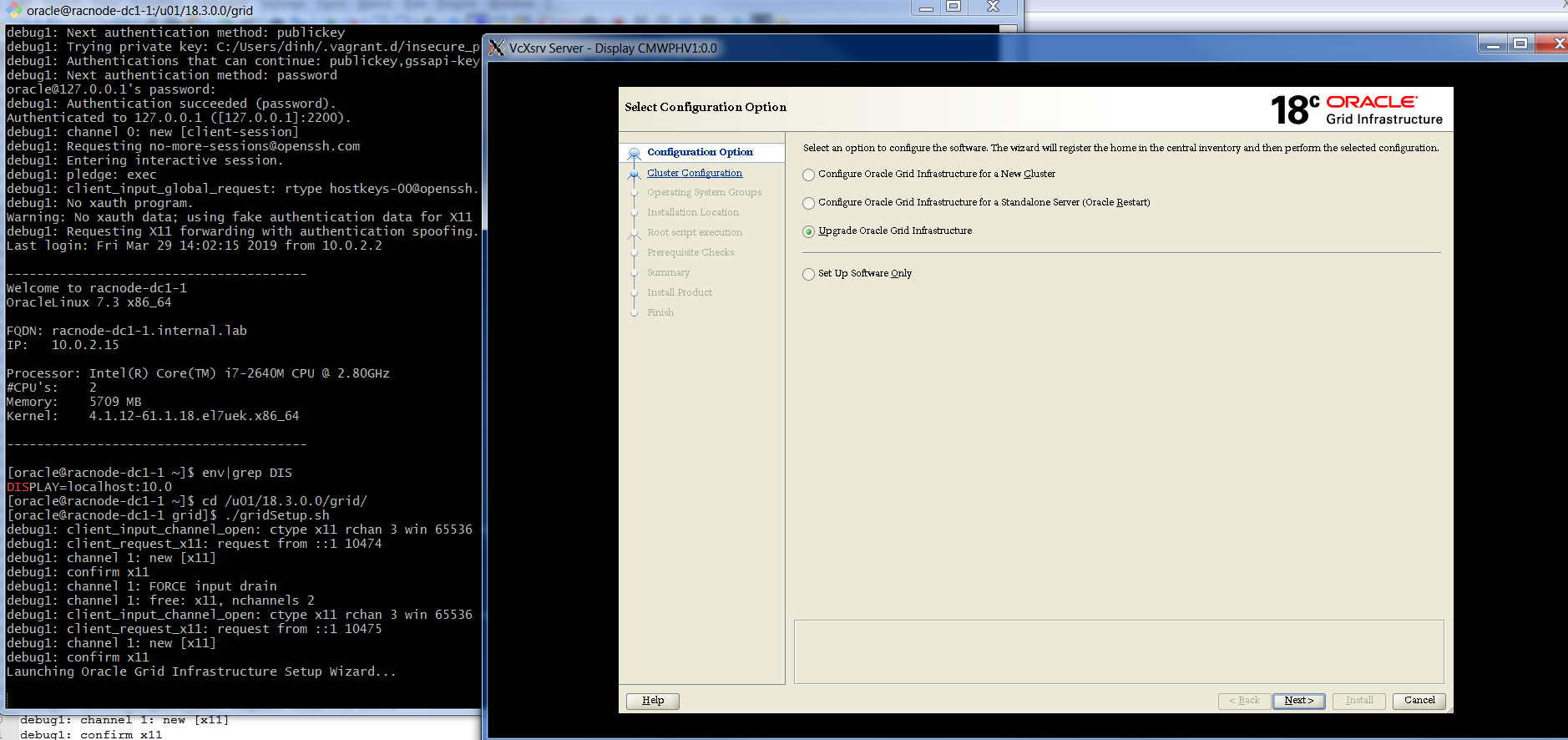
Conclusion
Having X11 configured will provide options to use CLI for GUI for installing Oracle software.
Oracle Database Consulting Services
Ready to optimize your Oracle Database for the future?
Share this
Share this


.svg)
.svg)