


Problem
You’re trying to create an SSIS Integration Catalog using SQL Server Management Studio for a SQL Server Instances dated 2016 or later. Upon right-clicking and choosing “Create Catalog, you see this error:
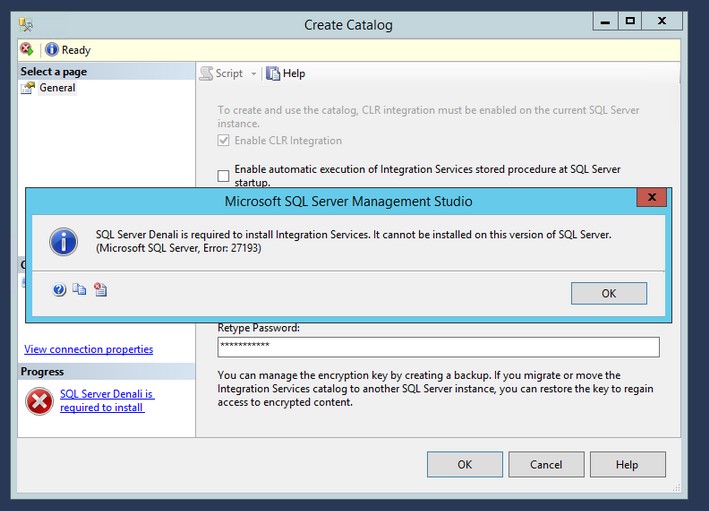
Cause
You get this error because you’re using SQL Server Management Studio 2012. SQL Server 2017 and later versions don’t come with SQL Server Management Studio during installation, so you’re likely using an old version from previous installations
Solution
Since SQL Server 2017, SQL Server Management Studio no longer comes with the SQL Server installation and has a separate life cycle. You can find information and download the Management Studio from here. Once you have the latest version of SQL Server Management Studio, you should be able to create a catalog without any issue.
Workaround
You can also create the SSIS Catalog through PowerShell. Here’s the code for that process:
# Load the IntegrationServices Assembly
[Reflection.Assembly]::LoadWithPartialName("Microsoft.SqlServer.Management.IntegrationServices")

# Store the IntegrationServices Assembly namespace to avoid typing it every time
$ISNamespace = "Microsoft.SqlServer.Management.IntegrationServices"

Write-Host "Connecting to server ..."

# Create a connection to the server
$sqlConnectionString = "Data Source=localhost;Initial Catalog=master;Integrated Security=SSPI;"
$sqlConnection = New-Object System.Data.SqlClient.SqlConnection $sqlConnectionString

# Create the Integration Services object
$integrationServices = New-Object $ISNamespace".IntegrationServices" $sqlConnection

# Provision a new SSIS Catalog
$catalog = New-Object $ISNamespace".Catalog" ($integrationServices, "SSISDB", "P@assword1")
$catalog.Create()
This will create the SSISDB on your instance, and you can proceed and manage your Integration Catalog.
For more information about SSIS and SSIS Catalogs, you can navigate here.
SQL Server Consulting Services
Ready to future-proof your SQL Server investment?
Share this
Share this


.svg)
.svg)