


Facing an InfiniBand error? Let me guess: Ports 03, 05, 06, 08, 09 and 12 are alerting? You have a Quarter Rack? Have recently installed Exadata plugin to version 12.1.0.3 or higher? Don't panic!
Understanding the "Polling for Peer Port" Alert
This is probably related to Bug 15937297: EM 12C HAS ERRORS CABLE IS PRESENT ON PORT 'N' BUT IT IS POLLING FOR PEER PORT. The full message might be something like " Cable is present on Port 6 but it is polling for peer port. This could happen when the peer port is unplugged/disabled". In fact, the bug that was closed was not a bug. Why? As part of the 12.1.0.3 Exadata plugin, the InfiniBand switch ports are now checked for non-terminated cables. So the errors 'polling for peer port' are the expected behavior. 'Polling for peer port' is an enhanced feature of the 12.1.0.3 plugin, which explains why you most likely did not see these errors until you upgraded the OMS to 12.1.0.2 and then updated the plugins. In Quarter Racks, ports 3, 5, 6, 8, 9 and 12 are usually cabled ahead of time, but not terminated. In some racks, port 32 may also be unterminated.
Diagnosing the Ports in OEM and CLI
When checking for an incident in OEM, you might see something like this image:

Or, if prefer, you can go on command line with a listlinkup on InfiniBand switch with ILOM CLI interface:
[root@exa1db2 ~]# ssh -l root exa1db2sw-ibb0
 You are now logged in to the root shell.
 It is recommended to use ILOM shell instead of root shell.
 All usage should be restricted to documented commands and documented
 config files.
 To view the list of documented commands, use "help" at linux prompt.
 [root@exa1db2sw-ibb0 ~]# listlinkup
 Connector 0A Not present
 Connector 1A Not present
 Connector 2A Not present
 Connector 3A Not present
 Connector 4A Not present
 Connector 5A Present Switch Port 30 is up (Enabled)
 Connector 6A Present Switch Port 35 is up (Enabled)
 Connector 7A Present Switch Port 33 is up (Enabled)
 Connector 8A Present Switch Port 31 is up (Enabled)
 Connector 9A Present Switch Port 14 is up (Enabled)
 Connector 10A Present Switch Port 16 is up (Enabled)
 Connector 11A Present Switch Port 18 is up (Enabled)
 Connector 12A Present Switch Port 11 is up (Enabled)
 Connector 13A Present Switch Port 09 is down (Enabled)
 Connector 14A Present Switch Port 07 is up (Enabled)
 Connector 15A Present Switch Port 05 is down (Enabled)
 Connector 16A Present Switch Port 03 is down (Enabled)
 Connector 17A Present Switch Port 01 is up (Enabled)
 Connector 0B Not present
 Connector 1B Not present
 Connector 2B Not present
 Connector 3B Not present
 Connector 4B Present Switch Port 27 is up (Enabled)
 Connector 5B Present Switch Port 29 is up (Enabled)
 Connector 6B Present Switch Port 36 is up (Enabled)
 Connector 7B Present Switch Port 34 is up (Enabled)
 Connector 8B Not present
 Connector 9B Present Switch Port 13 is up (Enabled)
 Connector 10B Present Switch Port 15 is up (Enabled)
 Connector 11B Present Switch Port 17 is up (Enabled)
 Connector 12B Present Switch Port 12 is down (Enabled)
 Connector 13B Present Switch Port 10 is up (Enabled)
 Connector 14B Present Switch Port 08 is down (Enabled)
 Connector 15B Present Switch Port 06 is down (Enabled)
 Connector 16B Present Switch Port 04 is up (Enabled)
 Connector 17B Present Switch Port 02 is up (Enabled)
How to Silence the Alerts
Because it is not a bug, there is no solution or workaround. Ok, but then how do we shush it? There are basically two options:
Option 1: Disable the Switch Port via CLI
1. Disable switch port with command disableportswitch as per the example below (complete reference guide at the end of this post):
# disableswitchport 13A
 Disable connector 13A Switch port 9 reason: Blacklist
 Initial PortInfo:
 # Port info: DR path slid 65535; dlid 65535; 0 port 9
 LinkState:.......................Down
 PhysLinkState:...................Polling
 LinkWidthSupported:..............1X or 4X
 LinkWidthEnabled:................1X or 4X
 LinkWidthActive:.................4X
 LinkSpeedSupported:..............2.5 Gbps or 5.0 Gbps or 10.0 Gbps
 LinkSpeedEnabled:................2.5 Gbps or 5.0 Gbps or 10.0 Gbps
 LinkSpeedActive:.................2.5 Gbps
 After PortInfo set:
 # Port info: DR path slid 65535; dlid 65535; 0 port 9
 LinkState:.......................Down
 PhysLinkState:...................Disabled
 #
Option 2: Adjust Metric Settings in OEM
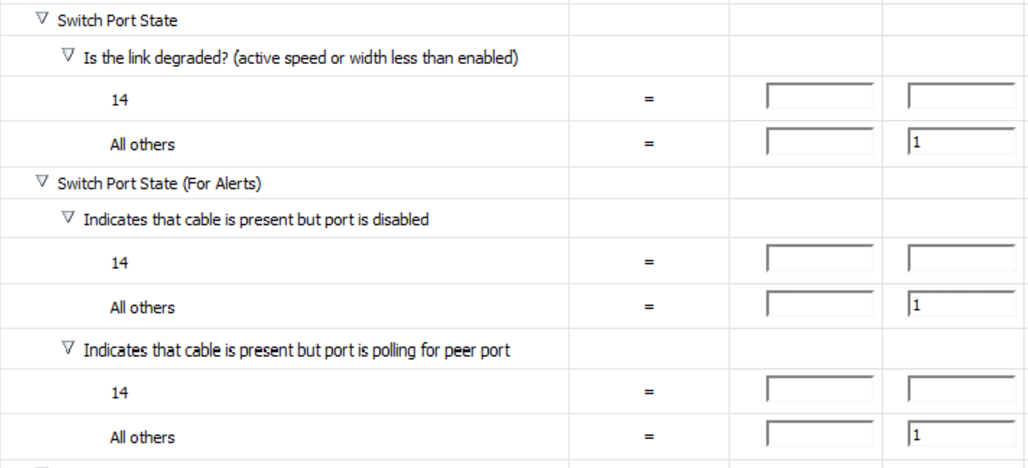
2. In OEM, go to InfiniBand Switch > Monitoring > Metric and Collections Settings. In " Switch Port State" click in "Edit Pencils" then click in " Add" to add a new option. For this new one, click in the magnifying glass in the Port Number column and add the ports you want to disable monitoring. Remember to let the thresholds empty. Repeat this process to all metrics under " Switch Port State". You'll have something like this:
A good reference for the commands is this document: Controlling the InfiniBand Fabric. I'd also recommend the MOS 12c: Red Arrow Down Status on IB ports or False Alert "Cable Is Present On Port 'N' But It Is Polling For Peer Port" (Doc ID 1514940.1), besides the already mentioned (not-)Bug note in MOS.
Oracle Database Consulting Services
Ready to optimize your Oracle Database for the future?

.svg)
.svg)