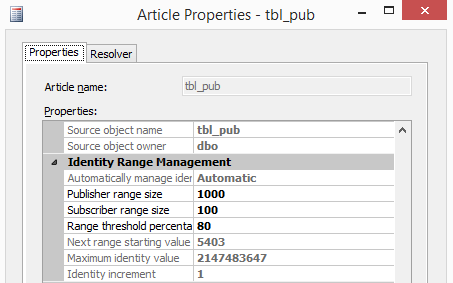
In Part 1 of this series, we explored Merge Replication Identity Range Management of tables with identity columns. We outlined how important it is to select the right datatype for identity columns and assign suitable ranges for your identity to reduce the overhead of allocating new ranges frequently.
There are some cases that can affect the range management due to the changes they make to the identity values allocation, this includes batches and transactions!
The Conflict: Identity Range Failures in Batches
I had worked recently with a case where the client’s apps fail intermittently with this error:
The insert failed. It conflicted with an identity range check constraint in database %, replicated table %, column %. If the identity column is automatically managed by replication, update the range as follows: for the Publisher, execute sp_adjustpublisheridentityrange; for the Subscriber, run the Distribution Agent or the Merge Agent.
The client just followed the advice and executed sp_adjustpublisheridentityrange to assign a new range on publisher but that was not convenient. The user was a db_owner so it should assign a new range by itself, but the error kept appearing. Initially, as a best practice, we advised changing the range to something larger in order to accommodate new rows—but this did not work.
Investigation: Unmasking the Hidden ETL Job
We began looking at processes inserting the data, and we found few stored procedures that insert single rows—nothing abnormal. It wasn't until we ran a trace to capture the load for few hours—we found a job running SSIS package on another instance.
The ETL SSIS package calls a stored procedure on publisher to load data from another system and dumps thousands of rows inside a transaction. Worse, the job never failed because the SSIS package used conditional constraints to suppress the stored procedure failure, and it also did not include logic to email anyone if the SP step failed. The code was something like this, logic wise:
SELECT DISTINCT rows INTO #temp from staging_instance.staging_database.dbo.table BEGIN TRAN T1 INSERT INTO dbo.table1 (col1, col2,....., colZ) SELECT * FROM #temp INSERT INTO dbo.table1_details (col1, col2,....., colZ) SELECT t.* , stag.col1, stag.col2 From table1 t1 join #temp t on t1.id = t.id and t.date_ < gedate() -2 join stag on t.Detail_id = stag.detail_id Insert into tracking select ‘Complete_ETL’, getdate() , @@rowcount Commit Tran1
Why Statement-Level Triggers Cause Replication Failure
The problem here became obvious: Triggers fire once per statement, not once per row. It is possible to create triggers to cope with multiple rows using INSERTED, but a replication trigger is not the place we want to mess with!
Let us test this on our existing simple schema (please refer to Part 1 for the schema). We will insert 400 rows into a temp table and insert them at once to the published table.
use pub Create table #tmp (col2 datetime) Insert into #tmp (col2) select getdate(); Go 400 select count(*) from #tmp -- Result: 400
Let’s record the identity value of the table on publisher: Dbcc checkident (tbl_pub , noreseed) Checking identity information: current identity value '4602'
The primary range is 4601-4701 & the secondary is 4701-4801, so adding 400 rows should override this: Insert into pub.dbo.tbl_pub (col2) select * from #tmp
Msg 548, Level 16, State 2, Line 1 The insert failed. It conflicted with an identity range check constraint in database 'Pub', replicated table 'dbo.tbl_pub', column 'col1'.
Here is what happened:
- SQL Server began inserting the data and assigning new Identity values; since the trigger fires per statement, it will not fire until the batch completes.
- Because the batch has more rows than the available free Identity slots (in this case, fewer than 200) it fails because the constraint is violated. However, the next identity value is already greater than the max value defined by the constraint.
- Because the batch failed, the trigger never fired and never allocated a new range.
- Any subsequent processes, even if ONE single row, will fail because the next available Identity slot, 4802, is greater than the limit of the secondary range (4801).
Manual Fixes and Their Drawbacks
Temporary resolution was following the advice of the error message and running sp_adjustpublisheridentityrange. The disadvantage, however, is that it creates some gaps in the identity column because the insert rolled back and never used the Identity slots.
Kindly note that rolling back a transaction does NOT set identity Seed to the value before the transaction start. If we want to reduce the gap then we can reseed the column to a value close to the most recent inserted value within the range.
select max(col1) +5 [reseed] from pub.dbo.tbl_pub where col1 between (select max(range_begin) from Distribution..MSmerge_identity_range_allocations where publication='pub1' and article= 'tbl_pub' and subscriber_db='Pub' and subscriber = 'MYINSTANCE') AND (select max(next_range_end) from Distribution..MSmerge_identity_range_allocations where publication='pub1' and article= 'tbl_pub' and subscriber_db='Pub' and subscriber = 'MYINSTANCE'); GO
Evaluating Long-Term Workarounds
Both are manual workarounds, and this was not desired. Here are a few programmatic workarounds we considered:
- Increase the range: Assuming a larger range can accommodate larger batches. Not quite true, since batch sizes vary and user processes can reduce available slots mid-way.
- Always assign new ranges when batches start: This creates significant gaps.
- Capacity logic: Add code that checks for available Identity range vs. batch row counts.
- If Current ID in primary/secondary range has enough slots > Proceed.
- If slots are insufficient > Run
sp_adjustpublisheridentityrange first.
- Insert as single rows: This works reliably but is very slow for large datasets.
The Optimized Solution: A Hybrid Insertion Approach
We ended up having a “Hybrid” approach:
- Batch insert if the range permits (much faster).
- Row-by-row insert if the range does NOT accommodate all the rows.
-- insert the rows required into the temp table. SELECT DISTINCT rows INTO #temp from staging_instance.staging_database.dbo.table select @count= COUNT(*) +500 from #temp --extra rows in case of concurrent inserts --Logic to determine range availability select top 1 @range_begin =range_begin,@range_end =range_end,@next_range_begin =next_range_begin, @next_range_end=next_range_end from distribution..MSmerge_identity_range_allocations where article = 'table1' and subscriber = 'Publisher' order by range_begin desc select @current=IDENT_CURRENT('dbo.table1') set @i=1 BEGIN TRAN T1 If (@current < @range_end and @count < (@range_end - @current) ) or (@current > @next_range_begin AND @count < (@next_range_end - @current) ) Begin --Batch Insert INSERT INTO Table1 (col1, col2, col3, . . ,ColZ) SELECT * FROM #temp End Else Begin --Row by Row Insert WHILE (@i <= @count) BEGIN INSERT INTO Table1 (col1, col2, col3, . . ,ColZ) SELECT * FROM #temp where ID = @i SELECT @i = @i + 1 END End COMMIT TRAN T1
Conclusion and Final Recommendations
Besides the recommendations in Part 1 of this series, the lesson we learned from that engagement was basic: You need to understand your environment! If you have transactions or batches that run against tables with identity columns engaged in Merge replication, then you want to ensure that the batch rows can fit within the available ranges.
SQL Server Consulting Services
Ready to future-proof your SQL Server investment?




.svg)
.svg)