


Oracle’s AI Data Platform (AIDP) is essentially an attempt to fix the biggest annoyance in enterprise architectures: the fact that your data lives in different cloud environments in different technologies. Oracle’s statement: “Empowering enterprises to build AI Agents and applications by uniting their enterprise data with best-in-class AI models and developer tools - driving innovation, efficiency, and competitive advantage.“
Here is an outline of what the platform is, what is inside it, and how the Workbench layer functions for the people who actually have to build things.
Part 1: The Platform (The Infrastructure Layer)
Essentially, AIDP is a managed infrastructure service that consolidates existing Oracle Cloud Infrastructure (OCI) components. Rather than being a new product, it represents a unified platform built from established Oracle tools, primarily:
1. "Lakehouse"
- Object Storage: This is where you dump raw files—CSV, Parquet, JSON, images, and logs. It’s cheap, scalable storage (similar to AWS S3).
- Oracle Autonomous AI Database: It is a multi-model database designed to replace the need for separate, niche databases. While it still handles high-speed financial and transaction records (SQL), it also natively includes:
- Vector Database: Built-in AI Vector Search allows you to store and query vector embeddings for RAG (Retrieval-Augmented Generation) applications directly next to your business data.
- Graph Database: It can model complex relationships (like fraud detection networks or supply chain dependencies) without requiring a separate graph database license.
- JSON & Spatial: It handles document-store data (JSON) and location data (Spatial) natively.
You don't need to spin up a separate Vector DB for your AI and a Graph DB for your analytics. One engine handles all data types with a single security model.
2. The front end
- Oracle Analytics Cloud (OAC) is the visualisation and business intelligence layer that sits on top of your data, where users interact with charts, dashboards, and reports. While AIDP manages the backend infrastructure, OAC provides the frontend insights. Its AI capabilities have moved beyond simple forecasting; the standout feature is the AI Assistant, a conversational interface that allows non-technical users to ask natural language questions (e.g., "Show me sales trends for Q3 compared to last year") and receive instant, automatically generated visualisations.
Part 2: The Workbench
The AIDP Workbench is the user interface that sits on top of the data platform. This has been built for Data Scientists and AI Engineers. It is designed to look and feel like a modern development environment, not a database admin console.
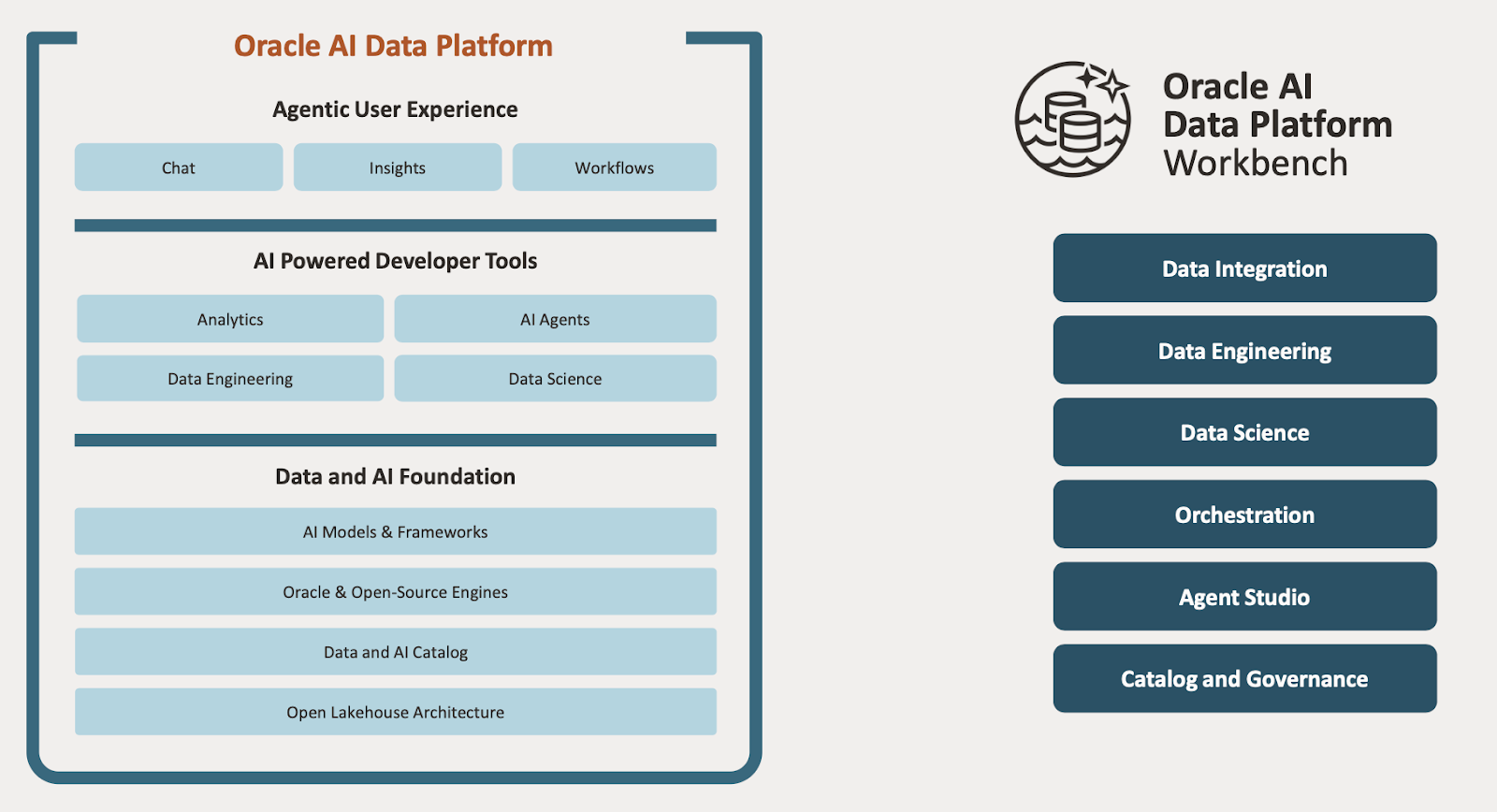
Here is what you actually do in it:
1. Data Integration, Data Engineering.
- Connectivity: Connect many sources. Zero ETL from Fusion.
- Managed Spark: AIDP Workbench spins up Apache Spark clusters on demand. You don't manage the servers; you just define the job. This is used for heavy lifting—processing millions of rows of raw data to get it ready for analysis.
2. Notebook-Based Development
- It provides a native Jupyter-based notebook environment.
- You write Python, SQL, or Scala directly in the browser.
- Key difference: These notebooks are pre-wired to the platform’s Spark clusters and the Autonomous Database. You don't have to waste hours configuring connection strings or ODBC drivers. You just import the library and query the data.
3. The "Agent Factory"
- This is distinct from standard data science. The Workbench has specific tooling for building AI Agents (using LLMs).
- This enables you to anchor these agents to your specific data. For example, you can write code that lets an LLM query your Autonomous Database to answer a user's question ("Show me the sales figures for Q3").
- It supports Vector Search natively. You can turn your documents (PDFs, policies) into vectors, store them in the database, and let the AI search them by meaning, not just keywords.
- Use a number of diff AI Models & Frameworks including Gemini.
4. Metadata & Governance
- The Master Catalog: AIDP Workbench indexes everything in the Lake and the Warehouse. It knows where data came from (lineage) and who is allowed to see it.
5. Project-Based Workspaces
- Work is organised into "Projects." A project is a container that holds your data connections, your notebooks, your models, and your team members.
- This solves the "works on my machine" problem. If you share a project with a colleague, they get the same environment and data access you have.
Part 3: The "Zero-Copy" Feature
This is the most critical technical detail of the platform.
Usually, if you want to analyse data, you have to move it. If your data is in Snowflake or AWS S3, you have to build an ETL pipeline to copy it into Oracle.
AIDP supports Apache Iceberg and Delta Lake open standards.
- What this means: The Workbench can "see" data sitting in Snowflake or AWS without moving it.
- How it works: It reads the metadata. You can write a SQL query in the Workbench that joins a table in your Oracle ERP with a table sitting in a Snowflake account.
- The Benefit: No egress fees (you aren't moving the data) and no latency (you aren't waiting for the copy to finish).
Summary
Oracle AIDP is the infrastructure (Storage + Compute + Governance).
AIDP Workbench is the toolset (Notebooks + Spark + Agent Building).
We offer a comprehensive, tailored AIDP Enablement Workshop designed to guide your organisation through every phase of adoption, from initial planning to full-scale operational deployment. Contact us for more information.
See also https://www.pythian.com/blog/oracles-ai-data-platform-workbench-hello-world
Share this
Share this

Oracle’s AI Data Platform Workbench: “Hello World”
HOWTO: Oracle Cross-Platform Migration with Minimal Downtime

.svg)
.svg)