


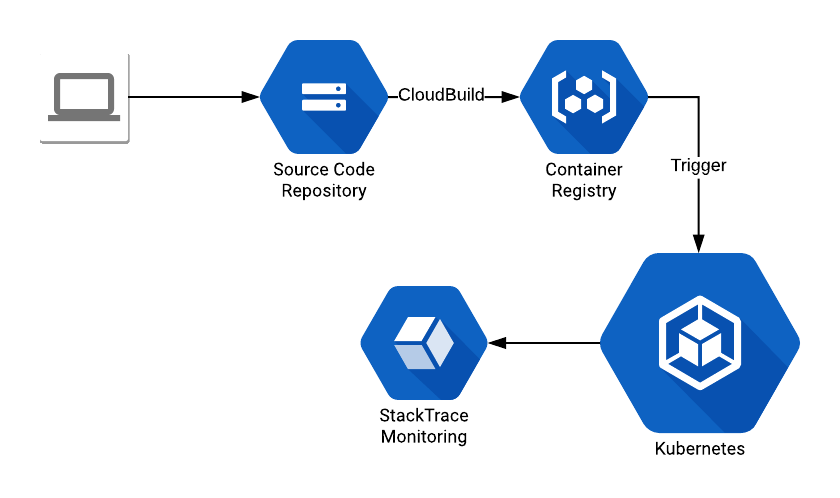
 The code that I created:
To successfully automate Kubernetes Jobs, you need two primary building blocks:
Core Components
A Dockerfile for my container
This defines the environment where your code will run.
A Python App that has the code to run (this will be the Job)
This is the actual logic that performs the task and exits upon completion.
High-Level Workflow
How does all this works?
- Commit the code to the GCP Source Code Repositories.
- A CloudBuild trigger (docs: https://cloud.google.com/cloud-build/docs/ ) that creates the container.
- Create a trigger (can be a CronJob) that runs the code that deploys the Job. For this exercise, I’m going to trigger the Job creation from my own laptop.
Implementing with the Kubernetes Python Client
Now the code. The difficult part here was dealing a bit with the documentation. For this code, I used the following library: https://github.com/kubernetes-client/python/tree/master/kubernetes. It provides the Kubernetes abstraction layer and greatly simplifies the work.
Building the Kubernetes Job Objects
To deploy a Kubernetes Job, our code needs to build the following hierarchy of objects:
- Job object
- Contains a metadata object
- Contains a job spec object
- Contains a pod template object
- Contains a pod template spec object
- Contains a container object
- Contains a pod template spec object
- Contains a pod template object
You can walk through the Kubernetes library code and check how it gets and forms the objects. Also, don’t forget that all this is based on the official Job specification: (https://kubernetes.io/docs/concepts/workloads/controllers/jobs-run-to-completion/#writing-a-job-spec).
Full Python Implementation Script
Without much else to say, you can check the full code here:
import hashlib import string import random import logging import yaml import sys,os, time from kubernetes import client, config, utils import kubernetes.client from kubernetes.client.rest import ApiException # Set logging logging.basicConfig(stream=sys.stdout, level=logging.INFO) # Setup K8 configs config.load_kube_config() configuration = kubernetes.client.Configuration() api_instance = kubernetes.client.BatchV1Api(kubernetes.client.ApiClient(configuration)) def kube_delete_empty_pods(namespace='default', phase='Succeeded'): """ Pods are never empty, just completed the lifecycle. As such they can be deleted. Pods can be without any running container in 2 states: Succeeded and Failed. This call doesn't terminate Failed pods by default. """ # The always needed object deleteoptions = client.V1DeleteOptions() # We need the api entry point for pods api_pods = client.CoreV1Api() # List the pods try: pods = api_pods.list_namespaced_pod(namespace,include_uninitialized=False,pretty=True,timeout_seconds=60) except ApiException as e: logging.error("Exception when calling CoreV1Api->list_namespaced_pod: %s\n" % e) for pod in pods.items: logging.debug(pod) podname = pod.metadata.name try: if pod.status.phase == phase: api_response = api_pods.delete_namespaced_pod(podname, namespace, deleteoptions) logging.info("Pod: {} deleted!".format(podname)) logging.debug(api_response) else: logging.info("Pod: {} still not done... Phase: {}".format(podname, pod.status.phase)) except ApiException as e: logging.error("Exception when calling CoreV1Api->delete_namespaced_pod: %s\n" % e) return def kube_cleanup_finished_jobs(namespace='default', state='Finished'): """ Since the TTL flag (ttl_seconds_after_finished) is still in alpha (Kubernetes 1.12) jobs need to be cleanup manually As such this method checks for existing Finished Jobs and deletes them. By default it only cleans Finished jobs. Failed jobs require manual intervention or a second call to this function. Docs: https://kubernetes.io/docs/concepts/workloads/controllers/jobs-run-to-completion/#clean-up-finished-jobs-automatically For deletion you need a new object type! V1DeleteOptions! But you can have it empty! CAUTION: Pods are not deleted at the moment. They are set to not running, but will count for your autoscaling limit, so if pods are not deleted, the cluster can hit the autoscaling limit even with free, idling pods. To delete pods, at this moment the best choice is to use the kubectl tool ex: kubectl delete jobs/JOBNAME. But! If you already deleted the job via this API call, you now need to delete the Pod using Kubectl: ex: kubectl delete pods/PODNAME """ deleteoptions = client.V1DeleteOptions() try: jobs = api_instance.list_namespaced_job(namespace,include_uninitialized=False,pretty=True,timeout_seconds=60) except ApiException as e: print("Exception when calling BatchV1Api->list_namespaced_job: %s\n" % e) for job in jobs.items: logging.debug(job) jobname = job.metadata.name jobstatus = job.status.conditions if job.status.succeeded == 1: logging.info("Cleaning up Job: {}. Finished at: {}".format(jobname, job.status.completion_time)) try: api_response = api_instance.delete_namespaced_job(jobname,namespace,deleteoptions,grace_period_seconds= 0,propagation_policy='Background') logging.debug(api_response) except ApiException as e: print("Exception when calling BatchV1Api->delete_namespaced_job: %s\n" % e) else: if jobstatus is None and job.status.active == 1: jobstatus = 'active' logging.info("Job: {} not cleaned up. Current status: {}".format(jobname, jobstatus)) kube_delete_empty_pods(namespace) return def kube_create_job_object(name, container_image, namespace="default", container_name="jobcontainer", env_vars={}): """ Create a k8 Job Object """ body = client.V1Job(api_version="batch/v1", kind="Job") body.metadata = client.V1ObjectMeta(namespace=namespace, name=name) body.status = client.V1JobStatus() template = client.V1PodTemplate() template.template = client.V1PodTemplateSpec() env_list = [] for env_name, env_value in env_vars.items(): env_list.append( client.V1EnvVar(name=env_name, value=env_value) ) container = client.V1Container(name=container_name, image=container_image, env=env_list) template.template.spec = client.V1PodSpec(containers=[container], restart_policy='Never') body.spec = client.V1JobSpec(ttl_seconds_after_finished=600, template=template.template) return body def kube_test_credentials(): try: api_response = api_instance.get_api_resources() logging.info(api_response) except ApiException as e: print("Exception when calling API: %s\n" % e) def kube_create_job(): container_image = "namespace/k8-test-app:83226641581a1f0971055f972465cb903755fc9a" name = id_generator() body = kube_create_job_object(name, container_image, env_vars={"VAR": "TESTING"}) try: api_response = api_instance.create_namespaced_job("default", body, pretty=True) print(api_response) except ApiException as e: print("Exception when calling BatchV1Api->create_namespaced_job: %s\n" % e) return def id_generator(size=12, chars=string.ascii_lowercase + string.digits): return ''.join(random.choice(chars) for _ in range(size)) if __name__ == '__main__': kube_test_credentials() kube_cleanup_finished_jobs() kube_delete_empty_pods() for i in range(3): kube_create_job() logging.info("Finshed! - ENV: {}".format(os.environ["VAR"])) sys.exit(0)Oracle Database Consulting Services
Ready to optimize your Oracle Database for the future?
Share this
Share this
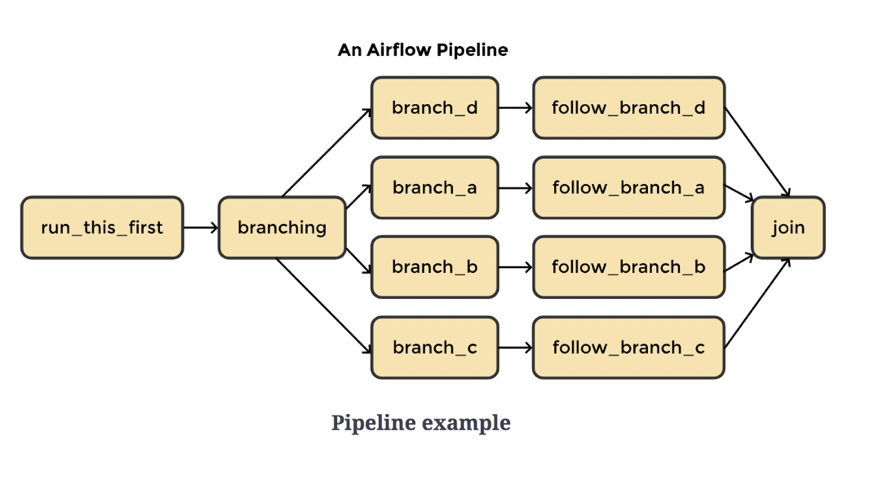
DAG Monitoring with Airflow


.svg)
.svg)