



Explanation
We are often being paged by development teams talking about locks, blocks or deadlocks and some people make the wrong use of the terms. There is a big difference between the three and it will explained at a high level in this post:
Lock
Lock is acquired when any process accesses a piece of data where there is a chance that another concurrent process will need this piece of data as well at the same time. By locking the piece of data we ensure that we are able to action on that data the way we expect. For example, if we read the data, we usually like to ensure that we read the latest data. If we update the data, we need to ensure no other process is updating it at the same time, etc. Locking is the mechanism that SQL Server uses in order to protect data integrity during transactions.
Block
Block (or blocking lock) occurs when two processes need access to same piece of data concurrently so one process locks the data and the other one needs to wait for the other one to complete and release the lock. As soon as the first process is complete, the blocked process resumes operation. The blocking chain is like a queue: once the blocking process is complete, the next processes can continue. In a normal server environment, infrequent blocking locks are acceptable. But if blocking locks are common (rather than infrequent), there is probably some kind of design or query implementation problem and the blocking may simply be causing performance issues.
A block can be described like this:
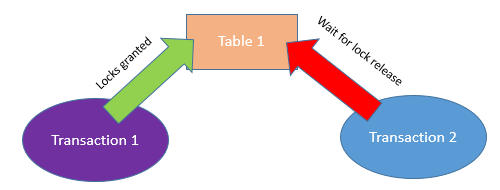
A blocking situation may NOT be resolved by itself (i.e. if the blocking process did not complete the transaction properly) or may take a long time to complete. In these extreme situations, the blocking process may need to be killed and/or redesigned.
Deadlock
Deadlock occurs when one process is blocked and waiting for a second process to complete its work and release locks, while the second process at the same time is blocked and waiting for the first process to release the lock.
In a simplified way, the deadlock would look like this:
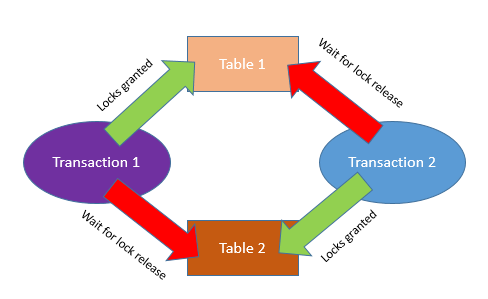
In a deadlock situation, the processes are already blocking each other so there needs to be an external intervention to resolve the deadlock. For that reason, SQL Server has a deadlock detection and resolution mechanism where one process needs to be chosen as the “deadlock victim” and killed so that the other process can continue working. The victim process receives a very specific error message indicating that it was chosen as a deadlock victim and therefore the process can be restarted via code based on that error message.
This article explains how SQL Server detects and resolves deadlocks: Deadlocks are considered a critical situation in the database world because processes are just being automatically killed. Deadlocks can and should be prevented. Deadlocks are resolved by SQL Server and do not need manual intervention.
Lock-Avoiding Design Strategies
Some of the strategies are described here: "There are a few design strategies that can reduce the occurrence of blocking locks and deadlocks:
- Use clustered indexes on high-usage tables.
- Avoid high row count SQL statements that can cause a table lock. For example, instead of inserting all rows from one table to another all at once, put a single INSERT statement in a loop and insert one row at a time.
- Break long transactions up into many shorter transactions. With SQL Server, you can use "bound connections" to control the execution sequence of the shorter transactions.
- Make sure that UPDATE and DELETE statements use an existing index.
- If you use nested transactions, be sure there are no commit or rollback conflicts.
Additions
- Access objects always in the same order (i.e.: update Table1, Table2 and Table3 rather than sometimes Table2 first).
- Don’t schedule long data updating processes to run concurrently, if possible.
- Keep transactions as short as possible.
Discover more about our expertise in SQL Server.
SQL Server Database Consulting Services
Ready to future-proof your SQL Server investment?

.svg)
.svg)